
Anomaly detection
People & Team ManagementHandbookBe the first to know about unusual behavior in your team's time logging patterns.Being aware of unusual activity in your team early can mean the difference between making manageable shifts and huge course corrections. Misunderstandings and misalignment can quickly derail entire projects and teams; there’s nothing worse than realizing what could have been fixed by a minor procedural change or a quick chat snowballed into an expensive, unsalvageable mess.
With the help of AI, Timely can help teams stay well ahead of such crises. It is able to detect unusual activity and proactively notify managers before they get out of hand. These anomalies can be anything the AI considers to be abnormal in your team’s logging patterns — like logging time to a dormant project. It raises a flag which you can find on the “Latest Activities” feed from your main Project “Dashboard” view:
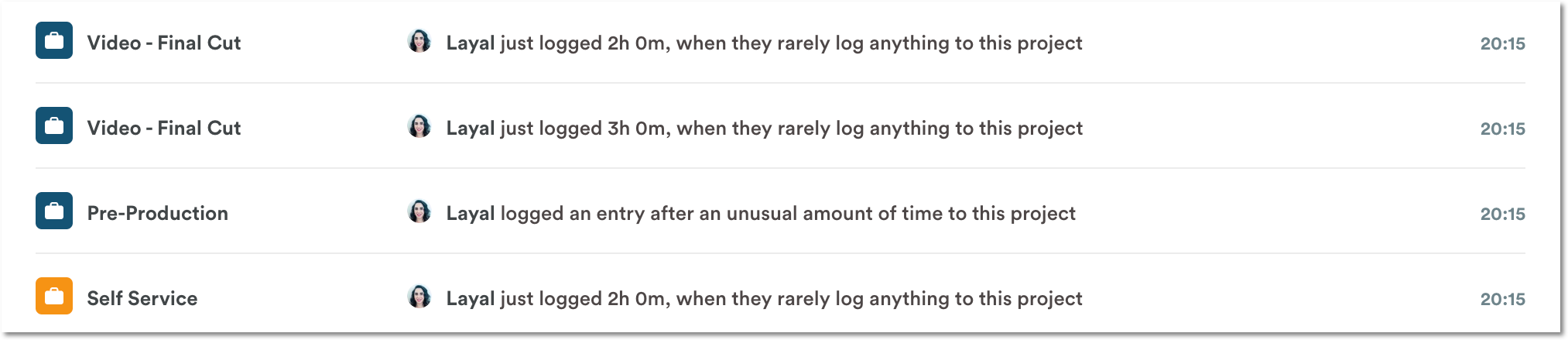
Examples of inconsistent logging activity
Anomalies are flagged when someone:
- Logs hours to a project they are rarely active on
- Logs too many or too few hours against their average; whether that’s per project, per day, or for a specific day of the week
- Logs hours for someone else (if it’s an uncommon behavior)
- Logs too many hours against their weekly capacity
- Breaks with their regular logging patterns (e.g. by logging hours for a past month when they usually log hours every day, or by logging hours at the weekend)
- Logs too many or too few hours to a project
With anomaly detection, AI effectively acts as your personal briefing assistant. It helps identify threats and potential problems for you before they escalate — like employee burnout, unbalanced team workloads, logging hours to dormant projects, working over the weekend, or burning through a project budget unusually quickly. It’s all about guiding your attention to where it’s most needed to help you manage projects more proactively.
Last updated April 1, 2026
Have feedback for this article or need more help? Contact us now.