
Memory (Activities) 101
Time Tracking: AutoSheetHandbookThe basics of Memory explained — learn how Timely's AI time tracking captures your daily work activities.Memory is the engine behind Timely’s AI time tracking. It quietly captures everything you do on your computer throughout the day and turns it into many individual memories. Those memories are then combined into meaningful activities and summary intervals, so you can review and log time with clear context.
Since the concept of Memory might be new to some, we’ve put together this guide to explain the basics and break down key Timely terms. Let’s get you set up with AI time tracking in no time!
Getting Started with Memory
Before diving into Timely’s AI time tracking, you’ll need to get Memory up and running on your computer. This little sidekick is what captures all your daily activities behind the scenes! Follow our installation guides for Mac, Windows, or Linux.
Once Memory is installed, you’ll be tracking time like a pro, and Timely will help you assign that time to projects and tasks with ease.
What are memories?
We refer to the individual work events Memory captures as “memories”. These are uploaded to a daily timeline inside Timely that is 100% private to you. Each memory shows you the specific web or desktop app you worked in, with a title of the document or page you visited — as well as when you accessed it and how long you spent on it. Memories can be events from your calendar, your GPS location from the mobile apps, a file you worked on, a video call you attended, an email you sent or a website you visited.
Each memory is one small signal. Timely then groups related memories into activities, and those activities are used to build summary intervals that power AI-generated time suggestions.
FAQs
Do you have Memory for mobile devices?
At the moment, we only offer Memory for your computer. While Memory can’t currently capture mobile work activity in the same way as our desktop apps for Mac, Windows, and Linux, it’s certainly an interesting idea for us to consider in future. In the meantime, the Timely mobile apps can capture your GPS location to help fill in your day.
What’s the difference between hidden and deleted memories?
Deleting a memory removes it from Timely permanently, whereas hiding an app or activity simply removes it from your view. Keep in mind that memories are always private to you and cannot be viewed by anyone on your account, so there isn’t often a use case for completely deleting a memory.
Can I delete all of my memories at once?
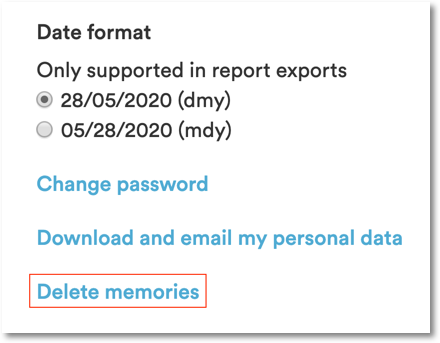
While it will severely limit the value you get from AI time tracking, you have the option to quickly delete whole chunks of your Memory history. You’ll find this option by going to Settings > Profile, then scrolling down to the “Delete memories” link:
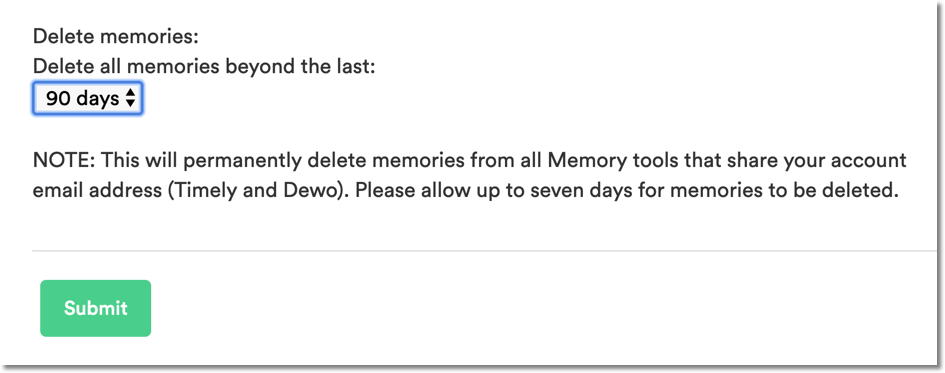
Just select the timeframe of memories you want to delete and hit “Submit”. Keep in mind that it can take up to seven days for memories to be deleted:
From this same page you can see a history of all bulk memory deletion requests, including the status, scope and date they were submitted:

Is my data safe/private?
Data from Memory is private to you and only you! We take privacy very seriously so click to read more about what data we capture, how we protect and process your data and how that data is incorporated into your Timely experience.
Last updated September 28, 2026
Have feedback for this article or need more help? Contact us now.