
Asana Sync Integration
IntegrationsDeep Sync IntegrationsHandbookTwo-way Asana sync — projects, tasks, users, and time entries flow between Timely and Asana automatically.Overview
This integration offers capabilities beyond the previous Asana integration, which tracked time spent on Asana items. The Asana Sync integration complements that by allowing you to seamlessly manage projects, update tasks in real-time, and maintain full visibility over progress in both tools.
What the Asana Sync Integration includes
- Real-time updates — projects and tasks stay in sync
- Users, projects & tasks synced — automatically import from Asana
- Tags, organized — Asana tags appear as individual Timely tags
- Updated architecture — OAuth with encrypted data transfer
- Time flows back to Asana — log time in Timely and see it reflected on Asana tasks
Connecting Timely to Asana — Workspace Admin
- Head to Settings > Integrations in Timely
- Choose Asana from the Next-Gen Integrations section
- Click Connect workspace with Asana, log in, and click Allow
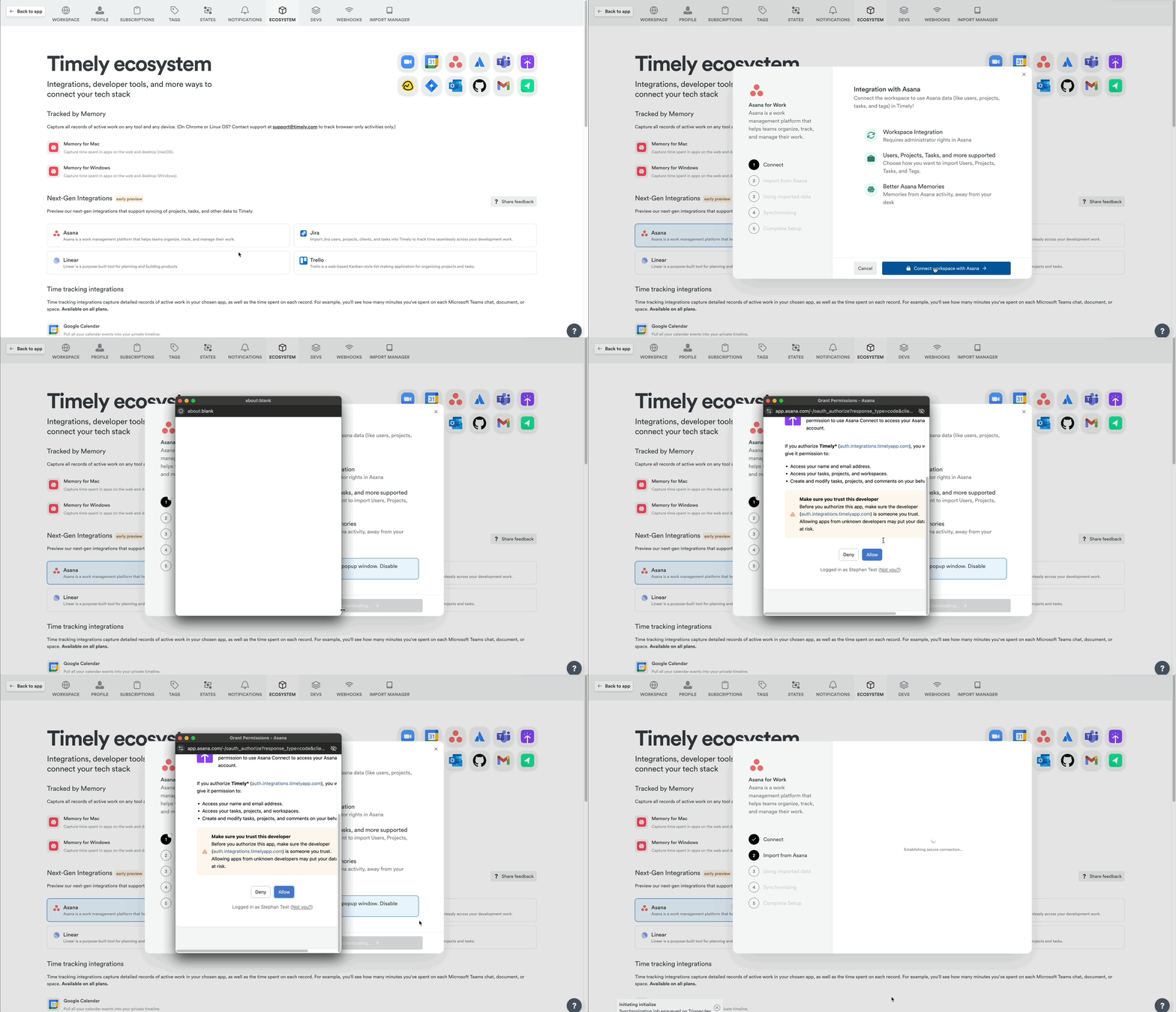
- Select or confirm the Asana workspace, then click Next
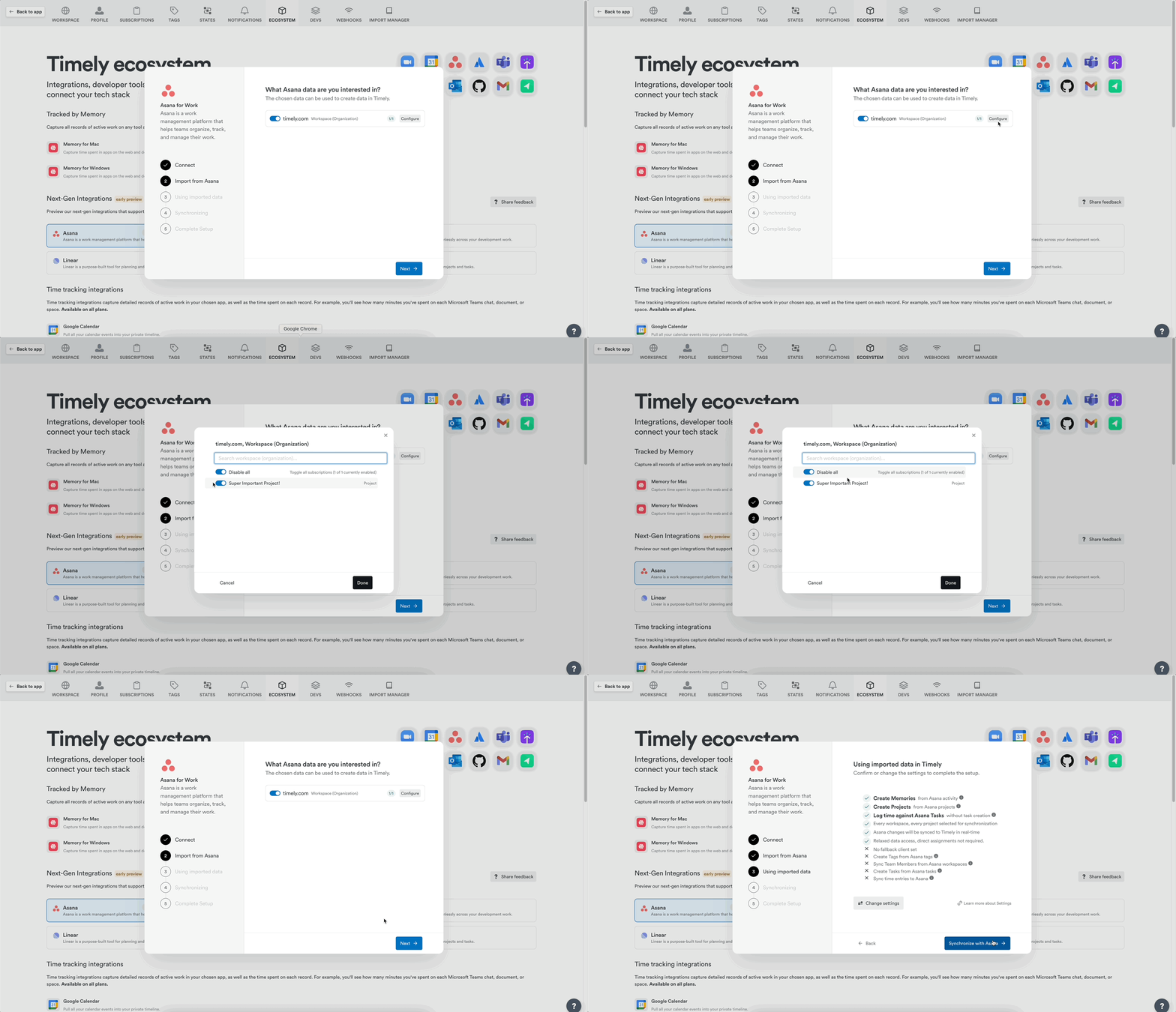
- Confirm the sync configuration (defaults are pre-set):
- Create Memories from Asana activity
- Create Projects from Asana projects
- Log time against Asana tasks without task creation
- Real-time sync enabled
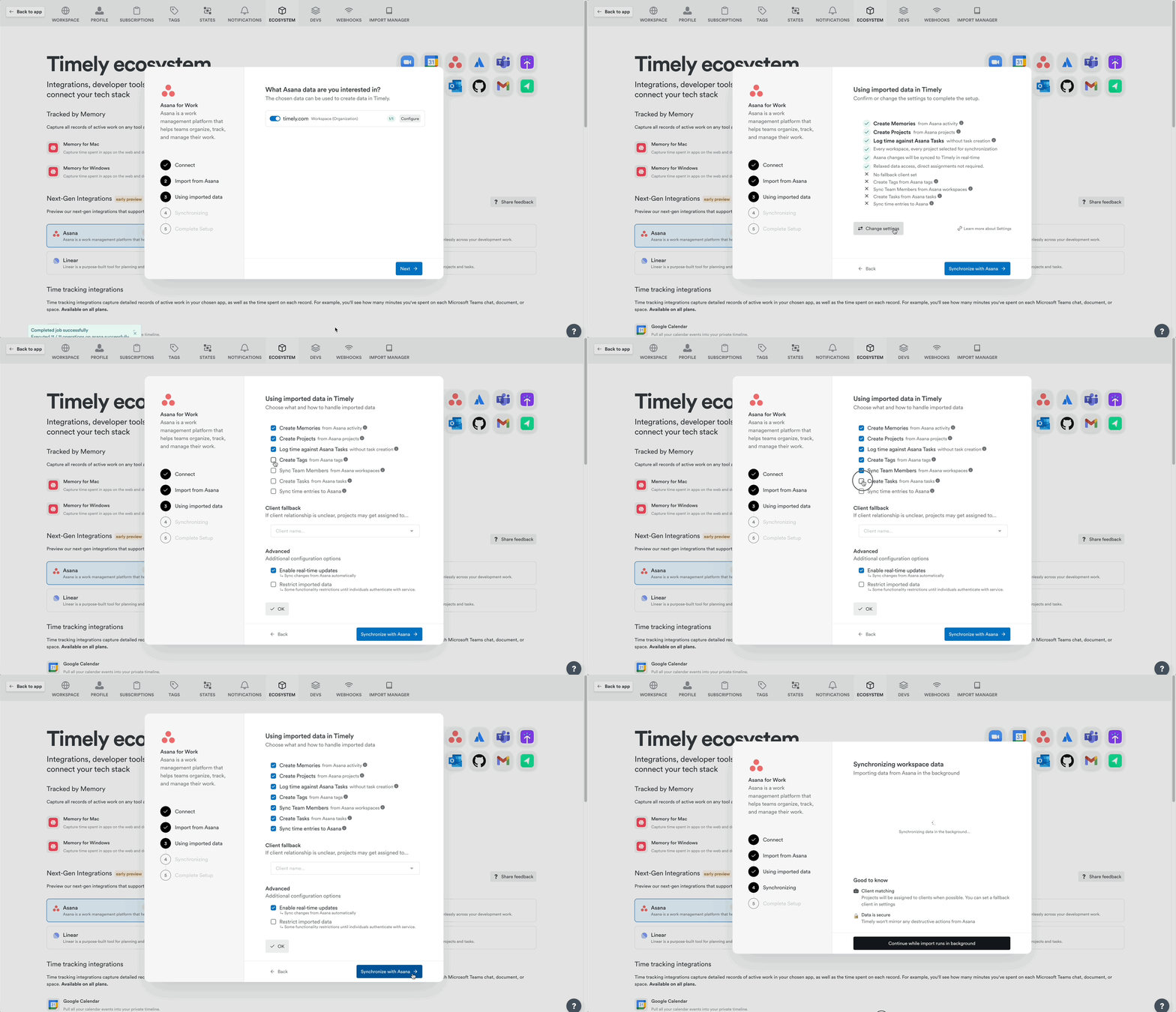
Additional options include:
- Create Tags from Asana Tags
- Sync Team Members
- Create Tasks from Asana Tasks
- Sync time entries to Asana
- Click Synchronize with Asana to finalize
Connecting — Personal Integration (Employees, Managers)
- Navigate to Settings > Integrations
- Find Asana in Next-Gen Integrations
- Click “Authenticate with Asana”
- Click Allow to approve permissions
Items synced from Asana
| Asana Item | Appears in Timely as | Details |
|---|---|---|
| Clients | Clients | Imported as active clients |
| Projects | Projects | Archived projects are skipped |
| Tasks | Tasks or Linked Work | Default: Linked Work references |
| Subtasks | Tasks | Up to 5 levels deep, shown flat |
| Tags | Tags | Optional — must be enabled |
| Users | Users or Unassigned Users | Auto-matched by email |
| Task Activity | Memories | Creation, completion, commenting, etc. |
| Logged Time | Syncs back to Asana | Optional, appears as comments |
Duplicate client names during import
If two or more Asana entities share the same display name (for example, two workspaces both called “Acme”), Timely will import all of them rather than silently dropping the duplicates. Each additional client receives a numeric suffix to make it unique — for example, Acme (2), Acme (3), and so on.
Memories from Asana activity
These actions generate a Memory in Timely:
- Create or complete tasks
- Move tasks between projects
- Reassign or rename tasks
- Add comments
- Visit app.asana.com in your browser
Logging time against Asana tasks
Once connected, search for Asana tasks directly in the time entry form. With the default configuration, tasks appear as Linked Work in AutoSheet or Attach a Task on the Classic timeline.
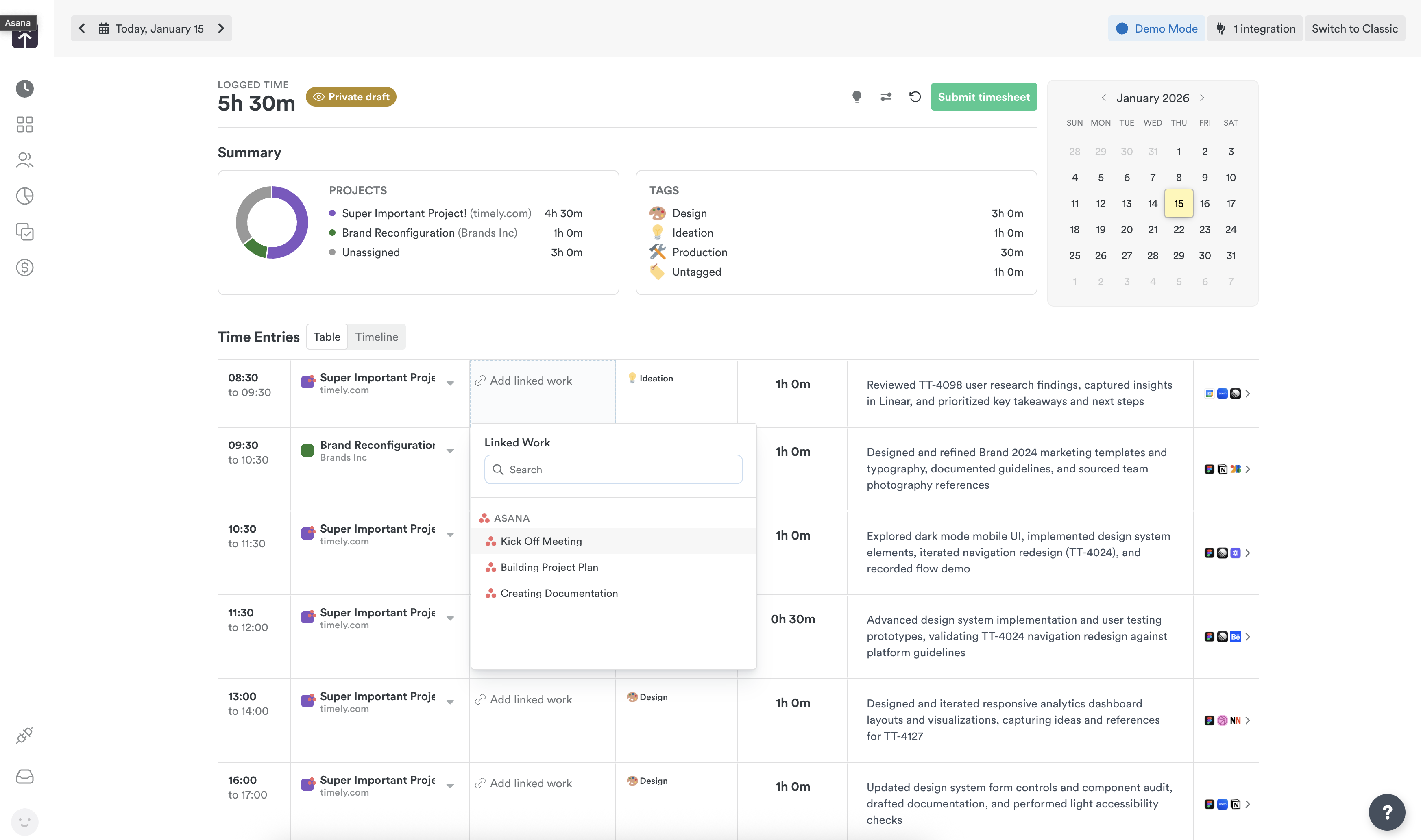
Checking time entry sync
When Sync time entries to Asana is turned on, the workspace connection’s settings (Settings > Integrations > Asana) include a Time Entry Sync tab. It shows how many time entries are Synced, In progress, and Failed.
If any entries have failed, click the Failed row to expand it. Failures are grouped by reason, with the number of entries for each:
- Authentication failed — the Asana connection needs to be re-authenticated
- Permission denied — the connected Asana account can’t update that task or project
- Task not found — the Asana task no longer exists
- Rate limited — Asana received too many requests at once
- Validation error — Asana didn’t accept the entry’s data
- Unknown error — any failure that doesn’t match the reasons above
Removing the Asana Sync integration
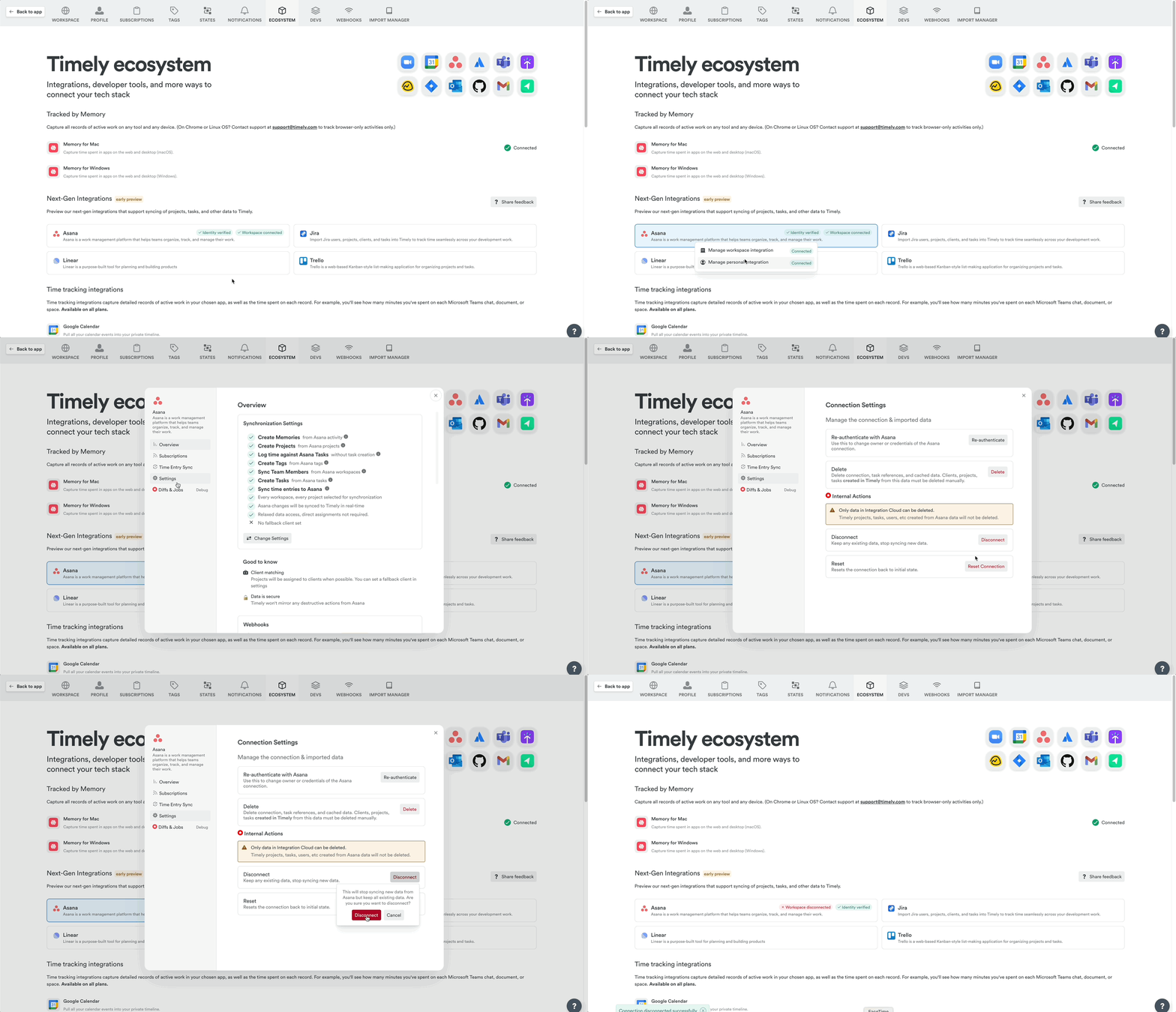
Head to Settings > Integrations, select Asana, click Settings, then Disconnect.
FAQs
Do I need the Tasks add-on?
No — you can log time using Linked Work references without it. The add-on is only needed to import Asana tasks as full Timely Tasks and sync time back.
Can time logged in Timely show up in Asana?
Yes! If task creation is enabled with start/end dates, time entries sync back as comments on the original Asana task.
What if I want to add projects or switch accounts?
You’ll need to disconnect and reconnect the integration.
Last updated October 7, 2026
Have feedback for this article or need more help? Contact us now.