
Zoom
IntegrationsAI Time Tracking SourcesHandbookSeamlessly pull all of your Zoom calls into Timely for automatic time tracking.Meetings today are increasingly digital — and that doesn’t mean capturing work spent in meetings has become any easier. We’ve built an integration with Zoom that automatically tracks all the time you spend in conference calls as and when they happen.
What you see in Timely
As long as you’re signed in to Zoom’s desktop app before you start or join a meeting, Timely will record:
- Who organized the meeting
- When you joined the meeting
- When you left the meeting

Integrating Zoom with Timely
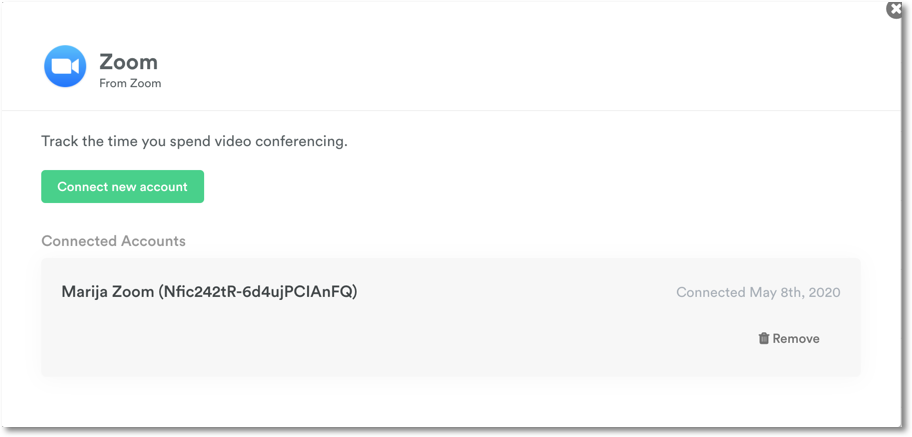
Head to Settings > Integrations:

Sign in to connect your account:
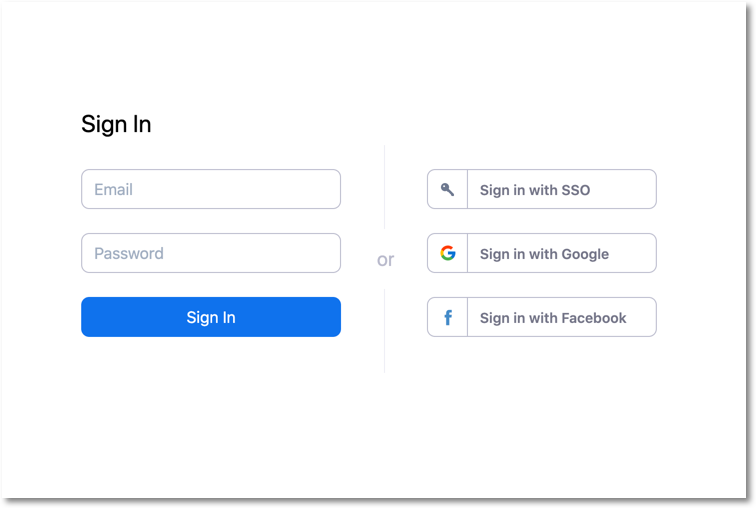

You’re all set! Any user in your organization that uses both Timely and Zoom will now see all their calls on their private timeline.
FAQs
I’m a non-admin Zoom user. Do I need to do anything?
Nope! Once the admin has connected Zoom, just make sure you’re signed into your Zoom account before starting or joining a meeting.
What if my Zoom email is different from my Timely email?
Using the “add another email” field in your profile, enter the email address you use for Zoom. Timely will use that to sync your accounts.
What happens if I’m not signed in?
Memory will still capture your time in Zoom but it won’t have the same level of detail that the integration provides. On Mac, Memory titles Zoom meeting activity with the names of the participants (for example, “Zoom Meeting — Alice, Bob, Carol”) when it can read them.
Why is Zoom asking me to reconnect?
If the Zoom authorization has expired or been revoked, Timely marks the integration as inactive and stops receiving your meetings. Reconnect Zoom from Settings > Integrations to start receiving them again.
What happens if I move to a plan without Zoom?
The duration of all logged time entries created with Zoom memories will not be affected, but the integration along with all memories will be removed.
Last updated October 7, 2026
Have feedback for this article or need more help? Contact us now.