
monday.com Sync Integration
IntegrationsDeep Sync IntegrationsHandbookSync projects, clients, tasks, tags, and users between monday.com and Timely.monday.com is a versatile project management platform that helps teams stay on track — made even better with Timely’s comprehensive integration. Once connected, your monday.com boards, groups, tasks, and users sync directly into Timely, so your team can capture time against the work that already lives in monday.com.
How it works
The monday.com integration imports data from monday.com into Timely. During setup, you choose how your monday.com structure maps to Timely’s hierarchy. There are two mapping options:
Boards as Projects (default) Your monday.com workspace becomes the client in Timely. Boards become projects, and items (and sub-items) become tasks.
Boards as Clients Each monday.com board becomes a client. The groups within each board become projects, and items become tasks.
Once connected, the following data syncs into Timely:
Projects Projects imported via monday.com appear in the Projects dashboard with an “imported from monday.com” label. They are mapped from either a Board or Group, depending on your selection during setup.
Clients Clients are imported from monday.com Boards and are managed in the Projects Dashboard.
Tasks & Sub-tasks Tasks — including sub-tasks — can be synced into Timely, provided the Tasks add-on is active. The sync is one-way: tasks created in Timely do not sync back to monday.com.
For tasks to sync properly, each one must have an assigned owner in monday.com.
Tags Tags are automatically imported from monday.com Boards using hashtags in the “Tag” column.
Users Users are imported if they are attached to a synced Board or Group. New users appear in “Unassigned Users” — they are not automatically invited to Timely.
Connecting monday.com to Timely
- Log into Timely
- Navigate to Settings > Integrations tab
- Choose monday.com from Next-Gen Integrations
- Click “Install Timely for monday.com” — a new window will open
- In the monday.com window, review permissions and select your workspace
- Click “Install”, then “Save”
- Close that tab and navigate back to the Timely integrations page
- Click “Connect new account” to finish integrating
- Confirm the workspace and click “Authorize”
- Choose to create “Projects & Clients” or just “Projects”
- Select your sync scope: everything, selected boards, or entire workspace
- Click the appropriate “Import and sync” button to finalize (this uses OAuth — no password sharing required)
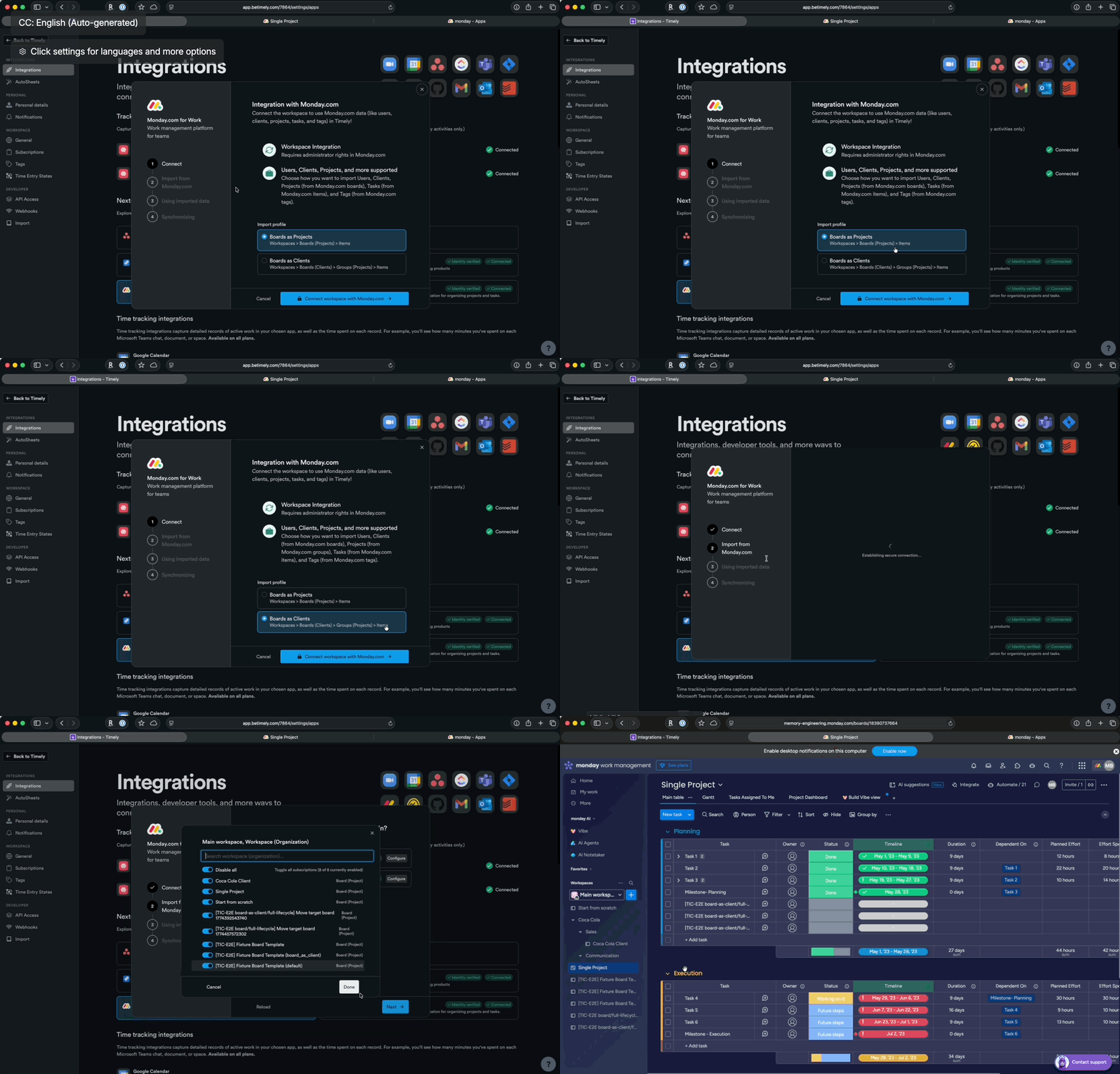
Choosing your data structure
After authorizing, you’ll configure how monday.com data is structured in Timely:
- Choose to create “Projects & Clients” or just “Projects”
- Select your mapping: Boards as Projects (workspace → client, boards → projects) or Boards as Clients (boards → clients, groups → projects)
- Select your sync scope: the entire workspace, selected boards, or all boards
- Click “Import and sync” to finalize
The initial import will pull in the minimum data needed so you can review and choose exactly what to bring into Timely. For larger workspaces, you can select specific boards rather than importing everything at once.
Task import configuration
By default, these fields are mapped:
| monday.com | Timely |
|---|---|
| Item name | Task Title |
| Person | Task Assignee |
| Tags | Tags |
| Item URL | Task Description |
| Date | Task Deadline |
| Status set to Done | Task Completed |
Duplicate client names during import
If two or more monday.com boards or workspaces share the same display name (for example, two boards both called “Acme”), Timely will import all of them rather than silently dropping the duplicates. Each additional client receives a numeric suffix to make it unique — for example, Acme (2), Acme (3), and so on.
Logging time against monday.com items using Linked Work
Once the sync is complete, team members can log time directly against monday.com items using Linked Work — Timely’s way of referencing external work items inside a time entry.
monday.com items (boards, groups, and tasks) appear as Linked Work references in AutoSheet, or as Attach a Task on the Classic timeline.
In AutoSheet:
- Open AutoSheet and locate the activity you want to log time for
- In the Linked Work column, click the dropdown
- Search by item name or paste a monday.com item URL
- Select the relevant item — your time is now tied to it in reporting
When a row already has a monday.com project assigned, the picker automatically narrows to items from that project. Use the Filter menu to adjust:
- Scope — All integrations, Same integration (monday.com items only), or Same project (items from this specific project).
- Status — toggle Open and/or Done items on or off.
Active filters are shown as chips at the top of the picker, and your preferences are saved and shared with the manual time-logging picker.
In the Classic timeline:
- Open a time entry
- Click Attach a Task
- Search for the monday.com item by name
- Select it and log your time as usual
Logged time references directly back to the corresponding item in monday.com. When a workspace owner runs a timesheet export or report in Timely, the entries will display the monday.com project and item they were logged against.
Memories from monday.com activity
Timely’s Memory app captures your monday.com activity and surfaces it as memories on your daily timeline — giving you a private, automatic record of the work you did, ready to turn into time entries.
When you visit monday.com in your browser, Timely creates a memory linked to the board or item you were viewing. These memories appear on your timeline and can be used to log time quickly — without having to remember what you worked on.
| Browser activity | Appears in Timely as |
|---|---|
| Visiting a Monday.com Board | Memory linked to that project |
| Opening a monday.com item | Memory linked to that item |
To make the most of monday.com memories, make sure the Timely Memory app is installed and running on your device.
Personal connections
By default, the workspace-level connection is all that’s needed for most teams. However, individual users can also set up a personal connection to monday.com.
This is useful if you want to restrict a user’s task view to only the items assigned to them in monday.com — rather than seeing all tasks across the workspace. When enabled, Timely will only surface tasks that are personally assigned to that user in monday.com.
To set up a personal connection, each individual user authorizes their own monday.com account via Settings > Integrations > monday.com > Personal connection.
FAQs
If I remove the integration, will imported items be deleted?
No. Previously imported projects, tasks, and clients remain in Timely.
If I delete an item in monday.com, does it also remove it from Timely?
No. The integration imports items but doesn’t keep the two platforms perfectly in sync after the fact.
What happens to Tasks marked as “Done” in monday.com?
Those tasks will also be “completed” in Timely after sync.
Can I change my mapping after initial setup?
No — you’ll need to remove the integration entirely and reconnect with your new mapping selection.
Does time logged in Timely sync back to monday.com? No. The sync is one-way: monday.com → Timely. Time entries logged in Timely do not push back to monday.com.
Last updated September 22, 2026
Have feedback for this article or need more help? Contact us now.