
New Features
- Project templates — Define reusable project templates with default settings for users, labels, rates, and more. When enabled, templates automatically create projects as new clients are added to your workspace — so every new client starts with the right setup from day one.
- Idle time exclusion per app — Mark specific apps as idle-exempt so Memory keeps capturing during long compiles, video calls, or document reading sessions, even without keyboard input.
- Empty Timeline intervals — AutoSheet now shows selectable empty time slots between activities, making it easier to claim untracked periods and assign them to projects.
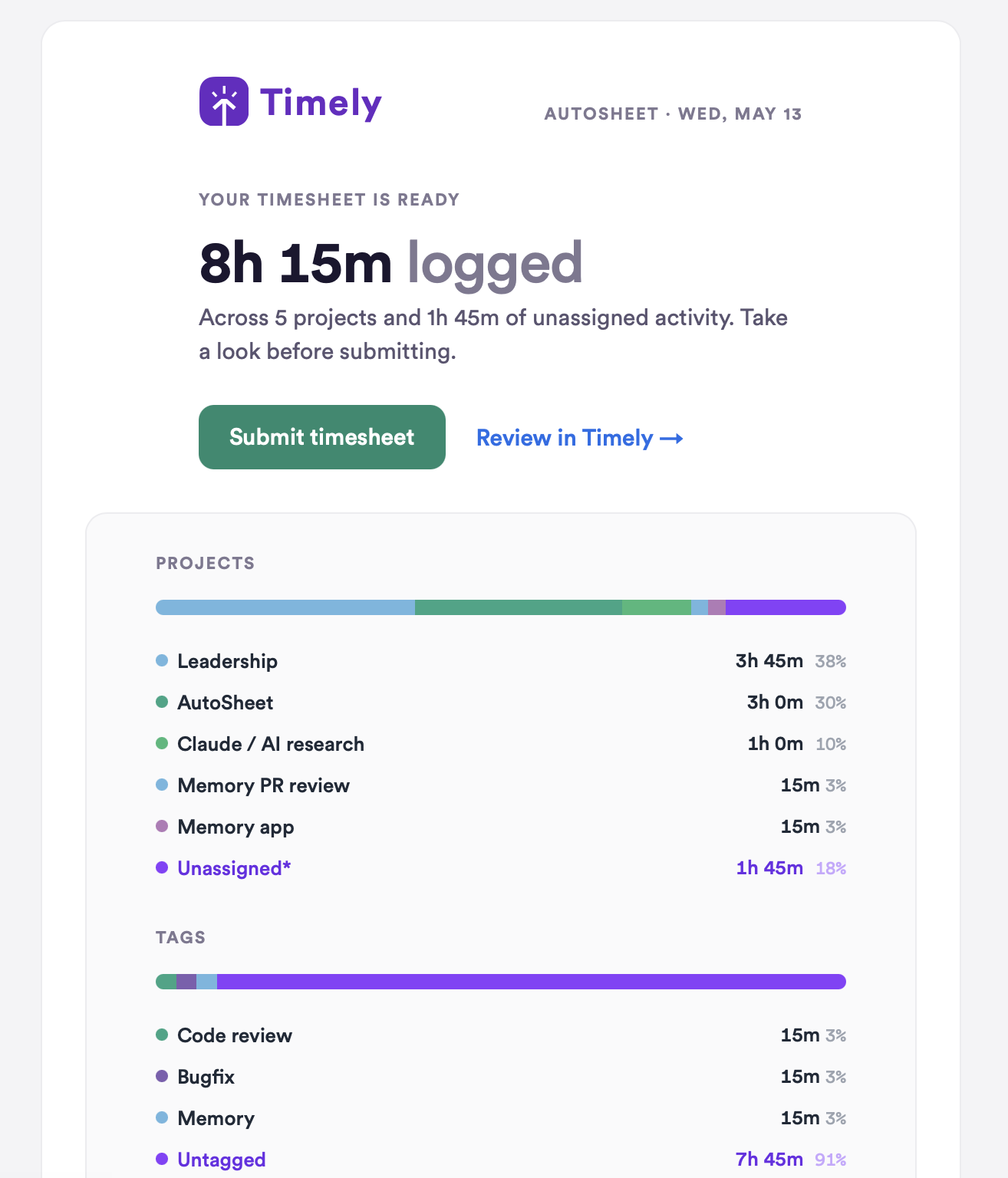
- AutoSheet email summaries — Timesheet reminder emails now include a visual breakdown of your day with project and tag summaries, matching what you see in the web app.
Improvements
- AI app title extraction — Title capture for Codex and Claude Desktop is now more reliable, so you see accurate project names in your timeline instead of generic app titles. Learn how Memory captures your work →
- AutoSheet validation — Project selection is now properly validated for admins, so you can’t accidentally submit time against a project you don’t have permission to log against.
- Manual entry controls — Duration, tags, and notes are now disabled on manual entries until you select a project, so you never lose input by filling in details before choosing where to log.
- Hours import error reporting — Row-level error reporting now shows you exactly which entries failed to import and why, so you can fix issues without guessing.
- Timeline minimum height — The AutoSheet timeline now maintains a minimum height on smaller screens, keeping your activity view usable regardless of screen size.
Bug Fixes
- AutoSheet generation failures — Fixed an issue where generation failures caused infinite loading spinners without any error message, so you now always get a clear notification if something goes wrong.
- Entry duration limits — AutoSheet entries can no longer accidentally extend past midnight when using the +/- buttons or dragging the timeline.
- Calendar crash prevention — Fixed an error screen that appeared when navigating to the calendar with an invalid date in the URL.
- Entry ownership protection — Prevented time entry ownership from being accidentally transferred when employees edit entries they have access to but don’t own.
- Timesheet reminder filtering — The “Notify Group” button on the People page now respects the active time period filter, so reminder emails only go to the users you’ve filtered for.
More updates
Smarter Timelines, easier edits and more control over your notes
See your seats at a glance, plus cleaner exports and invoices
Per-period recurring budgets, faster Trello and Jira syncing, and reliability fixes
Faster Linked-Work Search, Flexible Time Logging, and Reliability Fixes
Compliance Dashboard, Saved Filters, and Sync Reliability Improvements
Manual AutoSheet time, monday.com setup guidance, and security improvements