Time Doctor is one of the more popular time tracking platforms in the market today, with a bit of controversy behind it. Besides detailed tracking of work hours and tasks, Time Doctor also takes screenshots, records keyboard and mouse activity, and makes sure the employees are actually working.
Its key target audience are distributed, and remote teams where businesses need stricter employee monitoring features to make sure the team is actually working.
But how does Time Doctor actually perform in real life? Let's take a look at real-world Time Doctor reviews to find out what real users think, from both sides of the user experience.
Looking for a better, less intrusive alternative to Time Doctor? Try Timely for free today.
What review sites are telling us
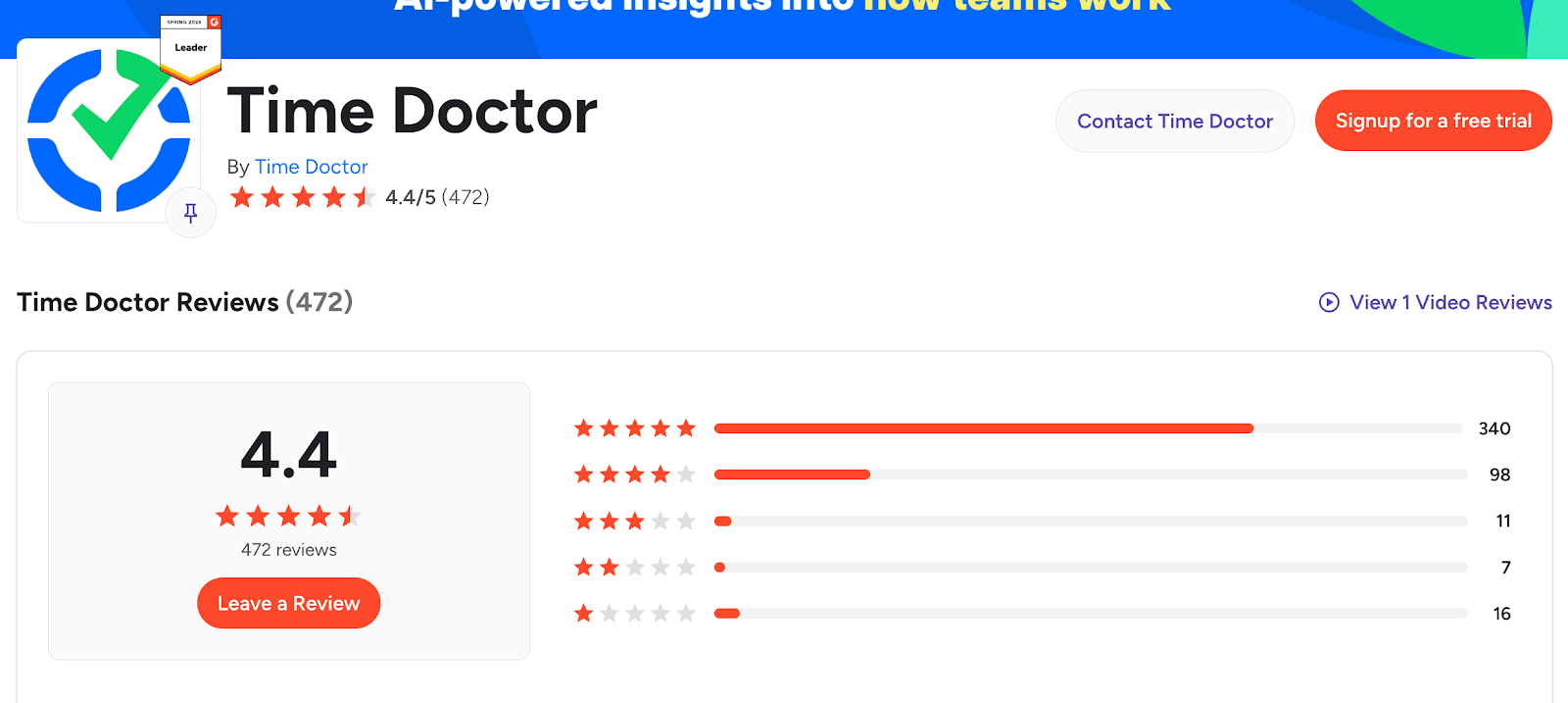
At the moment of writing, Time Doctor has an average score of 4.4/5 on G2, with 472 submitted reviews. While the bulk of the ratings are five stars, there is a significant number of 1- and 4-star ratings too.
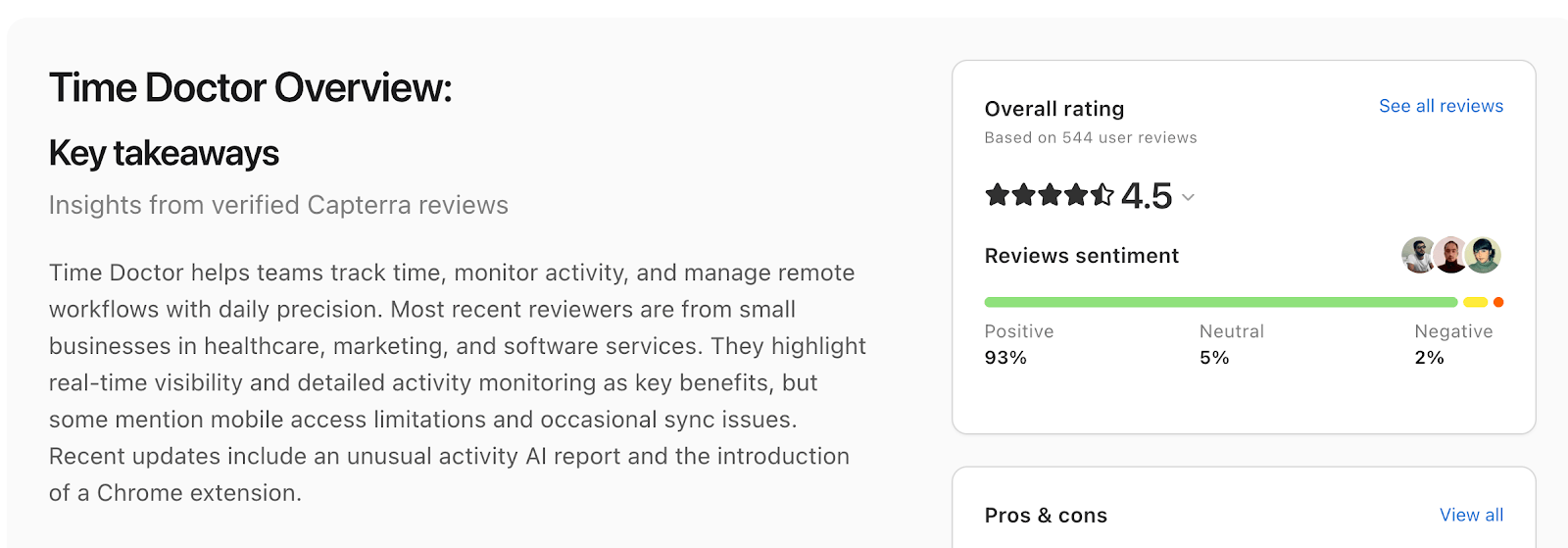
The situation is a little bit better at Capterra, with a 4.5/5 score and 544 user reviews:
Employees really dislike Time Doctor
It doesn't take much to find out that the end-users who actually have to install and run Time Doctor to track work hours and app usage are really not fond of Time Doctor.
Some G2 reviews will state things like "the screenshots are too invasive all the time", while others will say that team members were slow to adopt because the employee productivity features were too intrusive.
If you look through online communities like Reddit, you'll see members recommending each other to completely skip employers that use Time Doctor and go work for someone who values the actual work being delivered.
On the flip side, some employers like the screenshot capture and video recording features as it allows them to more closely monitor remote teams and track progress on tasks.
"I like the screenshot feature in Time Doctor, as it enables me to verify whether remote staff are actually working on their assigned tasks or not. The automatic time and app tracking are good too. Their terrible billing (misleading, overcharging, no refund) and terrible customer support undo all that is good."
Others are more understanding of the fact that not all work requires constant typing and scrolling:
"(I don't like) that it measures productivity as mouse and key strokes, because some work requires a lot of reading and analyzing."
Either way, expect polarizing opinions and a lot of initial pushback. While you may like the project management features or the detailed task tracking, all your employees will see is their sensitive data shared in the name of time tracking and productivity monitoring.
The employee monitoring app slows down devices
If you want to use all the employee monitoring features of Time Doctor, it's going to require your team to install Time Doctor on their devices. This is where trouble begins, because the burden of installing for remote or hybrid teams is on the employee, who may not be the most technologically literate folks out there.
But the real problem is the fact that Time Doctor can slow down those devices significantly, especially if they're older.
"On less powerful computers, it does slow down a bit when obviously recording the full screen." - G2 review
"I would say it's the slowness of loading multiple recordings or screencasts. Also, it's quite complicated to download it. I had to research from my end." - G2 review
The best way to minimize risks (and keep your employees happy) is to have dedicated devices for your employees with Time Doctor installed on them, which is neither cheap nor easy.
The detailed reports can be too detailed
The data you get from Time Doctor's employee and productivity monitoring features is priceless, especially when combined with other data points from project management, sales, and other apps in your tech stack. The only problem is, you could need a simple projects and tasks report but get drowned in dashboards instead.
For the average manager, app usage tracking, work/life balance metrics, offline time tracking and other metrics can be just too much. If you want a simple way to track billable hours and find out which team members are delivering work, Time Doctor can be too confusing.
As one reviewer puts it:
"There's a lot of info on the dashboard that I'm not really across or maybe even need. I'd like easy training or explanations, and quarterly reviews to see how things are going, what's used and what's not. I think it would be helpful to check in with an account manager to see what's helpful, what's not, clean up the dashboard, and work on figuring out what's needed and what’s not, along with any training that may be required."
The integrations don't always work as intended
Time Doctor integrates with a variety of project management, productivity, sales and other types of tools. These integrations are done natively, through a browser extension or an API, if you want to create something fully custom.
The problem is that the native integrations can either be too complex to set up or simply stop working for random reasons.
"I dislike the integration with ClickUp being buggy. The integration stops frequently, forcing us to switch to manual job costing. While this is an acceptable alternative, it is not as efficient as having the integration work seamlessly." - G2 review
Apparently, the API isn't any better either:
"We tried using their API to track time through our proprietary ticketing system, but we ran into issues and had to abandon the integration for the time being." - G2 review
Despite comprehensive time tracking, there could be inaccuracies
Time Doctor tracks many things, from work hours, to distraction alerts, idle time and more. It tracks time automatically across different devices (and within browsers) and team members can create time entries directly in the app. When you add GPS tracking and offline tracking when there is no internet connection, there are many moving parts in Time Doctor.
This can result in broken timesheets and inaccuracies where the employee hours slip through, causing frustrations with billable hours, payroll and client communication.
"Honestly, recently, a couple of months back, Time Doctor tended not to show the time properly. If someone worked for two hours, pressed pause, and came back, the app or connection between devices wouldn't display the tracked time accurately. It would just show the time from when it was paused, which could take a while to refresh to the actual tracked time. You could see it on the dashboard, but not on the pop-up window. Also, it's kind of heavy on devices, taking a lot of memory storage, and sometimes glitches or takes a while to load depending on the device type." - G2 review
For example, the app usage report won't work if you're not moving your mouse or using your keyboard and this activity tracking feature doesn't work well for meetings, among other things:
"It tends to stop recording my time while I’m in meetings if I’m not actively moving my mouse on the screen. Also, whenever I open Facebook to connect to a member’s account, it pops up and asks me if I’m still working." - G2 review
As this reviewer suggests, some people may use social media for work (e.g., paid ads, account management), and Time Doctor won't consider the time spent as actual work hours.
The biggest issues arise when someone pauses and resumes their time tracking or switch between platforms, e.g. going from a mobile app to the browser extension. The end result is an hours-tracked report that you and your clients can't use.
Time Doctor pricing can be confusing
We covered how much Time Doctor costs in a separate article, so we won't bother you with the detailed insights on that. There are, however, four plans:
- Basic plan - starts at $6.67 per user per month
- Standard plan - starts at $11.67 per user per month
- Premium plan - starts at $16.70 per user per month
- Enterprise plan - custom pricing
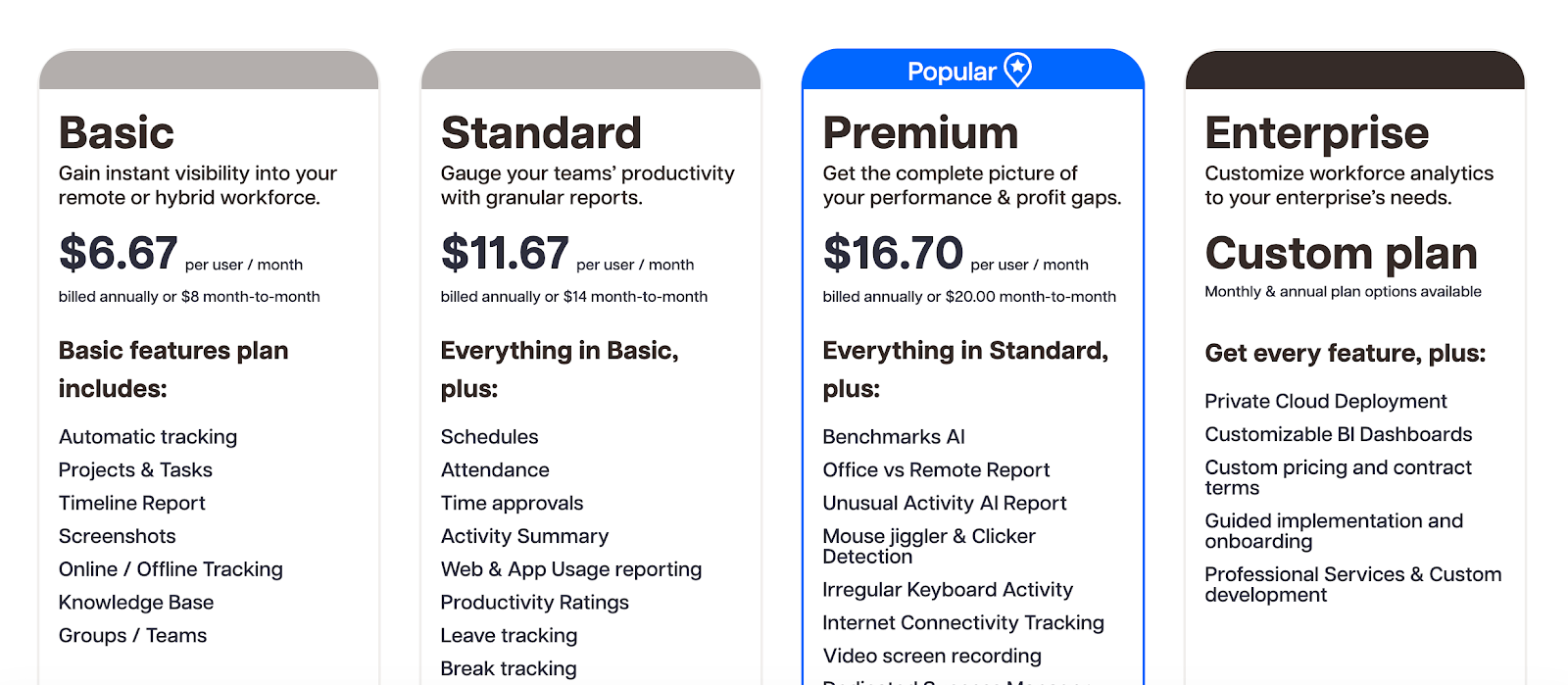
The more money you spend, the more advanced features you get for productivity analysis and project tracking. There is no free plan, but there is a 14-day free trial.
Things get complicated with add-ons because you can purchase them for things like software cost insights, unusual activity tracking, or office vs. remote report for productivity monitoring.
To find the best mix of features, you'll simply have to go for the Premium plan or mix and match the Basic plan with various add-ons.
In either case, Time Doctor pricing will end up being complicated and expensive, because even the cheapest plan doesn't have any integrations with project management and other types of tools.
Why Timely is the better Time Doctor alternative
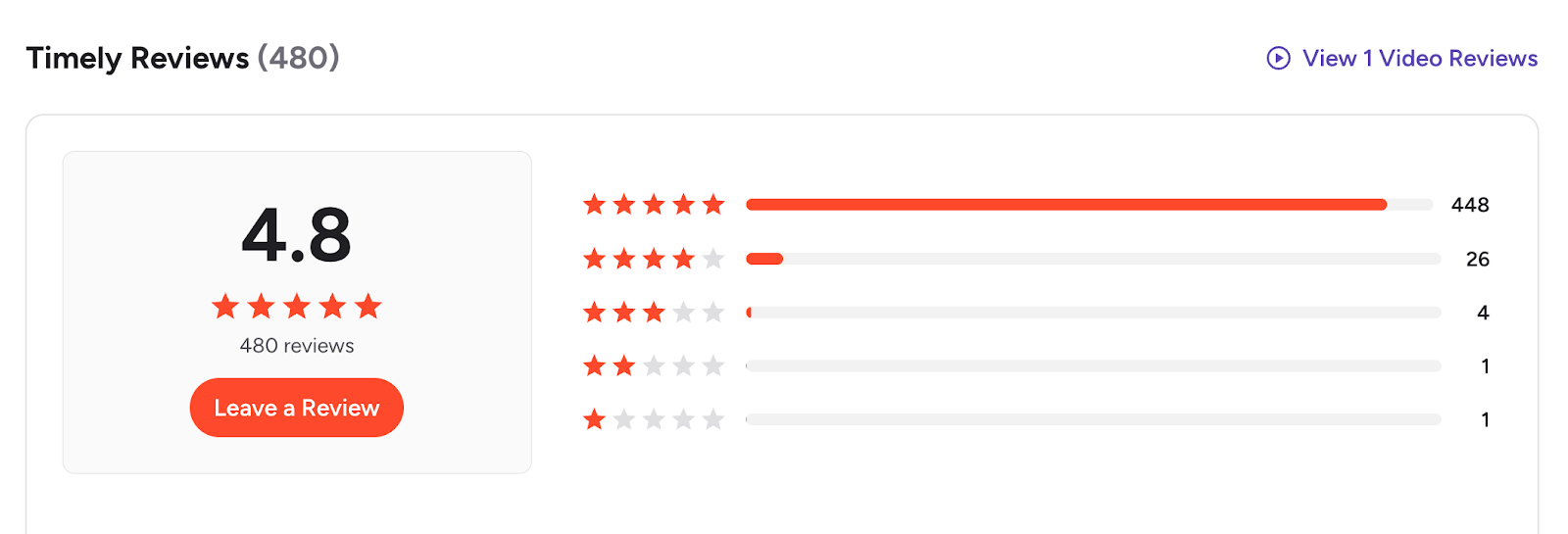
Looking at numbers alone, Timely scores better on the most relevant platforms. On G2, Timely scores at 4.8/5 with 480 reviews.
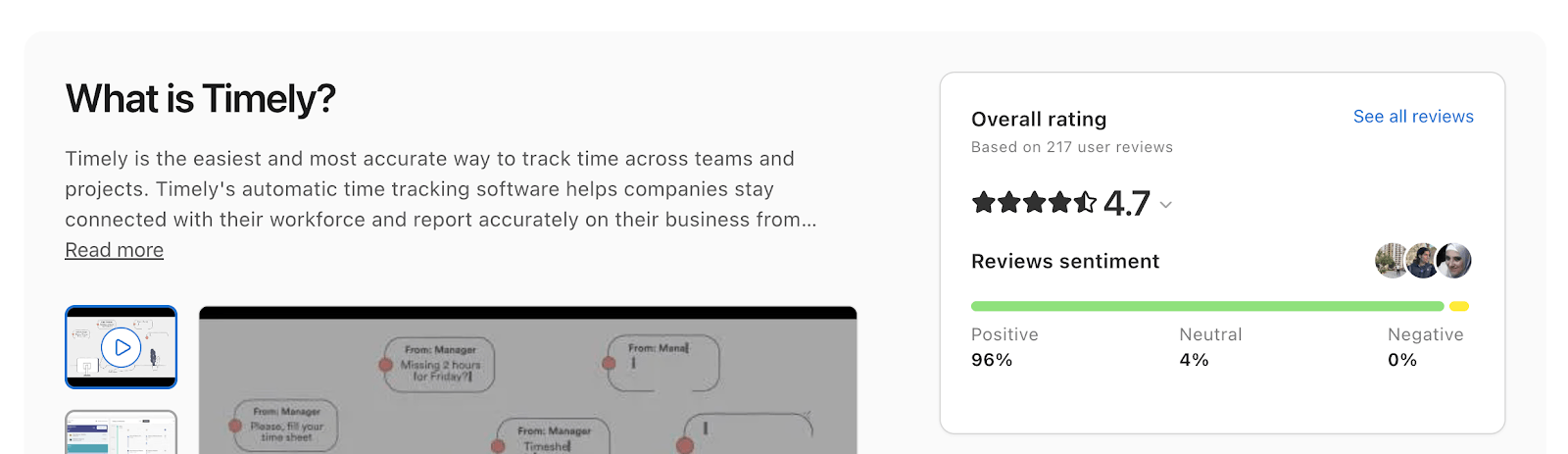
Capterra follows a similar sentiment:
First, Timely removes the biggest friction point: employee monitoring. There are no screenshots, no keystroke tracking, and no constant surveillance. Instead, Timely uses automatic time tracking in the background, which means your team doesn’t feel watched while still capturing accurate work data. This alone leads to much higher adoption and far less pushback from employees.
Second, it’s significantly easier to use. Where Time Doctor overwhelms users with dashboards and granular activity data, Timely focuses on clean timelines and simple reporting. You can quickly see how time is spent across projects without digging through layers of metrics that most teams don’t actually need.
Another major advantage is performance and reliability. Timely runs quietly without slowing down devices or requiring complicated installations across multiple environments. This solves one of the most common complaints about Time Doctor, especially for teams using older hardware or working across different setups.
On top of that, time tracking accuracy is more consistent. Because Timely automatically logs work activity instead of relying on manual timers, pauses, or device switching, there are fewer gaps and discrepancies in timesheets. This makes it much more reliable for billing, payroll, and client reporting.
Finally, Timely’s pricing and feature structure are easier to understand. You don’t need to piece together add-ons or upgrade just to unlock basic integrations. What you see is what you get, which makes planning and scaling much simpler.
In short, Timely gives you accurate time tracking, better team buy-in, and a cleaner experience, without the downsides that make Time Doctor frustrating for both managers and employees.
Try Timely for free today to see why Time Doctor users come to us for a change of pace.