

.png)
Time Doctor is a popular time tracking platform known for its employee productivity features. It's popular with remote and hybrid teams that want to keep tabs on team performance during work hours. Time Doctor is also one of the more expensive time tracking platforms, with add-ons that complicate your total monthly invoice.
Let's dive deep into Time Doctor pricing plans and find out if they make sense for your team.
Looking for a better, less intrusive Time Doctor alternative? Try Timely for free today.
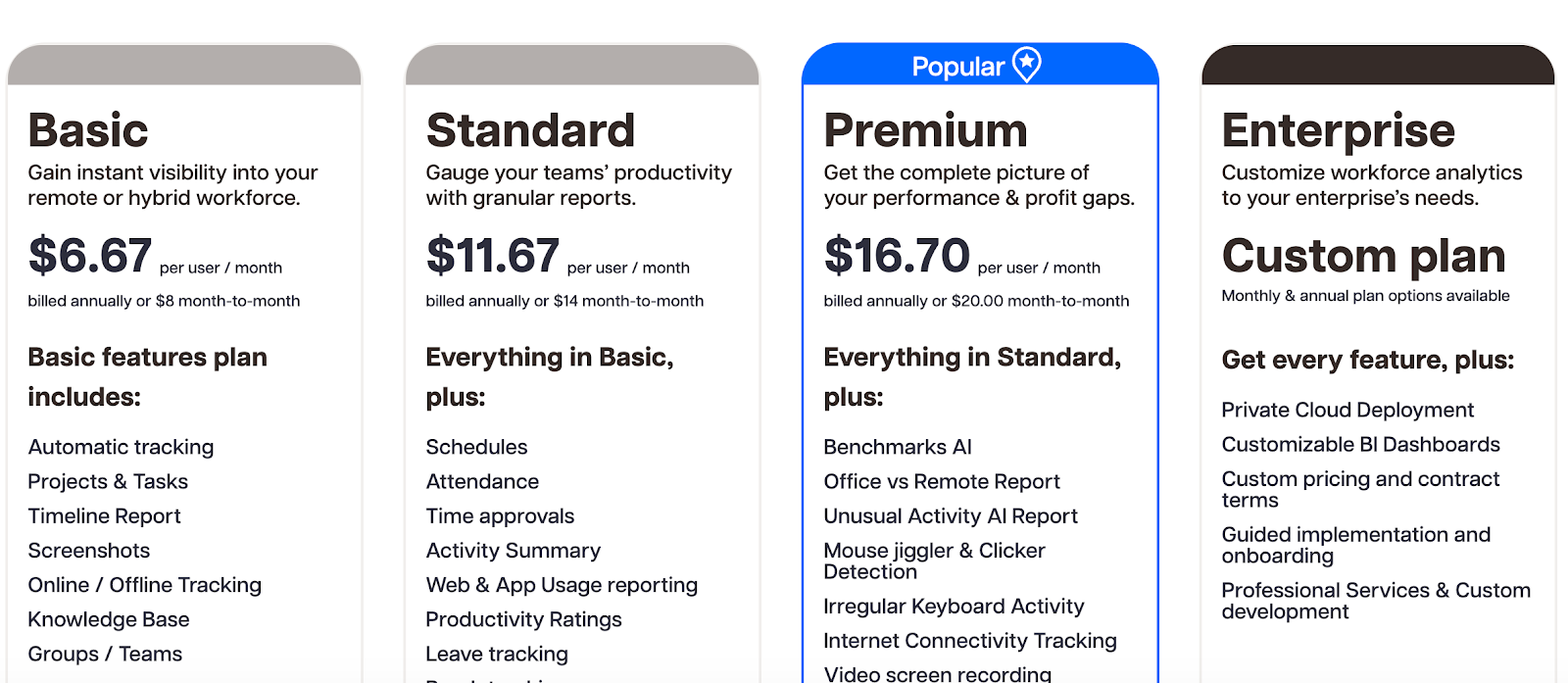
Time Doctor has four pricing plans
There is a 14-day free trial available where you can try all the features from all the tiers. Since Time Doctor requires plenty of setup, you may have to spend most of that time setting up integrations and installing employee monitoring software on various devices. However, for basic time tracking, this is more than enough time to see if the platform works for you.
There is no free plan available, so after 14 days, you can only upgrade to one of the paid plans.
There are two prices for each pricing plan. If you purchase annually instead of on a monthly basis, you can get each plan at a 20% lower price. The cheapest, Basic and Standard plans can be boosted with add-ons, which we'll talk about in a second.
The Basic plan starts at $6.67 per user/month
Best for: small teams that only need basic time tracking
If you want to try this plan out on a monthly basis, the starting cost will be $8/user/month. This plan gives you the bare bones of Time Doctor features, such as:
- Automatic tracking
- Project & task management
- Timeline report
- Screenshots
- Online and offline tracking
- Knowledge base
- Groups/teams
- Mac, Linux, Chrome, and Windows apps
At the face of it, seems like everything you need for basic productivity monitoring. However, the fine print reveals that this plan doesn't come with any integrations and if you get stuck with onboarding, you can only refer to the self-service knowledge base and ticket portal. In other words, you don't get any customer support.
This plan works well if you intend to try higher pricing plans later and want to see if Time Doctor serves its basic purpose for your team. In isolation, it seems like an okay deal, but compared to major time tracking software competitors, the features are fairly limited, and the lack of integrations can put many teams off from even starting.
While the more expensive plans are more geared towards distributed, hybrid and remote teams, this plan works well for anyone who wants accurate time tracking with essential features only.
You can improve this plan by purchasing add-ons.
Real-life example: for a team of 20 people, $1,600 per year with annual billing. If paying monthly, $160/month for 20 people.
The Standard plan starts at $11.67 per user per month
Best for: growing teams that need integrations and attendance tracking
If you pay on a monthly basis, it's going to cost you $14/user/month.
You get all the key features from the Basic plan, along with some extras:
- Schedules
- Attendance
- Time approvals
- Activity summary
- Web & app usage reporting
- Productivity Ratings
- Leave tracking
- Break tracking
- Payroll
- Work-life balance metrics
- Real-time notifications
- 60+ integrations
- Upgraded support
The main value of this plan is the ability to integrate various other project management, HR and payment tools into Time Doctor. There are two ways to do this: connecting them with your Time Doctor web dashboard or plugging them into your users' Chrome or Firefox browsers.
There are far too many integrations to list here, but Time Doctor covers the most important project management apps like Asana, Clickup, Notion, Trello, Todoist and others.
This plan is a strange middle ground where you get features that are common in other time tracking tools (but come in cheaper plans), and you don't get the signature Time Doctor features, such as screen recording or click tracking.
Like the Basic plan, you can also improve this one with optional add-ons.
Real-life example: for a team of 20 people, $2,800 with annual billing, or $280 per month if paying monthly.
The Premium plan starts at $16.70 per user per month when billed annually
Best for: remote or hybrid companies that want deep workforce monitoring
This price hikes up to $20 per user per month when you pay on a monthly basis. If you need Time Doctor monitoring features in all their glory (or shame), this is the plan to get.
It comes with everything from Standard, plus:
- Benchmarks AI
- Office vs remote report + website usage
- Unusual activity AI report
- Mouse jiggler & clicker detection
- Irregular keyboard activity
- Internet connectivity tracking
- Video screen recording
- Dedicated success manager
- Executive dashboard & reporting
- Automatic user provisioning
- Historical tracking data
- Open API access
- Single Sign-On (SSO)
- Client login access
- Meeting insights
- Software cost insights
This is the right plan for companies with a mix of remote and in-office teams that want detailed productivity reports and advanced security features. It's also built for businesses that have a lack of trust in their team's performance and want to enhance productivity metrics.
Note that this plan doesn't have GPS tracking, which can be important for companies that want to access real-time data on their team's location.
Real-life example: for a team of 20 people, the cost is $4,008 per year with annual billing or $400 per month if paying monthly.
The Enterprise plan has custom pricing
Best for: large organizations that require security, customization, and dedicated support
If you like Time Doctor's workforce productivity features and want a little bit more, the Enterprise plan is going to require going through a demo call to find out its exact costs.
You get all the features from Premium, along with a few extras:
- Private cloud deployment
- Customizable BI dashboards
- Custom pricing and contract terms
- Guided implementation and onboarding
- Professional services & custom development
This plan isn't so focused on advanced features as it is on improved security and reporting for enterprise organizations.
Plan add-ons
On top of the Basic and Standard plans, you can add one or multiple add-ons to get the features from the more expensive plans without upgrading.
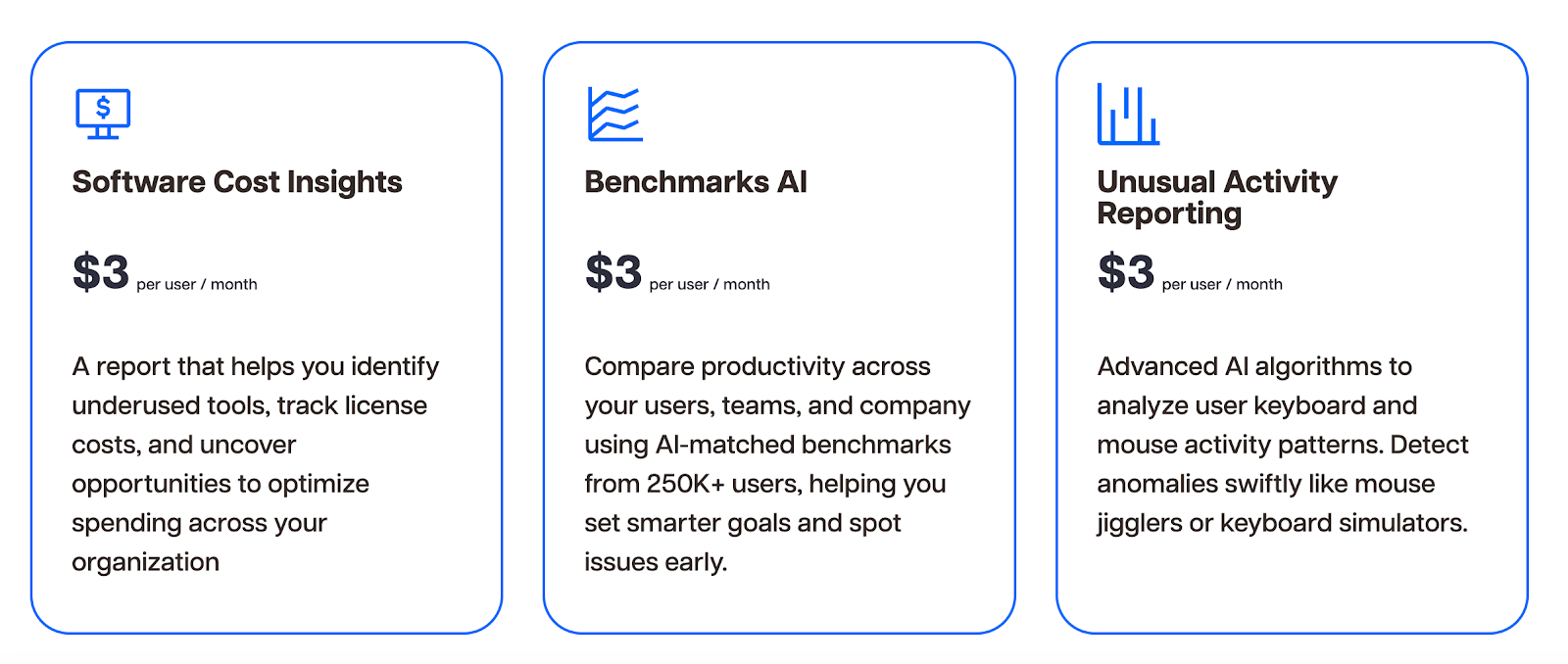
Software cost insights: an additional $3/user/month
A report that helps identify underused tools, monitor license spending, and reveal opportunities to reduce unnecessary software costs through app usage monitoring.
Benchmarks AI: additional $3/user/month
Compares productivity across users, teams, and the entire company using AI-matched benchmarks from more than 250,000 users, helping leaders set realistic performance targets and identify early productivity issues.
Unusual activity reporting: additional $3/user/month
Uses advanced AI analysis of keyboard and mouse behavior to detect suspicious or abnormal activity patterns such as mouse jigglers or keyboard simulators.
Meeting insights: additional $2/user/month
Analyzes real meetings across tools like Zoom, Microsoft Teams, Google Meet, and Slack to measure meeting load, engagement, and the impact meetings have on productivity and focus time.
Office vs remote report: additional $2/user/month
Advanced reporting that compares productivity between in-office and remote employees to support data-driven decisions about hybrid work policies.
Video screen recording: additional $3/user/month
Records videos of employees’ screens during work sessions to analyze task progress, uncover bottlenecks, and understand workflows through detailed reports.
HRIS native integration: additional $200/integration/month
Automatically synchronizes employee data from HR systems so user information stays updated when employees join, leave, or change roles.
Single Sign-On (SSO): additional $200/account/month
Allows users to log in through a centralized identity provider for secure one-click access while reducing password management issues.
Automated user provisioning: additional $200/account/month
Automatically manages user access through an identity and access management system, updating permissions during onboarding, role changes, and offboarding.
BigQuery access: additional $1,500/account/month
Provides direct access to raw datasets in Google BigQuery so teams can analyze workforce data and build their own advanced reports and analytics.
Why Time Doctor pricing isn't such a great deal
Time Doctor is built for companies that need very strong oversight of their distributed or remote workers. If you don't belong in this group, you're left with the Basic plan, which doesn't have any integrations with third-party tools, and it's also missing key features like schedules and activity summaries.
The Standard plan at $11.67 monthly gives you features that other time tracking tools have in their free or cheapest plans.
Compared to everything else, the Premium plan is a good value because you get all the features that are sold separately as add-ons. However, if you just need accurate tracking without detailed insights on how employees spend their time, it's too expensive to justify good features such as SSO and API access.
When Timely is a better choice
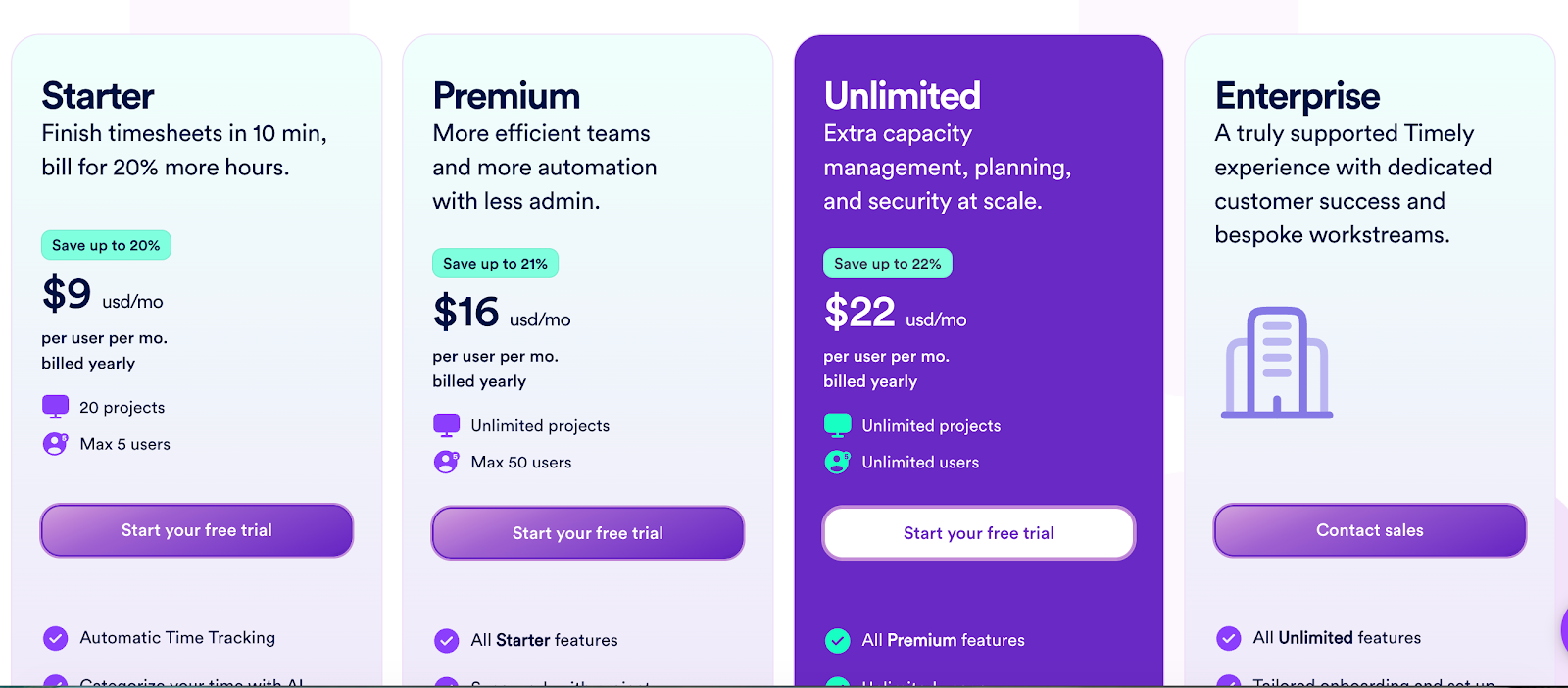
Timely has a free trial and the entry level plan starts at $9 per user per month when billed annually. In this plan, you get:
- Automatic time tracking
- Categorize your time with AI
- Project health monitoring
- Accurate billable hours reporting
- Time tracking on thousands of apps and websites
- In-app support
- API access
And unlike Time Doctor, you get access to all the integrations, even in the cheapest plan.
Timely helps your team stay on the same page with project dashboards, billable rates, and budgets, without intrusive monitoring and workforce analytics features such as video screen captures. We give you the data you need to understand how and when your team works and how it affects your profitability.

.svg)
