


Linear
Plan in Linear. Predict in Timely. Automatically capture every hour. Timely’s Linear integration brings automatic, AI-powered time tracking to your Linear workflow. Plan and manage work in Linear, while Timely captures activity in the background and turns it into accurate time data—without timers or manual timesheets.
.svg)


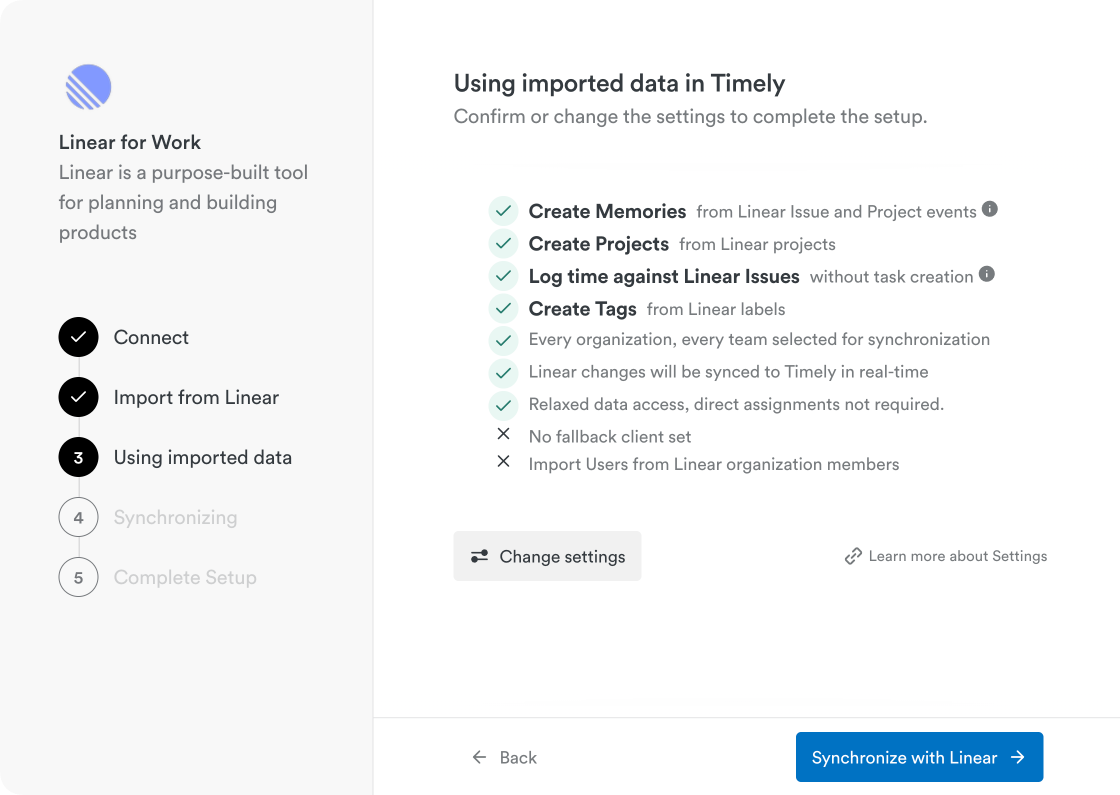
Real-Time Sync: Automatically syncs Linear teams, projects, issues, labels, and activity into Timely. Updates in Linear—such as creating or updating issues, commenting, or managing cycles—are reflected in Timely in real time.
Mapping: Linear Teams sync to Timely Clients, Linear Projects sync to Timely Projects, and Linear Issues (including sub-issues) are available as references for time tracking. Labels are imported as Timely tags.
Time entries logged in Timely can be linked directly to Linear issues, with a reference and direct link back to Linear.
AI-Powered Automation
- Work activity in Linear is captured automatically as users create issues, update projects, comment, and manage cycles.
- Memories provide context for what happened throughout the day.
- Timely’s AI suggests complete time entries, allowing users to log their entire day in one click.
Customization: Configure which Linear teams to sync, whether to create projects, import users and create tags from Linear labels—so the integration fits your workflow.
Security: Uses OAuth authentication, encrypted data transfer, and enterprise-grade infrastructure. Timely accesses Linear data in read-only mode and never modifies issues or project structure.

Benefits
- Accuracy: Capture every hour automatically with AI-assisted time suggestions linked to Linear issues—no missing or misattributed time.
- Reporting: Access complete, real-time time data for sprint analysis, forecasting, budgeting, and delivery insights. Understand how time is spent across teams, projects, and initiatives from planning to completion.
- Efficiency: Eliminate manual time entry, context switching, and duplicate task management. Teams stay focused on delivery while Timely handles time tracking in the background.
- Ideal For: Product teams, engineering teams, project managers, and agencies using Linear who want effortless time tracking and reliable reporting without disrupting existing workflows.

Requirements & Setup
- Requires a Timely Premium, Unlimited, or Enterprise plan.
- Simple setup takes less than five minutes (requires an initial admin connection).
What Gets Synced:
Linear Teams → Timely Clients
Linear Projects → Timely Projects
Linear Issues (and sub-issues) → Issue references for time entries
Linear Labels → Timely tags
Linear issue and project activity → Memories
Task Sync Rules
If issues are synced and a Linear team is not selected for syncing in Timely, its issues will not be imported or made available for time tracking.
Linear issues appear as “memories” on the Timely timeline. They can be attached to time entries as references but are not written back to Linear, ensuring Linear remains the source of truth.


the world

"Ingenious, efficient and effective time tracking system"

"Effective tool to help you keep track of time and stay productive"

"User-friendly and effective"

"Timely record my time automagically"

"Timely is hands down the best time tracking app available"

"A great experience which has made my invoicing life much easier!"

"So many valuable uses for Timely & Memory"

"Black box for all your daily efforts"

"A perfect tool to follow your time on projects"

"Best time tracking app"

"Timely - our time management tool"
"It's super easy tracking task details on timely without much hassle"

"Unbeatable time-tracking for many clients and projects"

"Best time tracking software on the market"

"An excellent, intuitive time tracker that helped me actually start tracking my screen time"

"Ingenious, efficient and effective time tracking system"

"User-friendly and effective"
"Effective tool to help you keep track of time and stay productive"
"Timely record my time automagically"
"Timely is hands down the best time tracking app available"
"Timely - our time management tool"
"An excellent, intuitive time tracker that helped me actually start tracking my screen time"
"Best time tracking software on the market"
"Unbeatable time-tracking for many clients and projects"
"It's super easy tracking task details on timely without much hassle"
"Best time tracking app"
"So many valuable uses for Timely & Memory"
"Black box for all your daily efforts"
"A great experience which has made my invoicing life much easier!"
"A perfect tool to follow your time on projects"
"So many valuable uses for Timely & Memory"
"Black box for all your daily efforts"
"A great experience which has made my invoicing life much easier!"
"Best time tracking app"
"A perfect tool to follow your time on projects"
"User-friendly and effective"
"Effective tool to help you keep track of time and stay productive"
"Timely record my time automagically"
"Ingenious, efficient and effective time tracking system"
"Timely is hands down the best time tracking app available"
"Timely - our time management tool"
"An excellent, intuitive time tracker that helped me actually start tracking my screen time"
"Best time tracking software on the market"
"Unbeatable time-tracking for many clients and projects"
"It's super easy tracking task details on timely without much hassle"
"So many valuable uses for Timely & Memory"
"Black box for all your daily efforts"
"A perfect tool to follow your time on projects"
"A great experience which has made my invoicing life much easier!"
"Best time tracking app"
"A great experience which has made my invoicing life much easier!"
"Black box for all your daily efforts"
"Best time tracking app"
"A perfect tool to follow your time on projects"
"So many valuable uses for Timely & Memory"
"User-friendly and effective"
"Effective tool to help you keep track of time and stay productive"
"Timely record my time automagically"
"Ingenious, efficient and effective time tracking system"
"Timely is hands down the best time tracking app available"
"Ingenious, efficient and effective time tracking system"
"Effective tool to help you keep track of time and stay productive"
"User-friendly and effective"
"Timely record my time automagically"
"Timely is hands down the best time tracking app available"
"A great experience which has made my invoicing life much easier!"
"So many valuable uses for Timely & Memory"
"Black box for all your daily efforts"
"A perfect tool to follow your time on projects"
"Best time tracking app"
"An excellent, intuitive time tracker that helped me actually start tracking my screen time"
"Timely - our time management tool"
"It's super easy tracking task details on timely without much hassle"
"Unbeatable time-tracking for many clients and projects"
"Best time tracking software on the market"
"Effective tool to help you keep track of time and stay productive"
"Timely is hands down the best time tracking app available"
"Timely record my time automagically"
"Ingenious, efficient and effective time tracking system"
"User-friendly and effective"
"Timely - our time management tool"
"It's super easy tracking task details on timely without much hassle"
"Unbeatable time-tracking for many clients and projects"
"Best time tracking software on the market"
"An excellent, intuitive time tracker that helped me actually start tracking my screen time"
"Timely - our time management tool"
"An excellent, intuitive time tracker that helped me actually start tracking my screen time"
"Best time tracking software on the market"
"Unbeatable time-tracking for many clients and projects"
"It's super easy tracking task details on timely without much hassle"