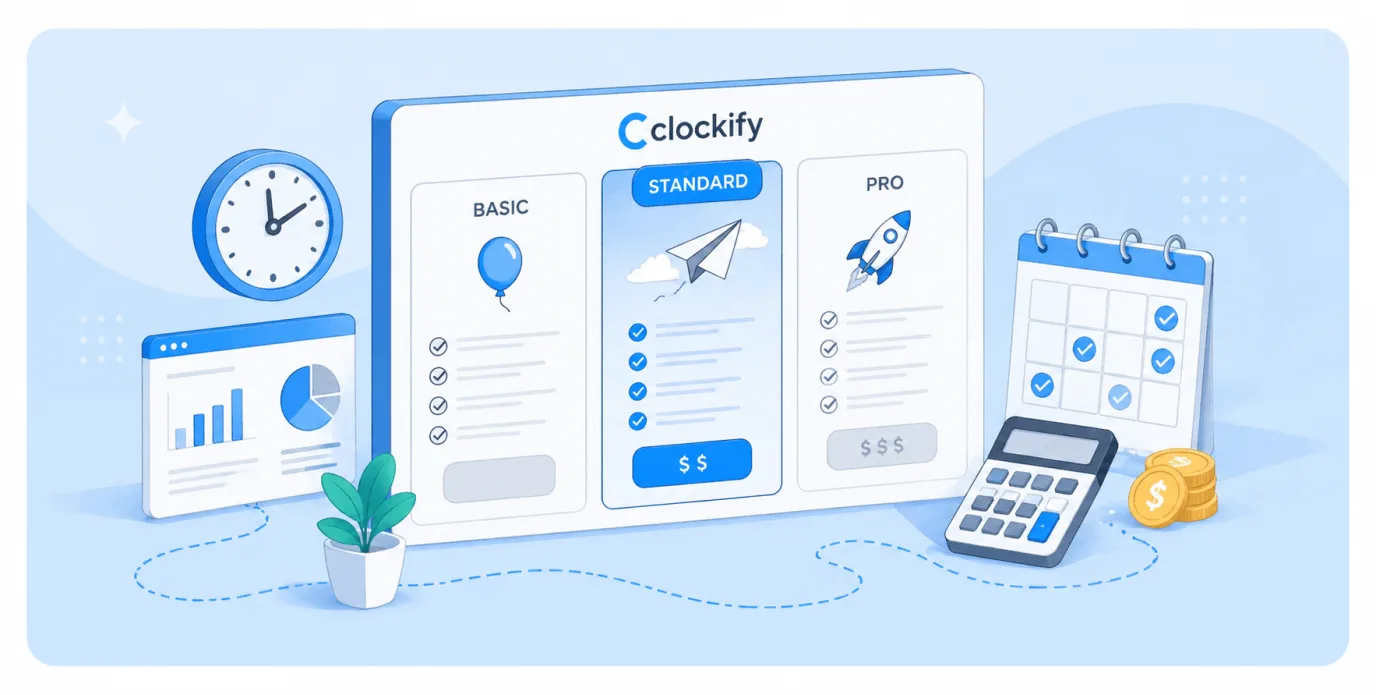
Clockify pricing is famous in the time tracking software arena for several reasons. First, the generous free plan. Second, the sheer number of different paid plans and the features that make them different from each other.
If you ever felt like figuring out Clockify costs requires several hours spent with an Excel sheet, you’re not alone. Today, we explain the different paid features and plans in Clockify, how much this tool really costs, and who each of the plans is best for.
Clockify pricing at a glance
| Plan | Starting price | Top features | Downsides | Best for |
|---|---|---|---|---|
| Free | $0/month | Unlimited users and projects, basic time tracking, timesheets, simple reports | No invoicing, no approvals, no budgeting, limited reporting depth | Freelancers or very small teams that just need to log hours |
| Basic | $3.99/month annually, $4.99 monthly | Billable rates, required fields, bulk editing, project templates, time audit tools | Still no approvals or invoicing, limited reporting, no planning tools | Small teams that need more structured time tracking and cleaner data |
| Standard | $5.49/month annually, $6.99 monthly | Invoicing, approvals, time off tracking, manager roles, task rates, QuickBooks integration | Weak forecasting and capacity planning, reporting still limited for deeper analysis | Agencies and service teams billing clients and managing timesheets |
| Pro | $7.99/month annually, $9.99 monthly | Scheduling, forecasting, budgeting, expenses, labor cost tracking, alerts, GPS and screenshots | Heavy focus on monitoring, still relies on manual time entry, limited forward planning | Growing teams that need visibility into costs and team activity |
| Enterprise | $11.99/month annually, $14.99 monthly | SSO, audit logs, advanced security, custom domain, full control over permissions | Adds control but not much new in daily workflow, still manual and reactive | Larger organizations needing compliance, security, and centralized control |
Want to skip the spreadsheet maths? Try the better Clockify alternative for automatic time tracking — get Timely for free today.
Clockify Free plan
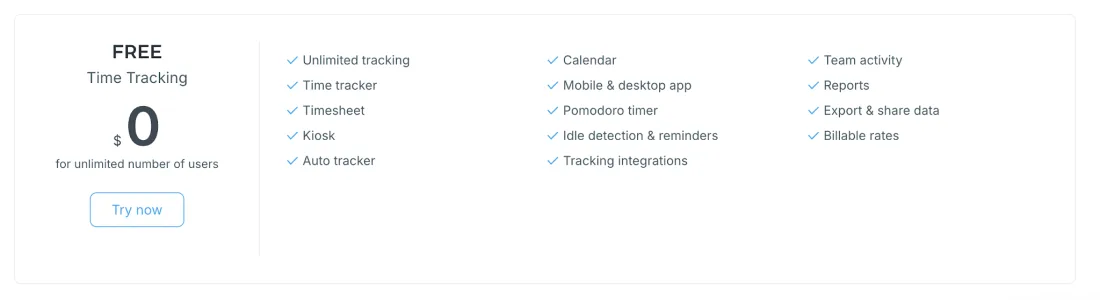
Clockify’s free plan is one of the main reasons the tool is so popular. On paper, it looks generous, since you get unlimited users and unlimited time tracking without paying anything. That makes it an easy starting point if you just want to log hours and see where your time goes.
What’s included
- Unlimited users so your whole team can join at no cost
- Unlimited projects and tasks with no usage limits
- Timer, manual time entry, and timesheets for logging hours
- Calendar view to visualize tracked time
- Basic reports with export options
- Kiosk mode for shared devices
- Integrations and API access for connecting other tools
- Basic team dashboard for a simple overview of activity
Best for: Freelancers, very small teams, or early stage startups that just need a free way to track hours across multiple people without worrying about budgets.
In practice, though, it’s a stripped down version of what most teams actually need once they move beyond basic tracking. Once you start relying on time tracking day to day, the downsides of the free version of Clockify become obvious. You can track time, but you cannot easily turn that data into invoices, approve it, or use it to manage projects.
Reporting is too shallow for anything beyond surface level insights, and there is no way to plan workloads or keep projects on budget. It works as a tracker, but not as a system for running a team or a business.
Clockify Basic plan
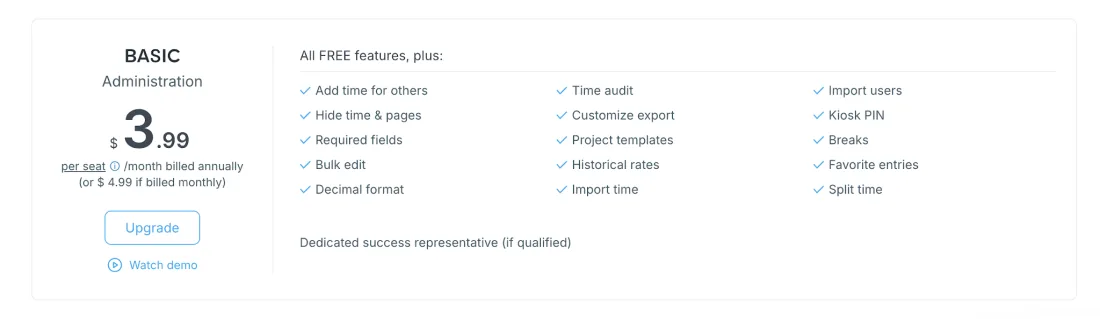
The Basic plan is where Clockify starts adding structure beyond the most basic features.
You still get the same core tracking features as the free plan, but this tier focuses on giving you more control over how time is logged, categorized, and billed.
It is a step up if you are starting to work with clients or need more consistent data across a team.
Pricing
- $3.99 per user per month when billed annually
- $4.99 per user per month when billed monthly
What’s included (new compared to Free plan)
- Billable rates so you can assign hourly rates to users or projects
- Time rounding to standardize how time entries are calculated
- Custom fields for adding extra time tracking data to entries, such as client type or task category
- Project templates to speed up setup for recurring work
- Bulk editing for updating multiple time entries at once
- Required fields to enforce more consistent time tracking across the team
Best for: Small agencies, consultants, and service based teams that need basic billing and more structured time tracking, but do not need to gain access to advanced reporting or team management features.
Even with billing in place, this plan still feels limited once you start managing real workloads. You can assign rates, but there is no strong system for approvals, forecasting, or tracking profitability across projects. Reporting still lacks depth, and there is no clear way to plan team capacity or stay ahead of deadlines. It moves beyond simple tracking, but it is not quite enough for running projects end to end.
Clockify Standard plan
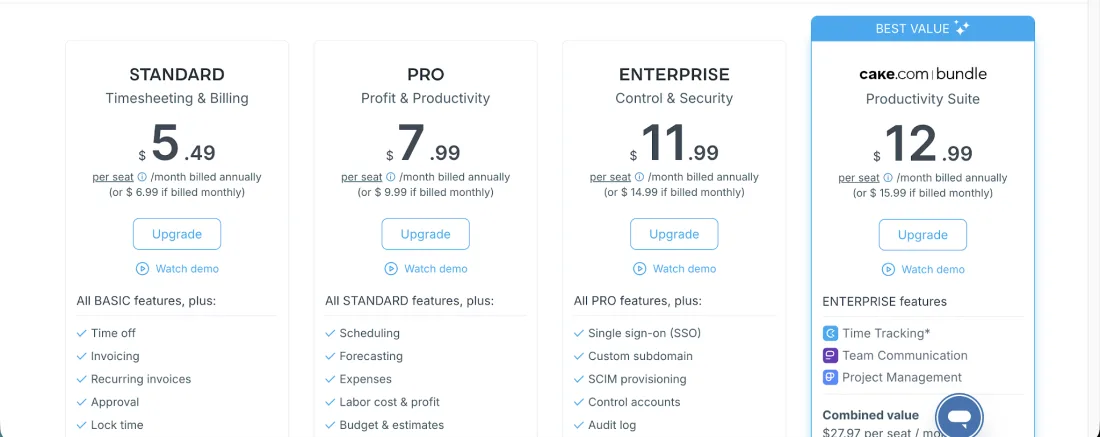
The Standard plan is where Clockify starts to feel more like a proper team management tool, not just a time tracker. This tier builds on billing and structure from the Basic plan, and adds features that help you actually manage projects, track progress, and get more useful insights from your data.
It is the first plan that moves beyond logging hours and into understanding how time is spent across a team.
Pricing
- $5.49 per user per month when billed annually
- $6.99 per user per month when billed monthly
What’s included (new compared to Basic plan)
- Time off tracking for managing vacations and absences
- Invoicing so you can turn tracked time into client ready invoices
- Approvals to review and confirm submitted time entries
- Manager roles and permissions for better team oversight
- Task rates to set different billing rates at a more granular level
- Advanced reporting with deeper insights into tracked time
- Data export and audit features for more control over records
Best for: Growing teams, agencies, and consultancies that need approvals, invoicing, and better visibility into team performance, not just basic time tracking.
This plan covers the operational basics, but it still falls short when it comes to planning and optimization.
You can approve time and send invoices, but there is limited support for forecasting workloads, tracking budgets in real time, or understanding team capacity. It helps you manage what already happened, but not what is about to happen, which becomes a problem as projects and teams scale.
Clockify Pro plan
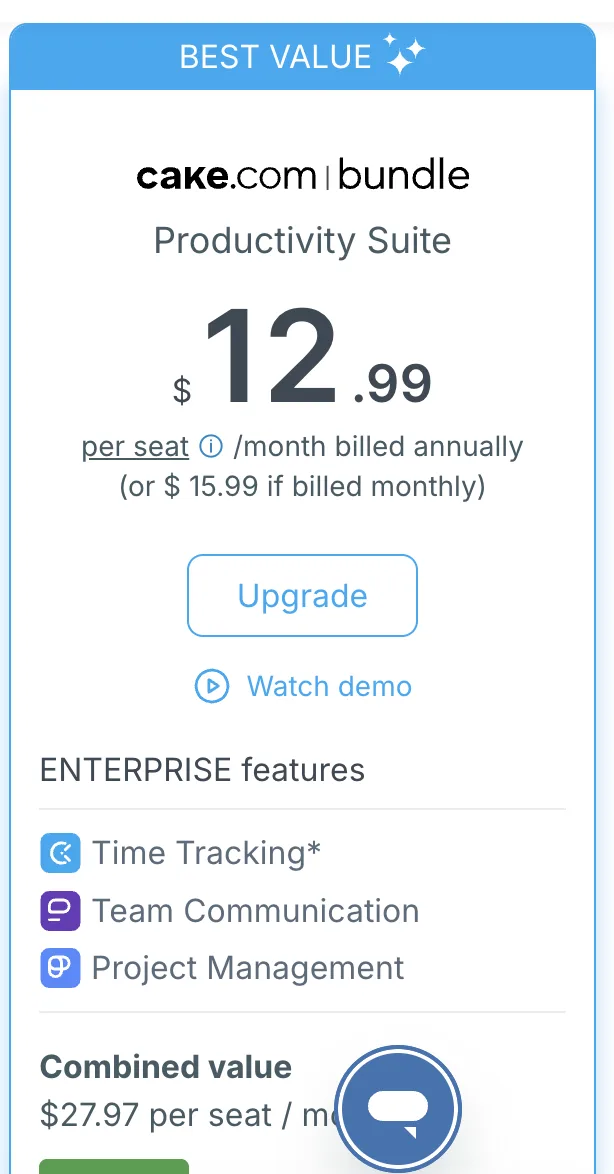
The Pro plan is where Clockify starts focusing on visibility and accountability across larger teams. By this point, you already have billing, approvals, and reporting in place, so this tier adds more control over tracking accuracy and a clearer view of who is doing what in real time.
It is made for teams that want tighter oversight and more reliable data, not just better reports and more advanced features.
Pricing
- $7.99 per seat per month when billed annually
- $9.99 per seat per month when billed monthly
What’s included (new compared to Standard plan)
- GPS tracking to see where time entries are logged from, useful for field teams
- Screenshot capture for monitoring work activity during tracked time
- Activity tracking based on keyboard and mouse usage
- Expenses tracking to log and attach costs to projects
- Labor cost tracking to compare billable rates with actual team costs
- Project budgeting and alerts to track progress against set limits
Best for: Mid sized teams, agencies, and companies with remote or distributed staff that need greater visibility into productivity, costs, and project performance.
Even with better tracking and cost control, this plan still leans heavily on monitoring rather than planning. You can see what your team did and how much it cost, but there is still limited support for forecasting workloads, balancing capacity, or improving how time is spent before problems happen. It gives you more data, but not necessarily better decisions.
Clockify Enterprise plan
The Enterprise plan is Clockify’s top tier. It’s made for larger organizations that need tighter control, security, and support. By this stage, the focus shifts away from adding more tracking features and toward governance, compliance, and managing time tracking at scale.
It is less about how you track time, and more about how you control and standardize it across bigger teams.
Pricing
- $11.99 per seat per month when billed annually
- $14.99 per seat per month when billed monthly
What’s included (new compared to Pro plan)
- SSO and advanced security controls for managing access across large teams
- Custom subdomain for a branded workspace
- Audit logs to track changes and user activity in detail
- Control over account settings and permissions at a more granular level
- Priority support with faster response times
Best for: Larger companies and enterprises that need strong security, centralized control, and compliance features across multiple teams or departments.
At this level, the gaps show up when you think about direction.
You get strong control and visibility, but the platform still relies heavily on manual input and after the fact reporting. There is limited help with planning work ahead, balancing team capacity, or improving how time is captured automatically. For organizations trying to move beyond tracking into optimization, it can still feel like a reporting tool rather than a system that actively improves how teams work.
CAKE.com Bundle
The CAKE.com Bundle is not just another Clockify tier, it is a completely different offer. Instead of paying for time tracking alone, you are getting a full productivity stack that combines time tracking, project management, and team communication in one package.
It essentially takes everything from the Enterprise plan and expands it into a connected system, so your team can track time, manage work, and communicate without switching tools.
Pricing
- $12.99 per user per month when billed annually
- $15.99 per user per month when billed monthly
What’s included (new compared to Enterprise plan)
- Pumble (team chat) for internal communication, similar to Slack
- Plaky (project and task management) for organizing work, tasks, and workflows
- Unified workspace and login across all tools
- Centralized user and billing management across the entire suite
- Enterprise features across all three tools, not just Clockify
- Integrated workflow where communication, tasks, and tracked time are connected
Best for: Teams that want an all in one workspace instead of stitching together separate tools for time tracking, project management, and communication.
What’s missing in real use
The value here depends heavily on whether you actually want all three tools. If your team already uses Slack, Asana, Jira, or similar tools, the bundle can feel redundant rather than helpful.
You are not getting best in class tools in each category, you are getting a tightly integrated ecosystem. That tradeoff works well for simplicity, but less so for teams that need deeper features in any one area or already have established workflows.
Clockify Kiosk pricing
Kiosk pricing is a separate layer on top of Clockify’s standard plans. Instead of paying for full users with emails, apps, and permissions, you pay a much lower price for “limited users” who can only clock in and out via a shared device.
This is designed for shift based environments — think warehouses, retail, hospitality, or on site teams where people do not need full access to the app. They just show up, enter a PIN, and start their shift.
How it works
- You add employees as limited users (no email required)
- They can only track time through the kiosk, no mobile app, no dashboard access
- Each limited user is billed separately at a lower rate than a full seat
Pricing by plan (per limited seat)
- Basic: $0.79/month annually, or $0.99 monthly
- Standard: $1.19/month annually, or $1.49 monthly
- Pro: $1.59/month annually, or $1.99 monthly
- Enterprise: $2.39/month annually, or $2.99 monthly
What you actually get
Kiosk users are intentionally restricted. They can clock in, clock out, track breaks, and see basic status info on a shared device. Admins still manage everything from full user accounts, including reports, approvals, and project setup.
This pricing model works well if your team does not need individual logins or detailed interaction with the system. For example, frontline workers, shift based staff, or temporary workers where speed and simplicity matter more than data depth.
Kiosk users are basically just punching in and out. They cannot manage tasks, review their time, or interact with projects in any meaningful way. That creates a gap if you want accountability, context around work, or any level of self managed tracking. It is great for attendance, but not for understanding how time is actually spent.
How Timely pricing compares to Clockify
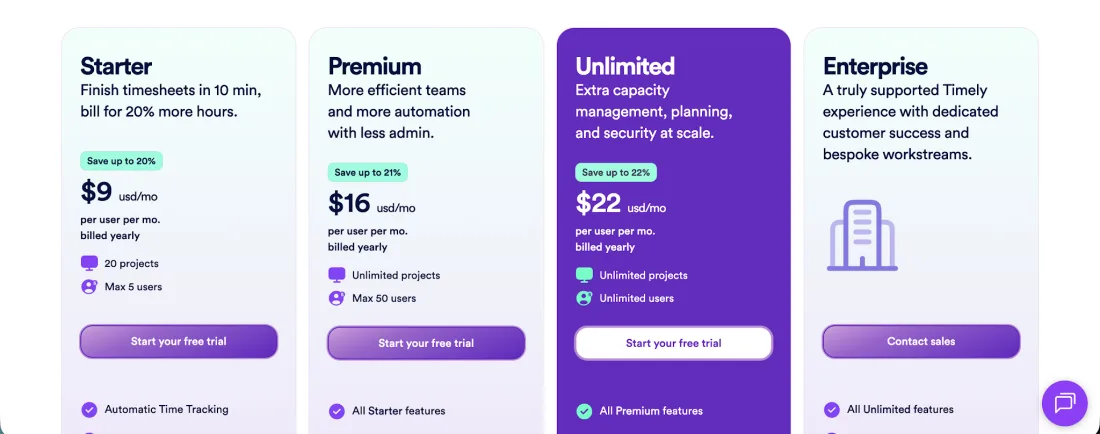
At a glance, Clockify looks cheaper. It has a free plan and lower entry level pricing across most tiers. Timely takes a different approach. It charges more per user, but includes features that Clockify only adds later, or does not fully support at all.
The real difference is not just price, it is how time is captured and used.
Timely pricing overview
- Starter: $9 per user per month annually, or $11 monthly
- Premium: $16 per user per month annually, or $20 monthly
- Unlimited: $22 per user per month annually, or $28 monthly
There is no free plan, only a 14 day trial.
The biggest difference: automatic vs manual tracking
Clockify is built around timers and manual input. Even with upgrades, your team still has to remember to start timers, log time, and fill in gaps.
Timely flips that completely. It automatically records time in the background across apps and websites, then uses AI to draft timesheets for approval.
That one difference changes everything. Instead of chasing missing time entries, teams review and approve what is already there.
What you get in Timely that Clockify struggles with
- Automatic time tracking by default across tools and activities
- AI generated timesheets that reduce admin work
- Built in capacity planning and workload management
- Project health and profitability tracking tied directly to real time data
- No surveillance features like screenshots or keystroke tracking
With Clockify, many of these either do not exist or are spread across higher tiers and still rely on manual input.
Where Clockify still wins
- A free plan, which Timely does not offer
- Lower cost entry for small teams or simple use cases
- More flexibility if you only want a basic tracker without automation
If your goal is just logging hours, Clockify is the cheaper option.
The real tradeoff
Clockify is built for tracking time after it happens. Timely is built for capturing time as it happens and using it to improve how teams work.
That is why Timely costs more. You are not just paying for time tracking, you are paying for:
- Less manual admin
- More complete and accurate data
- Better visibility into team capacity and project performance
For small teams or freelancers, Clockify’s free plan is hard to beat.
For agencies, consultancies, and teams billing clients, Timely usually pays for itself quickly because more hours are captured and billed accurately, and less time is wasted managing timesheets.
Start tracking time automatically today. Try Timely completely free.