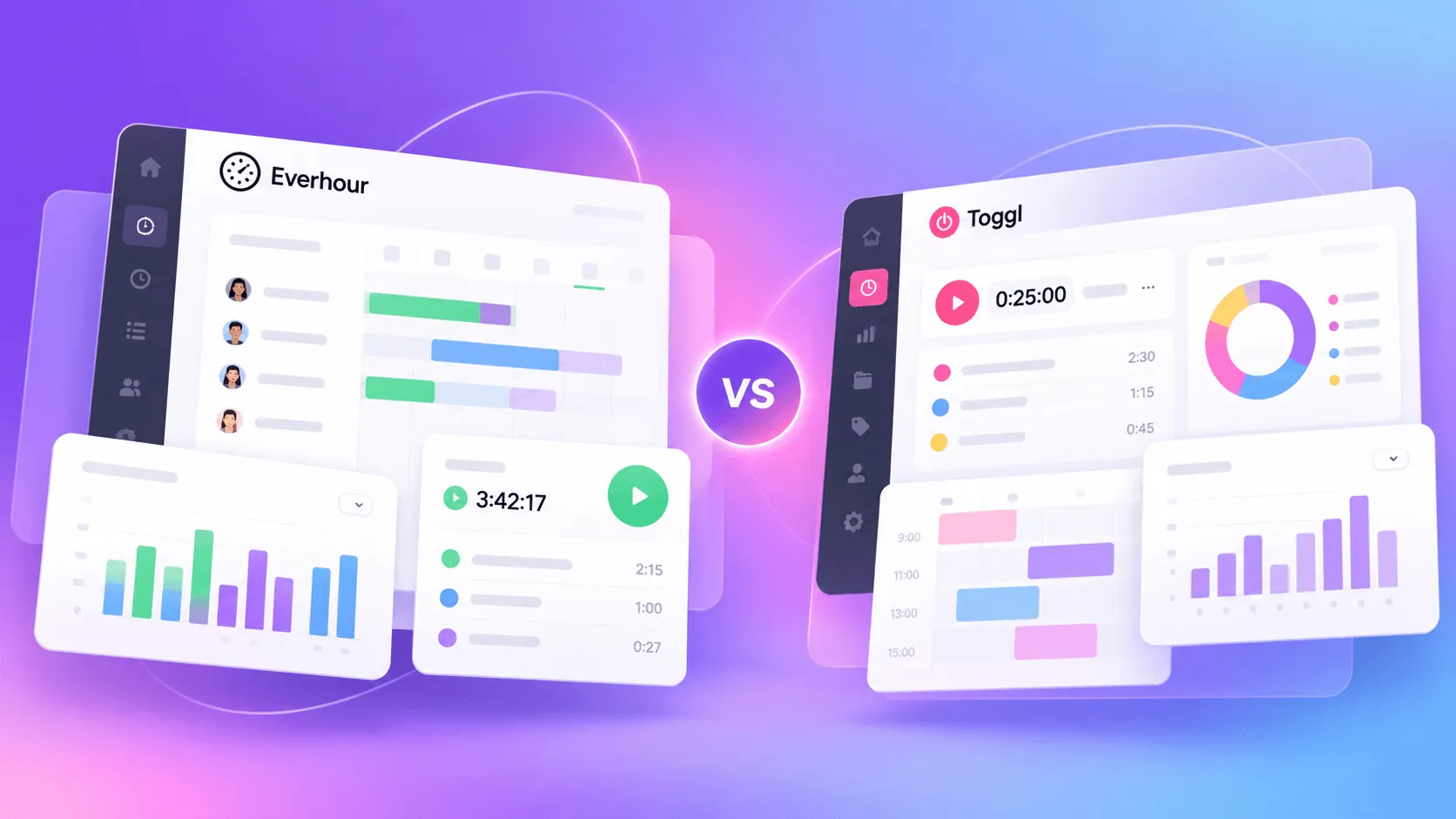
Everhour vs Toggl is a harder comparison in 2026 than it used to be.
Toggl has moved well beyond the old Toggl Track positioning and now wants to handle much more of the actual work planning process. Everhour still works best as the time and financial layer around tools such as Asana or ClickUp.
That changes the buying decision. Everhour is the stronger option if you already have a project stack and mainly need better control over tracked hours and client billing. Toggl is more convincing if you want planning and time tracking to live in the same product.
This guide looks at where each tool is actually stronger, so you can decide which setup fits how your team works.
TL;DR
| Everhour | Toggl | Winner | |
|---|---|---|---|
| Time tracking | Strong tracking inside existing project tools | More flexible tracking with automatic activity capture | Toggl |
| Project management | Basic native tools, stronger when paired with Asana or ClickUp | Strong planning, scheduling, and workload features | Toggl |
| Team management | Strong control over hours, permissions, and tracking limits | Better approval workflows and team permissions | Toggl |
| Reporting | More customizable reports for client and financial analysis | Cleaner visual reporting with strong profitability data | Everhour |
| Budgeting | Detailed budgets with alerts and hard tracking limits | Good budget visibility with stronger forecasting on Premium | Everhour |
| Invoicing | Full invoice creation with accounting integrations | Can create invoices from tracked work, but offers less billing depth | Everhour |
| Integrations | Strong project management and accounting integrations | Broad app support, although some Toggl Track integrations remain legacy | Everhour |
| Employee monitoring | Optional screenshot monitoring | No screenshots or manager access to private activity | Depends |
| Ease of use | Easy to adopt when your team already uses supported project tools | Better standalone experience for individual users | Toggl |
| Paid pricing | From $8.50 per user per month annually, with a five-seat minimum | Starter from $9 per user per month annually, Premium from $16 | Everhour |
| Best for | Agencies and service businesses with an existing project management stack | Teams that want project planning and time tracking in one product | Depends |
Get the better alternative to Everhour and Toggl for automatic time tracking. Try Timely for free today.
Everhour vs Toggl Track at a glance
Everhour vs Toggl used to look like a close comparison between two time tracking tools. Toggl's recent repositioning has changed that.
Toggl now presents itself as a broader work management product built around time intelligence. Time tracking is still the key feature, but the tool now covers project planning, team capacity, workload, and profitability as well. Toggl Track still exists for existing users, while new customers are pushed toward the new Toggl experience.
Everhour takes a more focused approach.
It connects time tracking with project budgets, billable hours, expenses, invoicing, and reporting, while fitting into project management tools such as Asana, ClickUp, and Jira.
That creates a much clearer split between the two. Toggl is moving toward becoming the place where teams plan and track work. Everhour makes more sense as the financial and time tracking layer that sits on top of the tools a team already uses.
Make sure to read our full coverage of Toggl Track alternatives too.
Time tracking features
Both tools cover the basics well, but they approach time tracking from different positions. Everhour keeps tracking closely connected to projects and client work, while Toggl gives you more ways to capture their time.
Timers and manual time entries
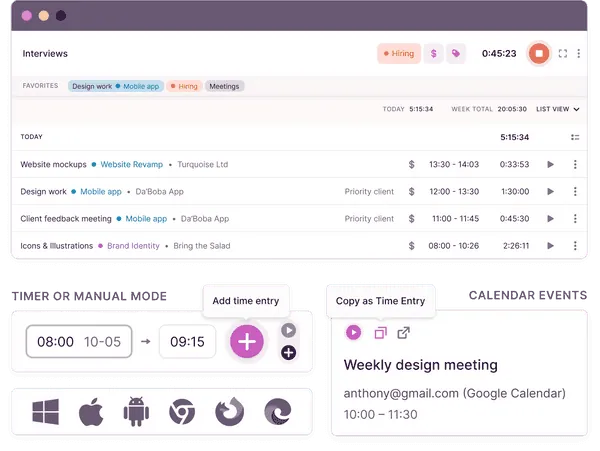
Everhour lets users track time with a timer or add hours manually after the work is finished. Day and week views make it easy to fill gaps, while clock-in and clock-out tracking can record work hours and breaks. You can also set estimates and compare them with the time recorded against a task.
Toggl gives you more options. Alongside the standard timer and manual entries, it supports automatic tracking, calendar-based entries, Pomodoro sessions, countdown timers, and Focus mode. The desktop app can privately record app and website activity, then let the user decide what should become a time entry.
If tracking flexibility is the priority, Toggl has the better setup.
Project-based time tracking
Everhour is particularly good at project-based time tracking when work already happens in another platform. The browser extension adds timers and time estimates directly inside Asana, ClickUp, Jira, Trello, and other supported tools. Changes to projects and tasks are synced back to Everhour automatically.
This is one of Everhour's biggest advantages. Someone can track time against multiple clients without constantly opening another app or recreating the same project structure elsewhere.
Toggl also supports tracking from tools such as Jira and Asana, but the new product puts much more emphasis on managing the underlying tasks inside Toggl itself. Tracked hours can sit alongside estimates and planned work, which fits its broader move into project management.
Timesheets and team's time
Both platforms turn tracked hours into timesheets, but Toggl now goes further with formal approvals. Team members can submit timesheets for review, while managers can approve them or request changes.
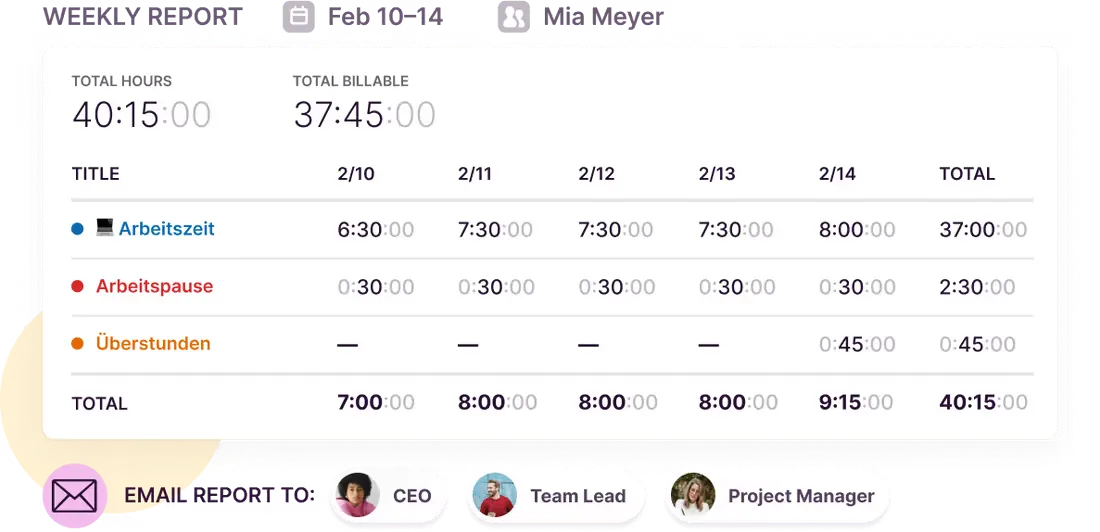
Everhour gives managers day, week, and monthly views of the team's time. Admins can also see currently running timers and review the hours recorded against individual tasks.
Neither product offers unlimited users for a single flat subscription. Both charge based on team size once you move beyond their free plans.
Automatic tracking and productivity insights
This is where Toggl has the clearest advantage.
Its desktop app can detect activity automatically, calendar events can become time entries, and idle detection helps remove time accidentally left running. That gives Toggl more ways to fill missing hours without relying entirely on someone remembering to start a timer.
Everhour has reminders, idle detection through its Chrome extension, and automatic clock-in or clock-out options, but it does not offer the same depth of passive activity tracking.
That gives Toggl stronger productivity insights and makes it the better choice if the best time tracking software for you is the one that requires the least active input. Everhour is more convincing when accurate time needs to stay closely tied to client projects, budgets, and the tools where the work already happens.
Project management
Project management is where the new Toggl has changed this comparison the most. Everhour can manage projects on its own, but its strongest use case is still alongside popular project management tools. Toggl now makes a much stronger case for replacing them.
Task management
Everhour lets you create projects, assign tasks, set priorities, add estimates, and track progress. Internal projects can use either List or Board views, with custom fields available when you need more structure.
It works well for basic project management, but I would not choose Everhour specifically to replace Asana or ClickUp. Its project features feel more useful as an extension of its time tracking and billing tools.
Toggl goes considerably further. You can manage tasks with custom statuses, subtasks, comments, attachments, priorities, and custom fields. Recurring projects and reusable templates are also available.
Project views and scheduling
Everhour gives you List and Board views for task management. Its separate Timeline feature adds scheduling, where managers can assign work across dates and compare planned hours with estimates.
Toggl offers Board, Task list, Calendar, and Timeline views for the same project data. Changes carry across each view, so a project manager can move from task status to scheduling without maintaining separate plans.
Toggl is much better here. It feels like an actual project planning product rather than time tracking software with a task board attached.
Workload and capacity planning
Both products can help managers understand the team's productivity and see who has room for more work.
Everhour's Timeline shows assignments by team member or project, alongside planned hours and time estimates. Its Team Hours dashboard also compares recorded hours with individual capacity.
Toggl puts capacity much closer to everyday project planning.
Their Timeline can show each person's available hours and flag overbooking while accounting for approved time off and non-working days. Workload and utilization reports provide another view of how work is distributed across the team.
Connecting projects with financial performance
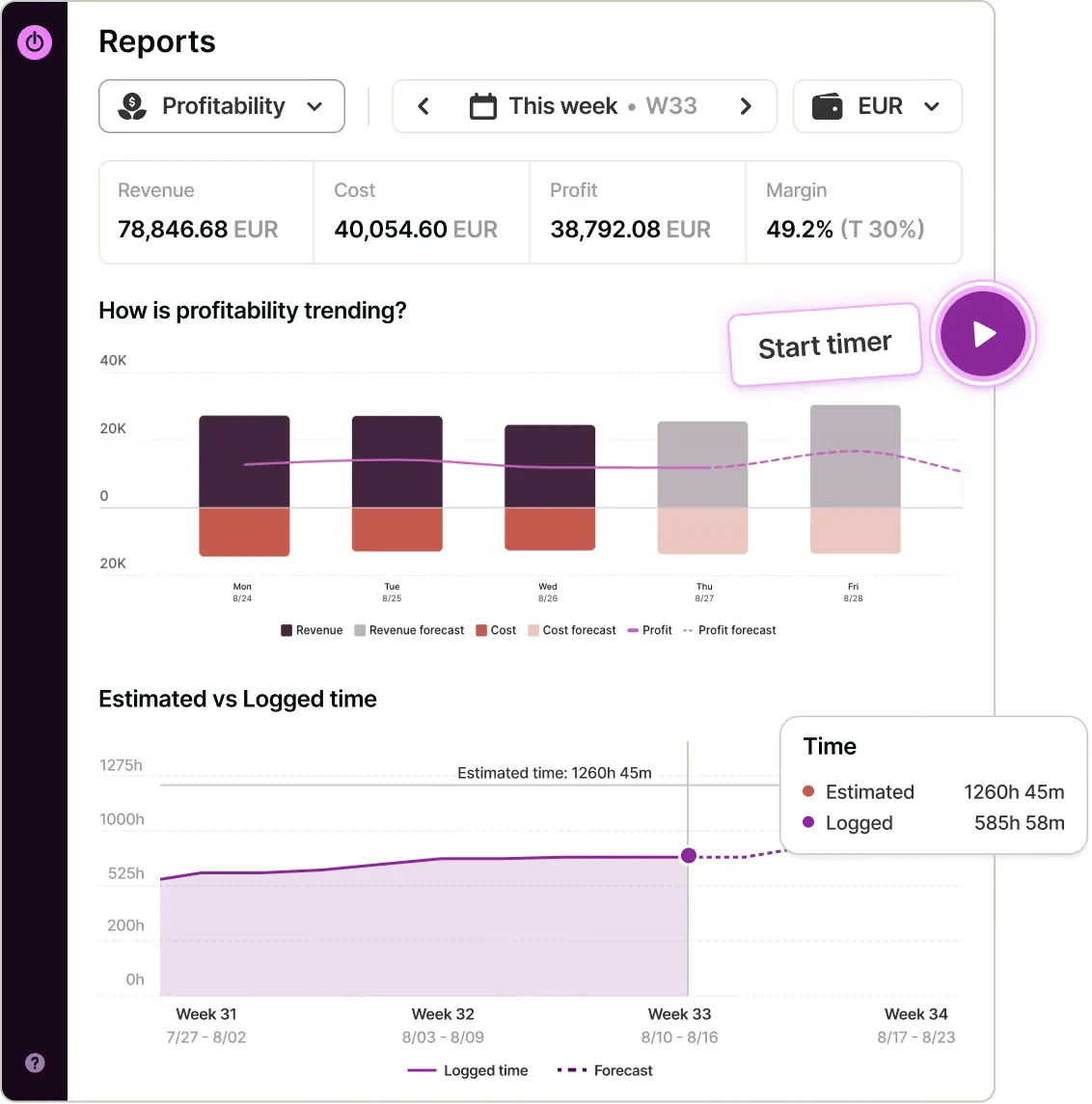
Everhour has always been good at connecting projects with budgets and labor costs. Project dashboards can show budget usage and compare billable amounts with labor costs.
Toggl now connects the project plan with tracked hours, utilization, and profitability as well. Managers can compare estimates with actual work and use the same data to assess productivity and profitability.
Toggl wins the project management comparison. Everhour still fits better when your team already works in Asana, ClickUp, Jira, or another established platform. Toggl is the better option if you want project planning and time tracking to live in the same system.
Team management
Both tools give managers control over tracked time, approvals, and employee access. Everhour feels more focused on operational control, while Toggl gives team leads more authority inside its broader planning workflow.
Roles and permissions
Everhour lets admins assign roles, restrict people to specific projects, control time editing, and correct entries on behalf of employees. Managers can also set individual billing and cost rates.
This works particularly well for businesses that manage multiple client accounts and need firm rules around who can see or change time data.
Toggl has organization, workspace, and team-level permissions. Team Leads can view and edit their team's time entries without receiving full administrative access across the workspace.
Toggl has the more flexible hierarchy here. It is easier to give managers control over their own teams without handing them access to everything.
Timesheet approvals
Both products support a proper approval workflow.
Everhour employees can submit timesheets to one or more admins. Managers can approve or reject them, leave notes, or approve only selected days. Approved entries are then locked from normal editing.
Toggl offers a more configurable system on Premium and Enterprise. You can assign approvers to individual employees, create multiple approval levels, schedule reminders, and review an audit log. Approved timesheets are locked as well.
If approvals are a major part of what you do daily, Toggl is a better choice.
Capacity and tracking limits
Everhour gives managers unusually direct control over how much time people can record. You can set daily, weekly, or monthly tracking limits for individual team members. Managers can also monitor weekly capacity and prevent employees from recording hours beyond agreed limits.
Toggl takes a planning-focused approach. Managers can define work hours, compare tracked time against expected hours, and combine that information with capacity planning and time off.
The best way to choose between them depends on what you are trying to control. Everhour is better when the concern is hours, budgets, and billing. Toggl is better when capacity and workload planning matter more.
Getting the team to use it
A time tracking system can have every management feature imaginable and still be the wrong choice if employees avoid it.
Both products let teams quickly start tracking time, but Everhour has an advantage when employees already spend their day in Asana, ClickUp, Jira, or another supported platform. Tracking can happen inside those tools rather than forcing another step into the workflow.
Toggl asks more from the team if you adopt its newer project management features, but it also gives managers one place to manage work and time. If your definition of the best time tracker includes team planning and approvals, the new Toggl has a stronger case than Toggl Track did.
Reporting and analytics
Both tools go well beyond basic timesheets. Everhour gives you more control over how reports are built, while Toggl makes common metrics easier to review without much setup.
Custom reports
Everhour is really good at customizable reporting. You can build reports with more than 30 columns, choose how data is grouped, apply filters, and save frequently used configurations. Reports can also be scheduled for automatic delivery.
This works well for agencies that need different views for internal management and client reporting. A report can show hours by client, member, task, project, billing status, cost, profit, or budget usage.
Toggl gives you Summary and Detailed reports, with filters for members, clients, projects, tasks, tags, billable status, and other fields. Searching through a large amount of tracked work is easy, although Everhour gives you more freedom over the final report structure.
Billable and non-billable time
Both tools make it easy to separate client work from internal activity.
Everhour can show billable and non-billable time by project, task, client, or team member. You can also add costs and billable amounts, which makes these reports useful for project-based tracking where hours eventually affect invoices or margins.
Toggl's Summary report shows total logged hours alongside billable time and non-billable time. You can then break the data down by project, task, client, or employee.
Profitability reporting
Everhour combines tracked hours with labor costs, billing rates, expenses, and project budgets. Project reports can show revenue and profit alongside the time that produced them.
Toggl has caught up considerably here. Its Profitability reports combine revenue and labor costs to calculate project profit and margin. You can also analyze results by client or project, although these reports require the Premium plan.
Sharing and exporting reports
Everhour reports can be exported to PDF, Excel, or CSV, and selected reports can be sent automatically by email. Client-facing reports can hide internal financial information while still showing how project hours were spent.
Toggl also supports PDF, CSV, and Excel exports. Reports can be saved and shared, and the Summary report offers charts that visualize time, billing, cost, and profit.
Everhour is stronger if reporting needs to be shaped around clients, budgets, and project finances. Toggl is easier when managers mainly need to open one platform and quickly see where time went and what that work was worth.
Budgeting and project costs
Everhour has the advantage here. Budget control has been part of the product for much longer, and it gives managers more ways to stop a project from quietly eating through its margin. Toggl now covers many of the same basics, but several of its financial features sit behind the Premium plan.
Project budgets
Everhour lets you set project budgets in either hours or money. Budgets can also reset on a recurring schedule, which is useful for retainers or ongoing client work. Expenses can be included in fee based budgets when you need a more accurate picture of total project spend.
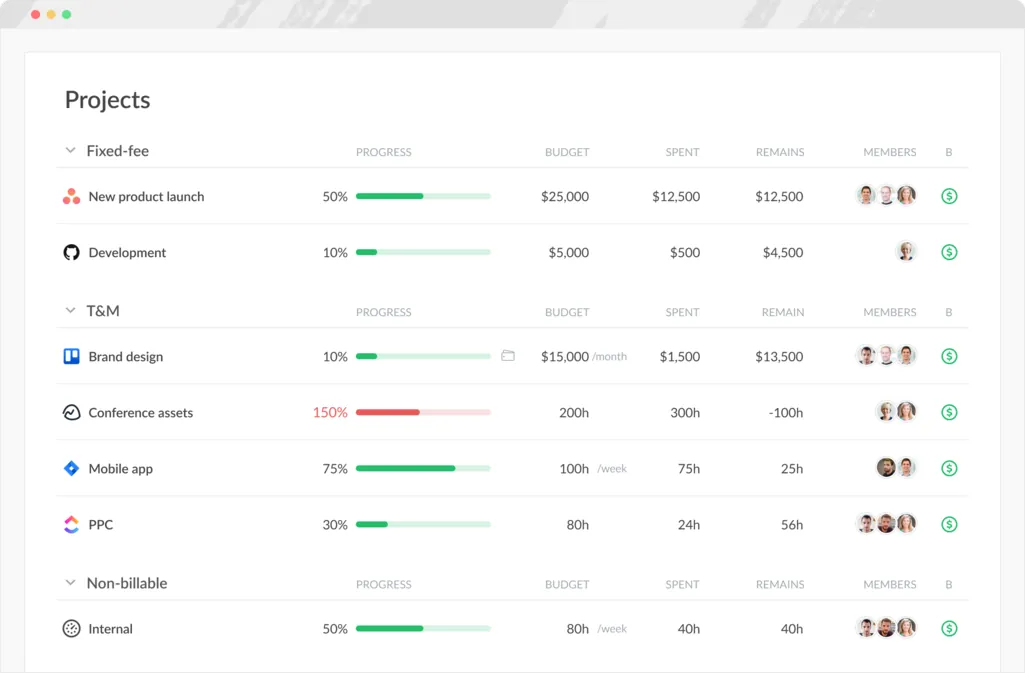
Toggl supports fixed-fee projects and lets managers monitor spending against the amount a client has agreed to pay. Its project dashboard can compare tracked work with the project budget and show how the project is progressing financially.
Budget alerts and limits
Everhour is much more aggressive about preventing overruns. You can create alerts at different budget thresholds and even stop employees from logging more time once the limit has been reached. Running timers can also be stopped automatically.
Toggl also warns managers when projects approach their budget or deadline, but Everhour gives you tighter control over what happens after that warning.
For agencies with strict client budgets, I would prefer Everhour's approach.
Labor costs and billable rates
Both platforms can assign labor costs to individual employees and use those costs to calculate project profitability.
Everhour combines labor costs with billable rates, expenses, tracked hours, and project budgets. Different billing rates can be set by team member or task, so project costs can reflect who actually performed the work.
Toggl supports labor costs at the workspace member and project member level. Billable rates can be set at several levels as well, including by workspace, member, project, or project member. Toggl also keeps historical labor cost data, so a salary change does not have to rewrite the cost of older work.
Profitability and forecasting
Toggl has improved significantly here. Its project dashboard can project future cost, revenue, and potential margin based on the current project setup. Premium users also get profitability reports that break performance down by project, client, task, member, or tag.
Everhour still gives managers more control before a budget problem happens. Toggl is increasingly good at showing what a project's finances look like, while Everhour does a better job of setting financial guardrails around the work itself.
Invoicing
Everhour has the stronger invoicing setup. Both products can turn tracked hours into invoices, but Everhour treats invoicing as a core part of the client billing process rather than an extra step after reporting.
Creating invoices from tracked time
Everhour can generate an invoice directly from billable time and expenses recorded for a client. Rates are applied automatically, while non billable entries are excluded. Once time has been invoiced, Everhour marks those entries accordingly so they do not appear on another invoice later.
Toggl also lets you create invoices from tracked time. You first filter a Summary or Detailed report to the work you want to bill, then create the invoice from that data. Summary reports create grouped invoice lines, while Detailed reports can include individual time entries.
Both approaches work, but Everhour feels more purpose-built for regular client billing.
Invoice customization
Everhour gives you considerably more control over the finished invoice. You can add company branding, payment terms, due dates, discounts, taxes, custom line items, and client details. Invoices can also include expenses alongside tracked hours.
The invoicing dashboard then shows which invoices are drafts, sent, due, or paid, giving agencies a useful overview of what still needs attention.
Toggl focuses more heavily on preparing tracked time for billing. You can control which time appears by filtering reports and use your existing billable rates to calculate the amount owed.
Accounting integrations
Everhour can copy invoices directly into QuickBooks Online, Xero, or FreshBooks. Client information can sync with the accounting platform, while invoice status can flow back into Everhour.
That is a meaningful advantage if invoicing is already part of a larger accounting process.
Toggl is better viewed as the system that prepares accurate billing data. Its reports can be exported to CSV or Excel and attached to invoices as evidence of completed work.
If client billing is an important part of the workflow, I would choose Everhour. Toggl can produce invoices from tracked work, but Everhour covers more of what happens between recording the hours and actually managing the invoice.
Integrations
Integrations are one of Everhour's biggest advantages. Its product was built around adding time tracking and financial controls to tools your team already uses. Toggl also connects with a broad range of apps, but the recent move from Toggl Track to the new Toggl creates an important caveat.
Everhour integrations
Everhour has native integrations that sync projects and tasks automatically, plus lighter browser integrations that add its timer inside other apps. Its native connections are particularly strong across project management and accounting software.
Some of the most useful Everhour integrations include:
- Asana
- ClickUp
- Jira
- Monday
- Notion
- Trello
- Basecamp
- Linear
- GitHub
- GitLab
- Slack
- QuickBooks Online
- Xero
- FreshBooks
- Deel
- Zapier
Everhour also adds time tracking through its browser extension to apps such as Airtable, Figma, Gmail, HubSpot, Intercom, Salesforce, Zendesk, and Google Docs. These connections are lighter because they do not sync the full project structure.
The deeper integrations are where Everhour stands out. Connect Asana, for example, and projects and tasks sync into Everhour automatically. Employees can then start timers inside Asana rather than constantly moving between the two apps.
Toggl integrations
The new Toggl supports many of the apps you would expect, including:
- Asana
- ClickUp
- Jira
- GitHub
- Google Calendar
- Outlook Calendar
- Slack
- Gmail
- Notion
- Trello
- Todoist
- HubSpot
- Zendesk
- Google Docs
- Zapier
Its browser extension can add time tracking controls directly inside these apps, while native connections are available for services such as Asana, Jira, Google Calendar, and Outlook.
The issue is that Toggl's current integration catalog still includes connections built for Toggl Track that are not supported by the new Toggl. QuickBooks Online is one example. Toggl explicitly labels it as a legacy Toggl Track integration.
That gives Everhour the edge today. Toggl covers the major project and calendar apps, but Everhour currently connects project management, time tracking, invoicing, and accounting more convincingly. The gap may close as Toggl continues moving integrations into its new product.
Employee monitoring
This is one of the clearest differences between Everhour and Toggl. Everhour offers optional employee monitoring through screenshots. Toggl has deliberately gone in the opposite direction and says surveillance features will not be part of its product.
Screenshot monitoring
Everhour can capture screenshots through its desktop app while an employee is tracking time. Admins choose which team members have screenshot monitoring enabled, so it does not have to apply to everyone.
The app takes one screenshot during each ten-minute interval, giving managers up to six screenshots per hour. Each capture is associated with the task and time entry that was active at the time.
Everhour also provides a few privacy controls. Screenshots can be blurred to protect sensitive information, employees can pause capture, and both employees and admins can delete screenshots. It does not record keystrokes.
This gives Everhour a clear advantage if proof of work is required for contractors, remote employees, or client projects. Whether that is actually desirable for a permanent team is another question.
Activity monitoring
Everhour stops short of the much more invasive monitoring found in dedicated employee surveillance software. It does not log keystrokes or continuously record everything someone does on their computer. Its monitoring is primarily there to verify the work associated with tracked hours.
Managers can also use timesheets, running timers, project activity, and reported work hours to see how time is being spent without enabling screenshots.
Toggl takes an anti-surveillance approach
Toggl does not take screenshots, record keystrokes, track browsing history, monitor app usage, or collect employee location data for managers. Its private Timeline can record activity to help an individual reconstruct their own day, but that information is not visible to other workspace members.
This is a deliberate product decision rather than a missing feature. Toggl has publicly positioned itself against employee surveillance and focuses on tracked time, projects, workloads, and results instead.
Everhour therefore wins if employee monitoring is a requirement. Toggl is the better choice if you want detailed time data without giving managers access to screenshots or private computer activity.
Ease of use
Both products are easy enough to pick up, but they reduce friction in different ways. Toggl puts more effort into making its own interface pleasant to use. Everhour often avoids the interface question altogether by bringing time tracking into the tools people already use.
Getting started
Everhour is easy to set up if your team already works in Asana, ClickUp, Jira, or another supported platform. Connect the integration, sync your projects, and employees can start tracking time without rebuilding the same project structure in Everhour.
That can make adoption much easier for established teams. There is less pressure to change how people already work.
Toggl asks for a little more setup if you plan to use its newer project management features. Projects, tasks, capacity, and workflows need to be configured inside Toggl before the product starts replacing other tools.
Everyday time tracking
Toggl is better for individual time tracking.
Its timer is quick to start, manual entries are easy to add, and calendar integrations help fill in missing time. Automatic activity tracking can also help people reconstruct their day when they forget to start a timer.
Everhour is less polished as a standalone tracking experience, but its embedded timers are extremely convenient. If someone spends most of the day inside Asana or ClickUp, starting a timer directly from a task can feel easier than opening a separate time tracking app.
Learning curve
Everhour has more financial settings to understand, including budgets, billing rates, labor costs, expenses, and invoicing. Most users will not need to touch these, but managers have more setup work.
Toggl is easier for individual employees, though the new product is more complex than Toggl Track used to be. Adding project planning, workload management, approvals, and profitability naturally creates more settings to learn.
Mobile and desktop experience
Toggl has the better app ecosystem for people who move between devices. Its desktop apps, mobile apps, browser extension, and web app all support regular time tracking.
Everhour also offers desktop and mobile apps, but its biggest usability advantage still comes from browser-based integrations with other work tools.
For pure ease of use, I would give Toggl the win. Everhour can still feel easier in practice when the goal is to add time tracking to an existing workflow rather than move the workflow somewhere new.
Pricing
Everhour has the simpler pricing model. There is one main paid plan, while Toggl spreads team features across Starter and Premium. That makes Everhour easier to budget for, although its five-seat minimum can make it expensive for very small teams.
| Everhour | Toggl | |
|---|---|---|
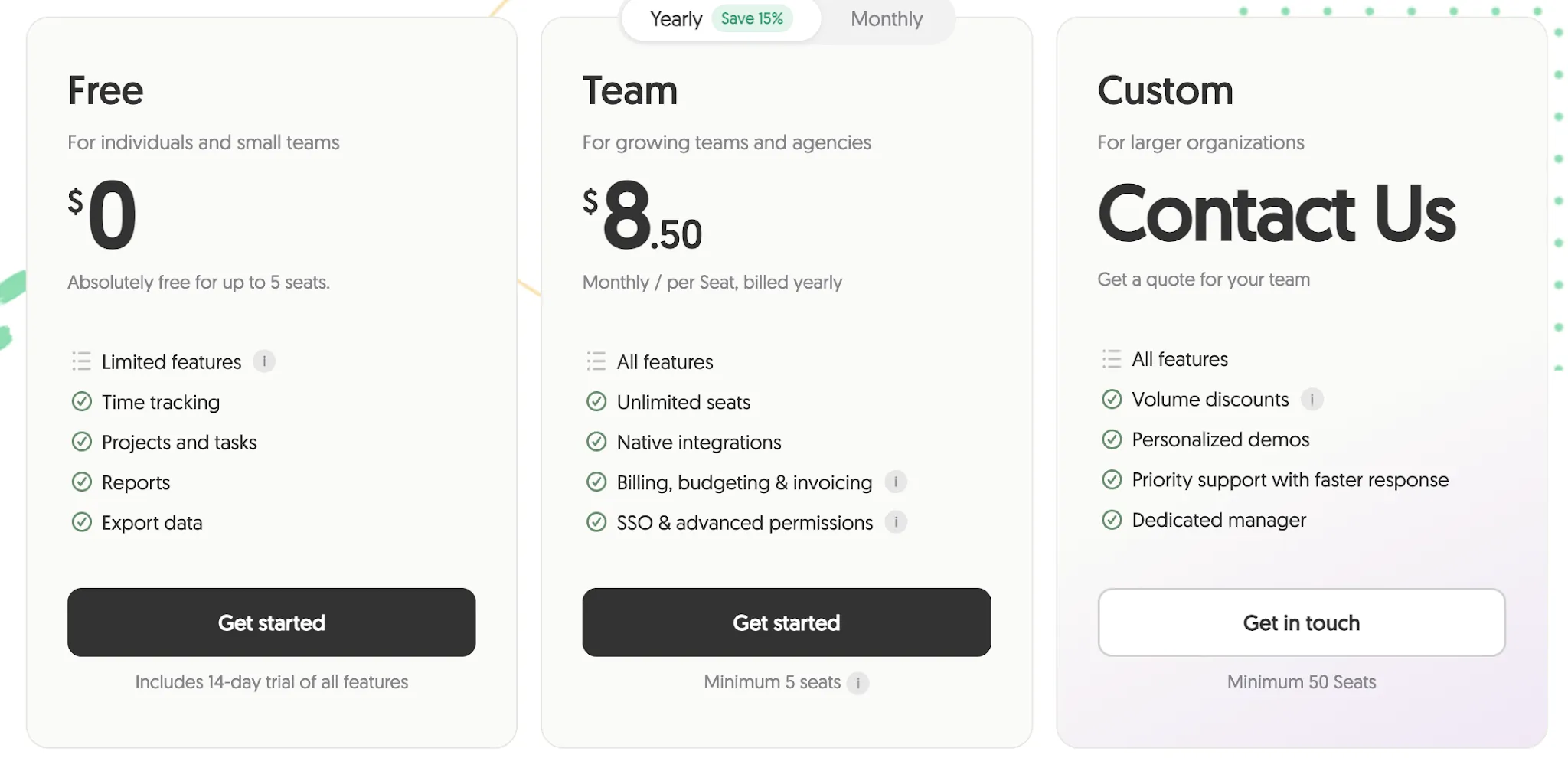
| Free plan | $0, up to 5 users | $0, up to 3 users |
| Starter paid plan | Team at $8.50 per user per month annually | Starter at $9 per user per month annually |
| Monthly price | $10 per user per month | $12 per user per month |
| Higher tier | No additional standard paid tier | Premium at $16 annually or $24 monthly |
| Enterprise pricing | Custom | Custom |
| Free trial | 14 days | 30 days |
| Minimum seats | 5 on Team | No stated minimum on Starter or Premium |
Everhour Team includes all of its main features for $8.50 per user per month with annual billing. That includes native integrations, budgeting, billing, invoicing, SSO, and advanced permissions. The catch is the five-seat minimum, so even a two-person team pays for five seats.
Toggl Starter costs $9 per user per month annually, which puts it very close to Everhour on price. It includes billable rates, team reports, timeline views, milestones, PTO, and basic capacity management.
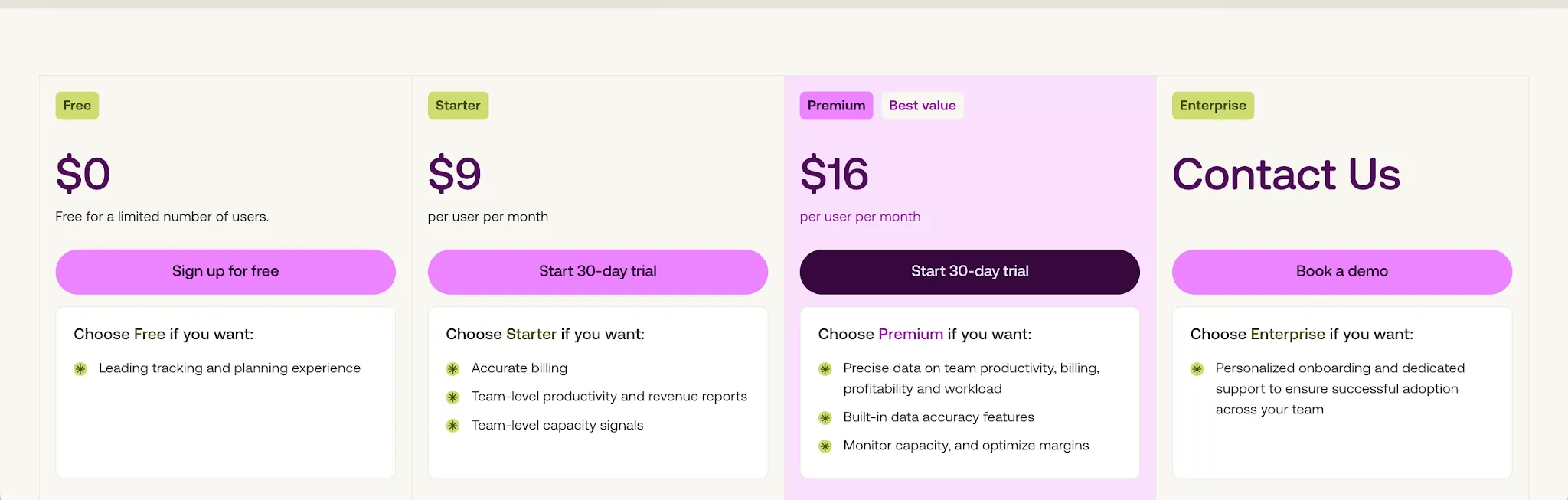
The bigger pricing question is whether you need Toggl Premium.
At $16 per user per month annually, it adds profitability reports, labor costs, fixed-fee projects, timesheet approvals, project dashboards, SSO, plus Jira and Asana integrations. Several features that Everhour includes in its single Team plan therefore require Toggl Premium.
Everhour offers better value once billing, budgeting, integrations, and financial reporting become important. Toggl Starter is competitively priced, but the jump to Premium is substantial if you need the features that make the new Toggl more than a time tracker.
Make sure to read our coverage of Toggl Track pricing too.
Toggl Track vs Everhour: Which one should you choose?
The choice comes down to whether you want time tracking to fit around your existing project stack or whether you want one product to handle more of the work itself.
Get Everhour if:
- Your team already works in Asana, ClickUp, Jira, or another project management tool.
- Client budgets and billable hours are a major part of your workflow.
- You need stronger invoicing features and accounting integrations.
- Screenshot monitoring is required for some employees or contractors.
- You want more control over project budgets, labor costs, and spending limits.
Everhour is the better fit for agencies and service businesses that already have a project management system in place and need tighter control over time, billing, and project finances.
Get Toggl if:
- You want time tracking and project planning in one product.
- Employees need more flexible ways to record their hours.
- Capacity planning and workload management are important.
- You want stronger timesheet approval workflows.
- You prefer a privacy-focused approach without screenshot monitoring.
- You want a cleaner experience for individual users.
Toggl is the better choice if you want to reduce the number of tools your team uses and bring planning, time tracking, capacity, and profitability into one system.
Everhour still has the advantage for client billing and financial control. Toggl has become a broader product after its recent repositioning, and I would choose it when project planning matters just as much as tracking hours.
Get the better alternative to Everhour and Toggl for automatic time tracking
Everhour and Toggl still depend on people remembering to start timers and clean up missed entries. If that is the part of time tracking you want to remove, Timely is the stronger option.
Timely automatically records activity across the tools you use and places it in a private timeline. Users can review that activity later and turn it into accurate time entries without trying to reconstruct the day from memory.
Managers still get visibility into project budgets and team reporting, while employees keep control over their private activity. Timely does not use screenshots or keystroke monitoring.
If forgotten timers are the main reason you are comparing Everhour and Toggl, Timely solves that problem more directly.
Try Timely for free and start tracking your time automatically today.