Toggl Track is one of the most popular time tracking tools in the world, and for a good reason. It's been around for decades, the UX is easy to work with, and the free plan is pretty generous. If you're a freelancer who only needs the basic time tracking features, it makes sense.
But if you need the key features related to timesheet approvals, reporting, invoicing and more, you're looking at paid plans, and here, Toggl Track may not be as attractive. In fact, there are quite a few options in the market with better value for money.
Today, we explore how much Toggl Track costs and what you get for your money.
TL;DR: Toggl Track pricing overview
| Free trial available | Best for | Most important features | Pricing annual | Pricing monthly | |
|---|---|---|---|---|---|
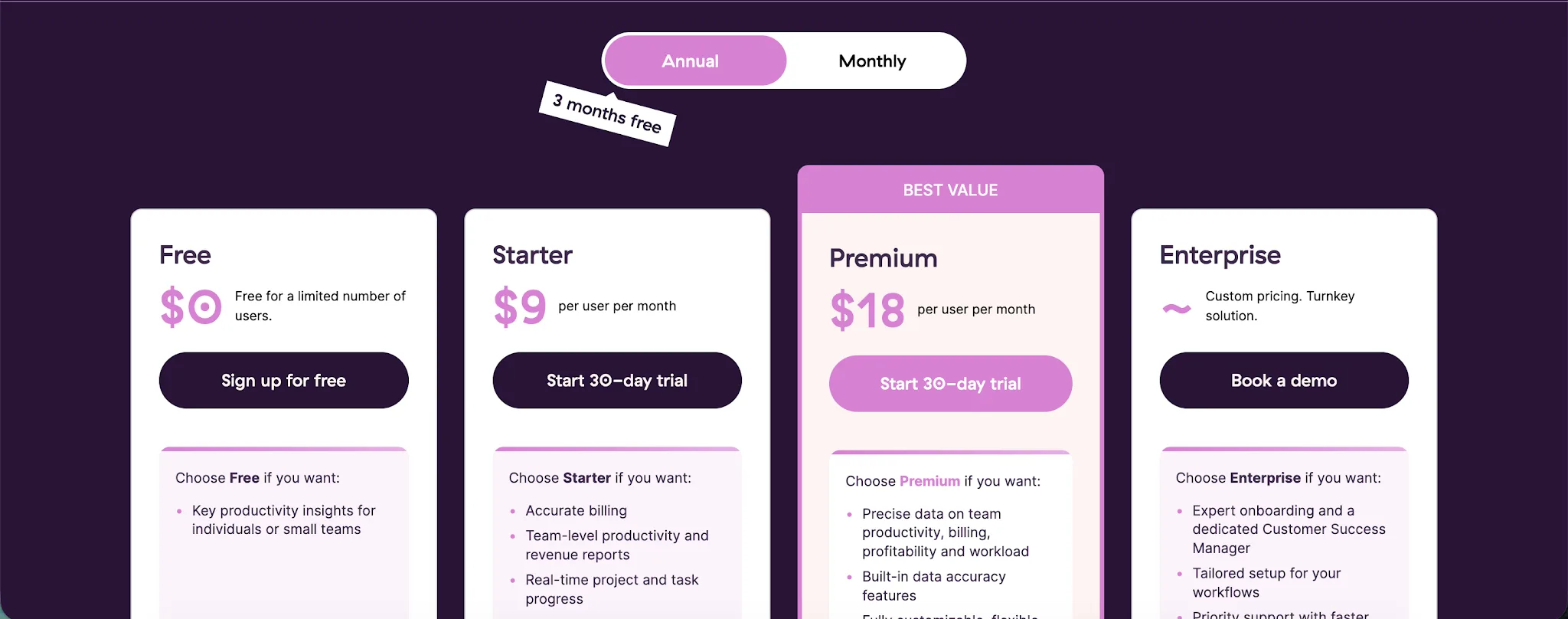
| Free | No | Freelancers, solo users, and very small teams that need basic time tracking | Time tracking on web, desktop, and mobile, browser extension integrations, Google and Outlook Calendar integrations, productivity reports | $0 user/month | $0 user/month |
| Starter | Yes | Small agencies, consultants, and service teams that need accurate billing and basic team reporting | Everything in Free, billable rates, project time estimates and alerts, revenue and productivity analysis, team collaboration features, project tasks | $9 user/month | $12 user/month |
| Premium | Yes | Growing agencies and project-based teams that need approvals, profitability data, and deeper reporting | Everything in Starter, profitability analysis, fixed fee projects, scheduled reports, timesheet approvals, data accuracy features, fully customizable reports, Jira and Salesforce integrations, SSO | $18 user/month | $20 user/month |
| Enterprise | No, demo available | Large companies that need custom setup, multiple workspaces, and hands-on support | Everything in Premium, personalised onboarding, dedicated customer success manager, custom setup, custom integrations, multiple workspaces under one Organization, volume discounts | Custom user/month | Custom user/month |
Get the better Toggl Track alternative for automatic time tracking. Try Timely for free today.
Toggl Track has a free plan and a free trial
Many time tracking tools have a free plan or a free trial, but very few have both. Toggl Track has an entirely free plan that you can use to track time for free, forever. The free trial is available for 30 days for the Starter and Premium plans. The Enterprise plan has custom pricing and no free trial.
You can get each plan on a monthly or annual basis, and buying annually will get you three months of Toggl Track for free.
The free plan is best for freelancers and very small teams that need basic time tracking
Toggl Track’s Free plan is a good starting point if you only need to track where your time goes. It gives individuals and small teams the core time tracking tools without forcing them into a paid plan right away.
It works best for freelancers, solo consultants, students, and small teams that want a simple way to track hours across projects. It is also a decent fit if you want to test Toggl Track before deciding whether the paid plans are worth it.
Key features:
- Time tracking on web, desktop, and mobile: Track time from your browser, desktop app, or phone, depending on how you prefer to work.
- Browser extension integrations: Toggl Track connects with more than 100 tools through its browser extension, which helps if your work happens inside apps like project management tools, docs, or calendars.
- Google and Outlook Calendar integrations: You can connect your calendar and turn meetings or scheduled work blocks into time entries.
- Productivity reports: The Free plan includes basic reporting, so you can see how much time you spend on different clients, projects, or types of work.
- Free forever pricing: The plan costs $0 and can be used long term, as long as you stay within the free user limit.
Toggl Track’s Free plan is good if your needs are simple. For personal productivity, freelance work, and light project tracking, it gives you enough to understand where your time is going.
Where it starts to feel limited is billing, team management, approvals, project estimates, and deeper reporting. Once you need to manage paid client work more seriously, compare team performance, or track profitability, the Free plan becomes more of a trial ground than a long-term solution.
The free plan makes Toggl Track a viable alternative to Clockify, which also has a generous free offer. Read our complete Clockify vs Toggl Hire comparison here.
The Starter plan is best for small teams that bill clients by the hour
Toggl Track’s Starter plan costs $9 per user per month and is built for teams that need more than basic time tracking.
It is best for small agencies, consultants, creative teams, and service businesses that need to track time across client work, set billable rates, and keep projects from quietly going over budget. It also works well if you have multiple team members logging hours and need a cleaner way to see who worked on what.
Key features:
- Time tracking across devices: Teams can track time from the web app, mobile apps, browser extension, and mobile and desktop apps, so work can be logged from almost anywhere.
- Billable rates: Set billable rates so tracked hours can be tied to client billing, project value, and basic revenue reporting.
- Project time estimates and alerts: Create time estimates for projects or tasks, then get alerts when tracked hours get close to the limit.
- Revenue, productivity analysis, team collaboration options: See how time connects to billable work, non billable work, and team output.
- Team collaboration features: Team members can work from the same workspace, share time entries, and keep project tracking more consistent.
- Project tasks: Break larger projects into smaller tasks, assign work more clearly, and track progress with more detail than the Free plan allows.
Toggl Track’s Starter plan is a good option if you manage client work and need basic billing visibility. The Free plan is enough for personal tracking, but Starter is where Toggl Track starts to make sense for actual team use.
The catch is that it still leaves out some features many growing teams eventually need, including timesheet approvals, fixed-fee projects, scheduled reports, and deeper profitability reporting. If your team mainly needs to track time, manage billable hours, and keep projects under control, Starter is a solid step up. If you need tighter control over reporting, approvals, and margins, you will probably outgrow it.
The Premium plan is best for agencies and teams that need deeper reporting
Toggl Track’s Premium plan costs $18 per user per month and is built for teams that need more control over reporting, approvals, profitability, and project tracking.
It is best for agencies, consultancies, professional services teams, and growing businesses that need to manage projects across clients, budgets, and internal teams. If the Starter plan helps you track time and bill clients, Premium goes further by showing how profitable that work actually is.
Key features:
- Custom reports: Build custom reports for different stakeholders, with more ways to filter, group, and present time tracking data.
- Profitability analysis: Connect tracked time with labor costs, billable rates, and project budgets to see which clients and projects are actually profitable.
- Fixed fee projects: Track work against flat rate or retainer budgets, which is useful when you need to manage projects that are not billed purely by the hour.
- Scheduled reports: Send reports on a set schedule, so managers and clients can get regular updates without pulling the same data each time.
- Timesheet approvals: Review and approve submitted time entries before they affect billing, payroll, or project reporting.
- Data accuracy features: Use required fields, locked time entries, and reminders to keep time tracker data cleaner across the team.
- Task management: Use tasks inside projects to organize work, assign clearer responsibility, and track progress at a more detailed level.
- Jira and Salesforce integrations: Connect Toggl Track with tools used by product, sales, and service teams, so Toggl Track works better inside a larger tool stack.
The Premium plan is the first plan that feels built for serious team reporting, not just time tracking. Starter is enough if you only need to track time, bill clients, and monitor basic project progress.
Premium makes more sense when project margins, approvals, custom reports, and cleaner time data matter every week. It is probably too much for freelancers and tiny teams, but it is a practical upgrade for teams that need stronger reporting and better control over how time turns into project and client data.
The Enterprise plan is best for large teams that need custom setup and support
Toggl Track’s Enterprise plan uses custom pricing and is built for larger teams that need advanced reporting, stronger admin control, and hands-on support.
It is best for companies managing multiple projects, departments, clients, and workspaces in one time tracking system. If Premium gives teams better reporting and approvals, Enterprise adds the support and setup help needed to roll Toggl Track out across a larger organization.
Key features:
- Custom pricing: Toggl does not list a fixed Enterprise price, so larger teams need to contact sales and get a quote based on their setup, user count, and needs.
- Priority support: Enterprise customers get faster response times and higher support priority, which is useful when time tracking affects billing, payroll, project reporting, or client work.
- Dedicated customer success manager: Enterprise includes a dedicated customer success manager who helps with onboarding, setup, training, and ongoing account guidance.
- Advanced reporting: Teams get Premium reporting features, including custom reporting, profitability data, scheduled reports, and deeper visibility into team time tracking.
- Multiple workspaces: Larger companies can manage multiple workspaces under one Organization, which helps when different departments, teams, or locations need separate setups.
- Unlimited projects and clients: Enterprise includes support for unlimited projects and clients, so teams can track work across many accounts without running into project limits.
- Automated time tracking: Teams can use automated time tracking features across desktop activity, calendar events, browser activity, reminders, and app based tracking.
- Mobile app access: Team members can track time from the mobile app, desktop app, browser extension, or web app, so time entries are easier to capture wherever work happens.
Toggl Track’s Enterprise plan is not the plan to choose because you need basic time tracking. It is the plan to choose when Toggl Track has already become a core part of how your team tracks work, reports on projects, and manages client or department-level data.
For small teams, Enterprise is almost certainly too much. For larger companies with many team members, multiple projects, approval needs, custom reporting requirements, and a need for better support, it is the plan that makes the most sense.
Why Timely is the better value for money
Toggl Track is a good time tracker, especially if your team is happy to start timers, stop timers, clean up entries, and build reporting habits around tracked hours. But that is also where the value question gets harder. The more your team forgets to track time, logs it late, or mislabels work across projects, the less useful your data becomes.
Timely is the better value for money because it solves that problem closer to the source. Instead of relying only on people to remember every timer, Timely captures work activity in the background and helps turn it into accurate timesheets. That gives teams cleaner data for billing, reporting, capacity planning, and project profitability.
This makes a big difference for agencies, consultancies, and service teams that work across multiple clients and projects. You are not just paying for a timer. You are paying for a system that helps people record time more accurately, understand where work is going, and make better decisions with less cleanup.
In the end, Toggl Track is a solid choice for teams that want simple tracking and familiar reporting. Timely is the stronger value if accuracy, adoption, and project visibility matter more than getting the lowest possible entry price.
If your team only needs basic timers, Toggl Track may be enough. But if missed hours, late timesheets, messy reports, and poor project visibility are already costing you money, Timely gives you more of what a paid time tracking tool should actually deliver.