TMetric offers a free plan and paid subscriptions starting at $5.83 per user per month, making it one of the more affordable time tracking tools on the market. But while the starting prices look attractive, some useful features are reserved for more expensive plans, and even the highest tiers still rely on employees to record their working hours.
So, how much should you actually expect to pay for TMetric, and which plan offers the best value for your money?
In this guide, we'll break down all four TMetric pricing plans, explain what you get at each tier, and cover the limitations you should know about before subscribing. We'll also look at an alternative if you'd rather have your working hours tracked automatically.
TL;DR
| Pricing starts at | Best for | |
|---|---|---|
| Free | $0, up to 2 users | Freelancers and individuals who need basic time tracking without billing features |
| Professional | $5.83 per user/month, billed annually | Freelancers and small teams that need invoicing, billable rates, project budgets, and task management |
| Business | $7.50 per user/month, billed annually | Growing teams that need attendance tracking, timesheet approvals, employee monitoring, and advanced integrations |
| Enterprise | Custom pricing, volume discounts available | Larger organizations that need custom integrations, deployment options, and priority support |
Professional costs $7 per user/month with monthly billing, while Business costs $9. Enterprise pricing is available upon request.
Get the better TMetric alternative for automatic time tracking. Try Timely for free today.
TMetric has four pricing plans
TMetric offers four pricing plans: Free, Professional, Business, and Enterprise, covering everyone from individual freelancers to larger organizations that need advanced time tracking and employee management features.
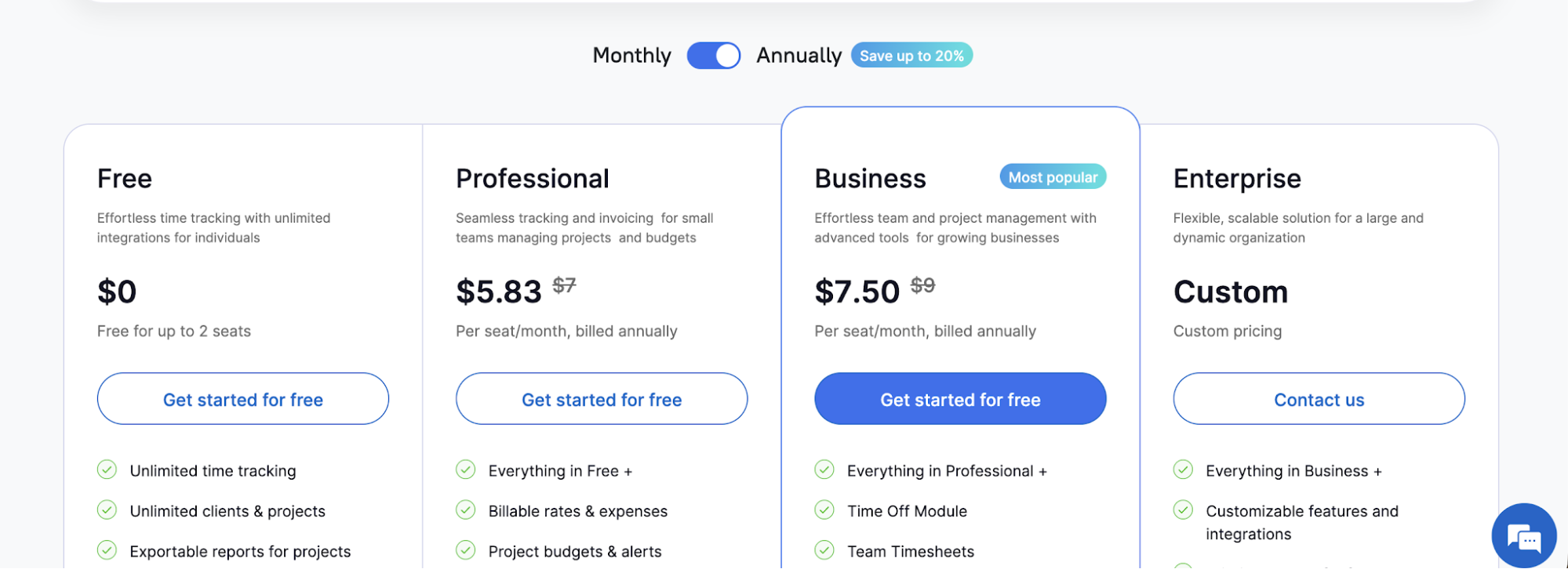
The Free plan supports up to two users at no cost. Professional starts at $7 per user per month, while Business costs $9 per user per month. If you choose annual billing, those prices drop to $5.83 and $7.50 per user per month, respectively. TMetric advertises discounts of up to 20% for annual subscriptions, while Enterprise pricing is available upon request.
All new users can start with a 14-day free trial that includes access to paid features, with no credit card required. Once the trial ends, you can subscribe to a paid plan or continue using TMetric for free.
But how useful is TMetric without a paid subscription? Let's look at what the Free plan includes and which features you'll have to pay to access.
The Free plan is free for up to two seats
TMetric's Free plan costs $0 and supports up to two users, making it a reasonable starting point for freelancers, independent contractors, and very small teams. Unlike some free time tracking software, it doesn't limit the number of projects you can create or the hours you can record.
Here's what you get with the Free plan:
- Unlimited time tracking: Track time using a timer or add and edit time entries manually, with no limits on recorded hours.
- Unlimited projects and clients: Organize your work across as many clients and projects as you need.
- Basic reporting: Generate detailed time reports, review hours spent on projects, and export reports in PDF or CSV format.
- Mobile app: Track working hours from anywhere using TMetric's Android or iOS app.
- Desktop app: Record time on Windows, macOS, or Linux, including when you're offline.
- Browser integrations: Start and stop timers directly inside more than 50 supported web apps.
- API access: Connect TMetric with other systems and access tracking data programmatically.
The biggest limitation is that the Free plan doesn't include billable rates, invoicing, or project budgets. This makes it difficult for freelancers and agencies that need to calculate how much to charge clients or monitor project costs.
You also miss out on task management, dedicated timesheets, and more advanced employee management features. And with just two seats available, even a small team will need to upgrade once it starts growing.
Overall, TMetric's Free plan handles basic time tracking well, but you'll need a paid subscription to manage the financial side of your projects.
The Professional plan starts at $5.83 per user per month
TMetric's Professional plan costs $5.83 per user per month with annual billing, or $7 per user per month when paying monthly. It's designed for freelancers, agencies, and small businesses that need a time tracking solution with billing and project management features.
Unlike the Free plan, Professional lets you manage the financial side of your work, from tracking billable hours to creating client invoices. You can also use it alongside your existing project management software.
The Professional plan includes everything in Free, plus:
- Billable rates and expenses: Set hourly rates for projects and individual team members, track expenses, and calculate how much clients owe.
- Project budgets: Set time or monetary budgets and receive alerts when projects approach their limits.
- Client invoicing: Generate invoices from tracked hours and expenses, then export or send them to clients.
- Task management: Break down projects into individual tasks, assign work, and set deadlines and estimates.
- Personal timesheets: Review recorded working hours and manage your attendance records.
- Calendar integrations: Connect Google Calendar or Outlook to view calendar events alongside your time tracking data.
- Time rounding: Automatically round recorded hours according to predefined rules for more consistent client billing.
- Data imports: Import existing clients, projects, and team members instead of having to create projects and set everything up individually.
The biggest limitation is that Professional still lacks several employee management features. You won't get team timesheet approvals, paid time off tracking, or screenshots and app usage monitoring. These are reserved for the Business plan.
Advanced integrations with tools like Jira, ClickUp, and Redmine are also unavailable at this tier. So while Professional is a reasonably priced time tracking tool for freelancers and small teams, businesses that need closer oversight of employee activity or more advanced integrations will have to pay extra.
The Business plan starts at $7.50 per user per month
TMetric's Business plan costs $7.50 per user per month with annual billing, or $9 per user per month when billed monthly. It's designed for growing businesses that need more control over employee activity, attendance, and team performance.
While Professional already lets you track billable hours and monitor project budgets, Business adds more comprehensive features for managing employees and reviewing how working hours are spent.
The Business plan includes everything in Professional, plus:
- Team timesheets: Review, approve, and lock employee timesheets in just a few clicks, with additional controls over who can edit recorded hours.
- Attendance tracking: Manage work schedules, employee vacations, sick leave, and other absences through the Time Off module.
- Activity tracking: Monitor employee activity levels and see which websites and applications team members use during working hours.
- Screenshot capturing: Take screenshots while employees track time to review their work activity, with screenshots stored for up to six months.
- Team dashboard: Get a centralized overview of employee activity, availability, and recorded working hours.
- Advanced integrations: Synchronize time data with Jira, Redmine, ClickUp, and QuickBooks, going beyond the basic integrations available through TMetric's browser extensions.
- Real-time notifications: Receive updates about relevant team activities without having to check reports constantly.
The biggest drawback is that many of these additional features revolve around employee monitoring. If your team doesn't need screenshots, website usage reports, or detailed activity tracking, there's considerably less reason to pay for Business over Professional.
TMetric also remains primarily a timer-based tracking tool. Employees still need to start timers or enter their hours, so upgrading to Business doesn't eliminate the effort involved in recording work.
For teams that prioritize accurate timesheets without monitoring individual employee activity, the additional expense may be difficult to justify.
The Enterprise plan has custom pricing
TMetric's Enterprise plan is designed for larger organizations that need customized integrations, additional support, and more flexibility in how the software is deployed. Unlike Professional and Business, Enterprise doesn't have a publicly listed price. You'll need to contact TMetric for a quote based on your team size and business specifics.
TMetric mentions volume discounts for large teams, but it doesn't say how big they are or how many users you need to qualify.
The Enterprise plan includes everything in Business, plus:
- Customizable features and integrations: Adapt the TMetric app to your organization's requirements and connect it with other productivity software.
- Priority support: Get faster assistance when you encounter technical issues or need help with your TMetric account.
- Customized deployment: Arrange a secure deployment configuration suited to your organization's technical and security requirements.
- Volume discounts: Negotiate pricing for larger teams instead of paying the standard rate for every additional seat.
The main drawback is that Enterprise doesn't introduce a separate set of time tracking capabilities. Business users can already monitor time spent on projects, review employee activity, and generate detailed reports. If you simply need a user-friendly time tracker, there's little reason to upgrade unless you require custom integrations or deployment arrangements.
The lack of transparent pricing also makes it difficult to compare TMetric against other tools. You'll need to contact sales to establish what your subscription includes, how discounts apply, and whether the additional services justify the expense.
Why TMetric might not be the right choice for you
TMetric is relatively affordable compared to many other time tracking tools, and the Free plan is generous enough for basic usage. However, low subscription prices don't automatically make it the right solution for any business.
Here are some of the biggest drawbacks to consider before subscribing:
- Time tracking still requires employee involvement. TMetric takes a timer-based approach, meaning employees generally need to start and stop timers or enter their working hours manually. If someone forgets to track their work, they have to reconstruct those hours later. This can lead to incomplete timesheets and inaccurate project reports.
- Useful features are locked behind paid plans. The Free plan doesn't include billable rates, invoicing, or project budgets. Even basic financial management requires Professional, while team timesheets, time off tracking, and advanced integrations require Business.
- You pay for administrators, too. TMetric charges workspace owners for a seat even if they only supervise employees rather than track their own time. If you want one tool for a large team, base fees can add up when managers and administrators also require paid access.
- Employee monitoring raises privacy considerations. Business includes screenshot capturing, website monitoring, and activity tracking. Although these features are optional, organizations that need to protect sensitive data must carefully configure monitoring permissions and determine what employee information should be collected.
- Multiple workspaces can complicate billing. TMetric allows separate subscriptions for different workspaces. This can make managing licenses and payments less convenient for agencies or organizations operating several independent teams.
There's also the question of what you're getting for your money. At $7.50 per user per month with annual billing, Business costs $900 per year for a team of ten. That's not necessarily expensive, but you're still relying on employees to remember to record their working hours.
If accurate time tracking is your main priority, rather than employee monitoring or administrative controls, it may make more sense to invest in software that captures work activity automatically.
Get the better TMetric alternative for automatic time tracking
TMetric offers affordable plans and plenty of features for managing projects, tracking billable hours, and monitoring employees. But there's one major limitation: you still have to remember to track your time.
With Timely, we take a different approach.
Our software automatically captures the time you spend across apps, websites, documents, and meetings, helping you create accurate timesheets without constantly starting and stopping timers.
Here's why Timely may be a better investment:
- Automatic tracking on every plan: Timely automatically records your work activity, including on our $9 per user per month Starter plan. You can review your activity and turn it into timesheet entries without reconstructing your day from memory.
- More accurate billable hours: Forgotten timers can mean missed billable work. Timely helps you account for those hours, giving you a clearer picture of project costs and profitability.
- Privacy without employee monitoring: Unlike TMetric's Business plan, Timely doesn't use screenshots or keystroke monitoring. Employees control what they share, while managers still get the project and team reports they need.
- Pricing based on your needs: Starter includes automatic tracking for up to five users and 20 projects. Premium adds unlimited projects, team management, budgets, and additional integrations, while Unlimited supports larger organizations with more advanced planning and reporting requirements.
TMetric is cheaper, and its Free plan is a reasonable option if you don't mind tracking your hours yourself. However, Timely offers something that TMetric's paid plans don't: automatic time capture that reduces the effort involved in keeping accurate timesheets.
Ready to stop worrying about forgotten timers? Try Timely free for 14 days and see how automatic time tracking works for you.