Harvest pricing changed dramatically in 2026, leaving some customers facing subscription increases of more than 1,500%. Following its acquisition by Bending Spoons in 2025, Harvest introduced a new billing structure that charges businesses for more than just employee seats.
The problem is that Harvest still advertises plans starting at $9 per user per month, while additional fees for projects, clients, tasks, and invoices can push the actual cost much higher. Some existing customers have reported renewal quotes thousands of dollars above their previous subscriptions.
In this guide, we'll break down the current Harvest pricing plans, explain the additional charges that aren't immediately obvious on the pricing page, and look at real customer experiences. We'll also cover a more predictable alternative for businesses that want automatic time tracking.
TL;DR: Harvest pricing in 2026
- Harvest introduced major pricing changes in 2026, following its acquisition by Bending Spoons in 2025. Some existing customers reported price increases exceeding 1,500%.
- The biggest change is usage-based billing. Harvest now charges for active projects, clients, tasks, and invoicing activity when businesses exceed their included allowances, in addition to their regular subscription fees.
- Harvest offers two billing options: Flex charges according to usage, while Unlimited adds a fixed usage fee to avoid variable charges. Neither option makes the total cost easy to calculate from the public pricing page.
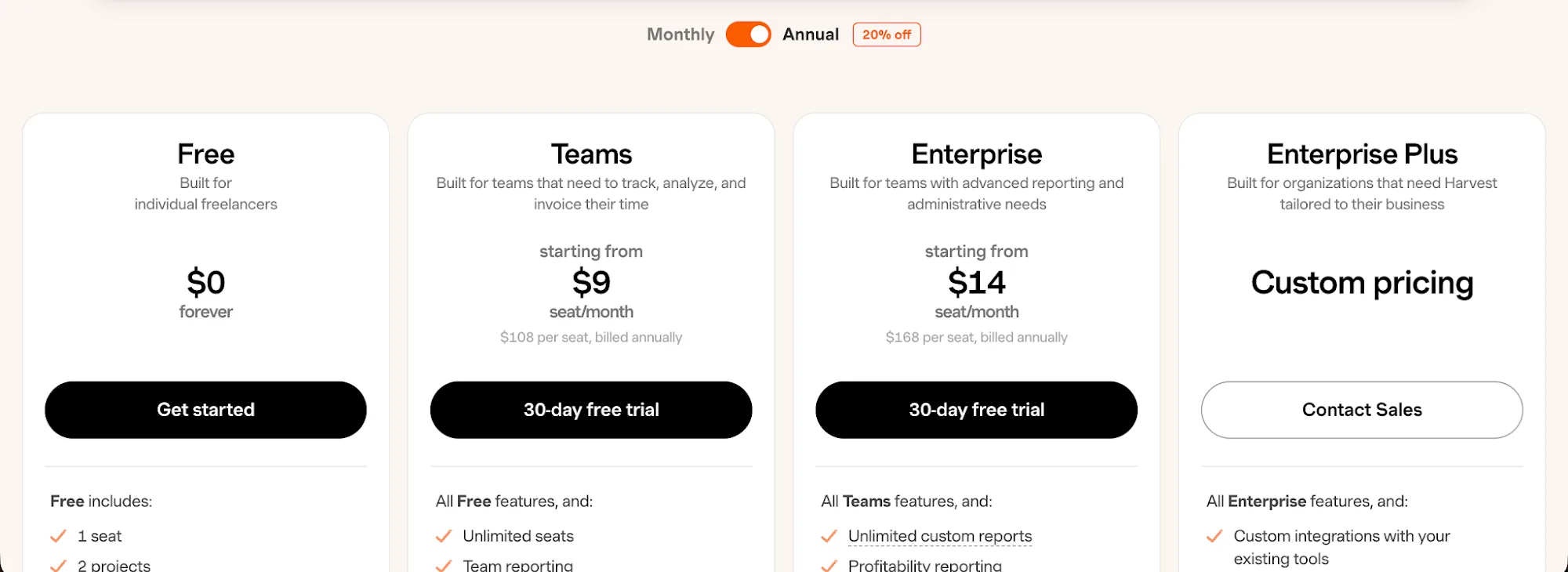
- There are four Harvest pricing plans: Free ($0), Teams (from $9 per user per month), Enterprise (from $14 per user per month), and Enterprise Plus (custom pricing). The advertised paid rates assume annual billing.
- The Free plan is limited to one user and two active projects. It includes basic time tracking and invoicing, but businesses need a paid subscription to add employees or manage more projects.
- Actual customer bills have increased dramatically. The BBC reported one consultancy's monthly bill jumping from $130 to $2,110. Harvest's own documentation also shows how a $44 bill could increase to $404 once usage charges are applied.
- Timely offers more predictable pricing and automatic time tracking. Plans start at $9 per user per month with annual billing, without additional usage charges for active clients, tasks, or recorded hours. A 14-day free trial is available.
Harvest had a massive price increase in August 2026
In August 2026, Harvest made headlines after customers reported subscription price increases of more than 1,500%. The controversy followed after the Italian software company Bending Spoons acquired Harvest in 2025 and a major overhaul of Harvest's pricing structure during 2026.
Previously, Harvest charged businesses a flat subscription fee based on the number of users. The new pricing model introduced additional usage charges, meaning customers could end up paying considerably more even without adding employees.
According to Harvest's official documentation, paid subscriptions now have two billing options:
- Flex billing: Customers pay a base subscription fee per user, plus additional charges based on active projects, clients, tasks, and invoicing. These charges apply when usage exceeds the included allowances.
- Unlimited billing: Customers pay a fixed usage fee on top of their subscription, avoiding variable usage charges as their business activity grows.
The impact on some existing customers was enormous.
In an August 20 BBC investigation, Richard Haldenby, who runs UK consultancy Salentis, reported that his monthly Harvest bill had increased from $130 to $2,110, an increase of approximately 1,523%.
Another customer reported their annual subscription jumping from $2,800 to $23,000.
Harvest responded by explaining that customers on older legacy plans experienced some of the largest increases. The company also stated that customers receive notifications 30 days and 10 days before renewal, giving them an opportunity to review their options.
However, the biggest concern with the new Harvest pricing isn't necessarily the advertised subscription rates. The official pricing page still lists the Teams plan starting at $9 per user per month with annual billing, but additional usage fees can push the actual cost much higher.
Harvest also confirms that new customers on Flex billing don't encounter usage charges until their second paid renewal. This means the first invoice may not reflect what they'll eventually pay.
In summary, Harvest's advertised prices are only part of the equation. Before subscribing or renewing, you need to calculate your expected usage charges, especially if you manage many clients and projects or generate large numbers of invoices.
Let's look at the current Harvest pricing plans and what each one actually includes.
The Free plan is genuinely free
Harvest's Free plan costs $0 per month with no expiration date. It's designed for individual freelancers who need basic time tracking, expense management, and invoicing without paying for a subscription. However, you're limited to one user and two active projects.
Here's what the Free plan includes:
- Time tracking: Track working hours using timers, daily and weekly timesheets, or calendar imports.
- Project management: Create up to two active projects, set estimates, and track work billed hourly or at a fixed rate.
- Expense tracking: Record project expenses, attach receipts, and keep track of reimbursable costs.
- Invoicing: Generate client invoices based on tracked hours and expenses, although sending invoices directly requires a Stripe connection.
- Basic reporting: Review time and project reports, with support for up to four custom reports.
- Mobile and desktop apps: Track working hours through Harvest's web, desktop, and mobile applications.
- Integrations: Connect Harvest with supported third party tools, although some integrations are reserved for paying customers.
The biggest limitation is the two-project maximum. If you're a freelancer working with several clients simultaneously, you'll quickly reach that limit. Adding another team member also requires upgrading to a paid subscription.
There are restrictions on invoicing, too. Free users can't email invoices directly from Harvest or export them as PDFs without connecting Stripe. You also can't integrate with QuickBooks Online, import existing data, or customize invoices with your company logo.
Overall, Harvest's Free plan offers a decent amount of functionality for individual freelancers, but the project limit and invoicing restrictions make it less practical for anyone managing a growing client base.
The Teams plan starts at $9 per user per month
Harvest's Teams plan starts at $9 per seat per month with annual billing, or $11 per seat per month if you choose a monthly plan. This means you'll pay $108 per user upfront for a yearly subscription, compared to $132 over 12 months when paying monthly.
The yearly or monthly plan offers the same features, so the main difference is the billing period and the discount you receive for paying upfront.
Teams is Harvest's first paid plan, designed for agencies and businesses that need to track employee hours, manage client projects, and handle invoicing across multiple team members.
The Teams plan includes everything in Free, plus:
- Unlimited team members: Add as many employees as you need, with each additional seat increasing your subscription cost.
- Team reporting: Review employee utilization, available capacity, and workloads to see how working hours are distributed across projects.
- Billable and cost rates: Set individual billing rates and internal costs for employees to understand how much their work costs and generates.
- Accounting integrations: Connect Harvest with QuickBooks Online, Xero, Stripe, and other supported tools to synchronize invoices and payments.
- Bulk imports: Import projects and team members using CSV files instead of creating everything individually.
- Scheduled phone support: Book calls with Harvest's support team when you need assistance with your account.
However, the advertised per-seat rate isn't necessarily your total Harvest cost. The Teams plan uses a billing structure that can add charges based on active projects, clients, tasks, and invoicing activity.
With Flex billing, these charges are calculated based on your activity during the previous billing period and apply when you exceed the included allowances. You can also choose Unlimited billing, which replaces variable usage charges with a fixed usage fee on top of your subscription.
Another limitation is that Teams doesn't include profitability reporting, timesheet approvals, or unlimited custom reports. Those features are reserved for the more expensive Enterprise plan.
Ultimately, Teams gives businesses more flexibility than Free, but the additional usage charges make it difficult to predict exactly how much you'll pay without estimating your workload first.
The Enterprise plan starts at $14 per user per month
Harvest's Enterprise plan starts at $14 per user per month (billed annually), or $17.50 per user per month with monthly billing. The annual cost is $168 per seat, compared to $210 over 12 months when paying monthly, giving you a 20% discount for committing to a full year.
Enterprise is designed for larger teams that need more control over their time tracking data, project finances, and employee permissions. It includes everything in Teams, including accounting and payment integrations, but adds enterprise features for managing and analyzing work across an organization.
The Enterprise plan includes everything in Teams, plus:
- Unlimited custom reports: Create and save as many custom reports as you need, compared to the four-report limit on Teams.
- Profitability reporting: Analyze profit margins across clients, projects, tasks, and employees by comparing billable amounts against internal costs.
- Timesheet approvals: Review and approve employee timesheets before hours are used for client billing.
- Activity logs: Access an audit trail of time entries and changes, making it easier to identify who modified project data and when.
- Single sign-on (SSO): Use SAML authentication to connect Harvest with identity providers like Okta and Microsoft Azure AD.
- Required time entry notes: Make it mandatory for employees to add descriptions to their time entries, improving reporting accuracy and accountability.
- Custom exports: Export reports to CSV with your preferred columns instead of relying on standard report layouts.
However, Enterprise still comes with additional usage charges. Just like Teams, the advertised subscription price only covers your base seats and included allowances. Flex billing adds charges when you exceed the included usage limits for projects, clients, tasks, and invoices, while Unlimited billing adds a fixed usage fee.
This means a company with 10 employees will have a base annual subscription of $1,680, but the actual total could be higher depending on the billing option and usage.
Another consideration is that Enterprise doesn't include custom integrations, personalized onboarding, or a dedicated customer success manager. Those services are reserved for Enterprise Plus.
Overall, Enterprise makes the most sense for organizations that need profitability reporting, timesheet approvals, and stricter administrative controls. If you primarily need time tracking and invoicing, Teams offers most of the same functionality at a lower starting price.
The Enterprise Plus plan has custom pricing
Harvest's Enterprise Plus plan is designed for larger organizations that need custom integrations, personalized support, and more control over how they use the software. Unlike Teams and Enterprise, it has no publicly available starting price, so you'll need to contact Harvest's sales team for a quote.
Harvest doesn't disclose whether Enterprise Plus offers the same 20% annual billing discount as its other paid plans. Your final price will depend on the agreement you negotiate, including your seat count, business requirements, and any additional services.
Enterprise Plus includes all the enterprise features available in the lower plans, plus:
- Custom integrations: Connect Harvest with your existing business software through integrations tailored to your organization's requirements.
- Product customization: Adapt certain parts of Harvest to better accommodate how your teams manage projects and track time.
- Dedicated customer success manager: Get a designated contact to help manage your Harvest account and resolve ongoing issues.
- Personalized onboarding and training: Receive assistance with setting up the software and training employees to use its time tracking and invoicing features.
- Assisted data migration: Get help transferring existing Harvest data or moving records from another time tracking solution.
- White labeling: Customize the product's branding to better match your organization's identity.
- Early involvement in product development: Receive privileged access to product development and opportunities to influence upcoming features.
The biggest drawback is the lack of pricing transparency. Harvest doesn't publish a minimum commitment, starting seat count, or an estimated Enterprise Plus subscription cost. You'll need to speak with sales before you can compare it against other enterprise time tracking solutions.
There's also the question of usage charges. Harvest's standard paid plans calculate additional fees based on active projects, clients, and tasks, as well as invoicing activity. It's unclear whether Enterprise Plus includes unlimited usage or negotiates these charges separately. Make sure your quote specifies how active clients, projects, and other usage will affect your total bill.
Ultimately, Enterprise Plus makes sense for organizations that need custom development and dedicated support. If your employees simply need to track time, manage invoices, and generate financial reports, the regular Enterprise plan already covers those requirements without requiring a sales consultation.
What the Harvest fine print is hiding
At first glance, Harvest pricing looks affordable. Teams starts at $9 per user per month with annual billing, while Enterprise starts at $14. Both plans advertise a 20% annual discount, and the pricing page describes the subscriptions as simple and flexible.
But those advertised prices don't tell you how much Harvest will actually charge you.
Following the Bending Spoons acquisition in 2025, Harvest introduced a billing model that charges businesses for more than just employee seats. The resulting Harvest app price increase has left some long-standing customers facing renewal quotes several times higher than their previous subscriptions.
Here's what you need to know before subscribing.
Harvest charges extra for projects, clients, tasks, and invoices
Under the new flex usage billing model, your subscription includes two separate charges:
- Base subscription fee: The advertised price multiplied by your number of paid seats.
- Usage-based fees: Additional charges based on the number of active projects, clients, tasks, and invoices your business uses.
According to Harvest's billing documentation, each plan includes a free usage allowance. Once you exceed that allowance, additional usage becomes chargeable.
The important distinction is that Harvest only counts projects, clients, and tasks with time tracked during the relevant billing period. Archived, deleted, and untouched items don't contribute to those usage charges.
However, Harvest doesn't publicly disclose the exact allowances or the price of exceeding them. You won't find a clear rate per additional project or client on its pricing page.
This makes calculating your actual bill difficult without access to a Harvest account.
For example, imagine an agency with five employees on Teams. Its advertised base subscription is $45 per month with annual billing. But if the agency manages dozens of active clients and hundreds of tasks, its renewal cost could be substantially higher.
The exact amount depends on usage fees that aren't publicly available.
Your second bill can be much higher than your first
Another important detail concerns when Harvest starts charging for usage.
For new customers using Flex billing, the first paid invoice generally covers subscription seats only. Additional usage is calculated from activity during the previous billing period, so those charges first appear at the second paid renewal.
Harvest even acknowledges the potential difference in its documentation, giving an example of a bill increasing from $44 to $404 once usage charges are included.
That's an increase of approximately 818%, without necessarily adding more employees or upgrading to a more expensive plan.
The alternative is Unlimited billing, which replaces variable charges with a fixed usage fee. However, the price of Unlimited billing isn't publicly disclosed either.
Actual Harvest customers have reported enormous increases
The controversy surrounding Harvest's new pricing isn't hypothetical. Customers have shared examples on Reddit, LinkedIn, and in major news publications.
In March 2026, an agency project manager explained on Reddit that their company had previously paid no more than $80 per month.
Harvest's proposed replacement plan would cost $1,900 per month, while the cheaper Flex option was quoted at $1,100.
The user described the proposed $1,900 charge with a short clarification:
"That is not a typo."
In August 2026, the BBC reported that UK consultancy Salentis faced an increase from $130 to $2,110 per month, approximately 1,523%. Another customer reported an annual bill rising from $2,800 to $23,000.
The complaints continued into October. One consulting company with 75 employees shared on Reddit that its new pricing would increase from $900 to $3,454 per month.
The user summed up their frustration:
"This is for time tracking! TIME TRACKING!"
These are individual customer reports, and not everyone experienced increases of this size. Still, they demonstrate how significantly the new pricing model can affect businesses with large numbers of active projects and clients.
Existing customers need to check their renewal notices carefully
Harvest says it sends a renewal notice 30 days and another 10 days before a subscription renews. However, customers have reported being surprised by the size of their proposed renewal charges.
The company also confirms that its checkout process defaults to Enterprise with annual billing when a trial ends. If you don't change the selection, you could subscribe to a more expensive plan than intended.
There are a few additional billing details to understand:
- Your current plan may be a legacy subscription. Customers who subscribed before November 7, 2024, may still have older pricing and features that differ from today's advertised plans.
- Adding seats can trigger immediate charges. Harvest prorates the cost of additional seats for the remaining billing period.
- Removing seats doesn't immediately reduce your bill. You can request fewer seats for your next renewal, but you generally can't remove paid seats during the current billing cycle.
- Changing billing options can affect your total cost. Moving between Flex and Unlimited changes how usage fees are calculated, even if your employee count stays the same.
Before accepting a renewal, administrators should open Settings → Billing → My usage billing in their Harvest account. The billing section shows current usage and projected charges, while the simulation tool lets customers estimate how changes to their activity could affect future bills.
You should also compare the available subscription options rather than automatically accepting the proposed renewal.
So, how much does Harvest really cost?
The answer is that the advertised per-seat price is only the starting point.
Harvest's Teams plan may cost $9 per user per month, but that figure doesn't necessarily reflect what you'll pay once usage charges are applied. Even the more expensive Enterprise plan uses the same billing structure.
For businesses with relatively few active projects and clients, the additional fees may be manageable. But agencies and consultancies that regularly create new tasks, manage numerous client accounts, and generate invoices could face much higher charges.
The biggest problem with Harvest pricing is predictability. When the free usage allowance and additional rates aren't publicly disclosed, it's difficult to compare the actual cost against other time tracking tools.
If predictable subscription costs are important to your business, make sure you get a complete estimate of your Harvest renewal cost before committing to an annual subscription.
Get the best Harvest alternative for automatic time tracking
Harvest's recent pricing changes have made it harder for businesses to predict their subscription costs. When you're paying extra for projects, clients, tasks, and invoices, even a relatively affordable starting price can turn into an expensive renewal.
With Timely, you get a more predictable pricing structure and automatic time tracking that Harvest doesn't offer.
Here's why Timely makes more sense:
- Predictable subscription costs: Timely charges a fixed price per user based on your chosen plan. You won't face additional usage fees just because you're managing more clients, recording more hours, or generating more time entries.
- Automatic time tracking included: Even our $9 per user per month Starter plan includes automatic activity tracking across apps, websites, documents, and meetings. Harvest still relies primarily on employees starting timers and entering hours themselves.
- Clear project allowances: Starter supports up to 20 projects and five users, while Premium starts at $16 per user per month with annual billing and includes unlimited projects. You can see exactly which limits apply before subscribing.
- More accurate billable hours: Timely automatically captures work activity and helps turn it into accurate timesheets, reducing forgotten hours and giving you a clearer picture of project profitability.
Harvest remains a reasonable option for freelancers using the Free plan or businesses that need built in invoicing. But if you're looking for automatic time tracking with pricing that doesn't fluctuate based on your number of active clients and projects, Timely is a better fit.
Ready for automatic time tracking without unpredictable usage charges? Try Timely free for 14 days and see how much easier managing your working hours can be.