Toggl Track (then known just as Toggl) has been around since 2006, making it one of the longest-standing SaaS platforms, and not just time tracking tools. The premise has been the same since the beginning: let people track time easily and on their own terms, so that the focus is on efficiency and not monitoring.
20 years later, Toggl Track is one of the most popular time tracking software choices, largely due to its free plan. When you jump into the paid plans, users start pointing out some real areas where Toggl isn't really there yet.
So, despite being their competitor, we're bringing you an unbiased and honest Toggl Track review, showing what real users think about this platform.
Let's start with the good sides and then go into reasons why users look at Toggl Track competitors.
| Pros | Cons |
|---|---|
| Simple setup and an easy timer that requires little training | Syncing between the desktop, mobile, and browser apps can be slow or inconsistent |
| Clean interface that stays familiar across devices | Editing past entries can require too many clicks |
| Useful reports for billable hours, client work, and team activity | Advanced dashboards, forecasting, and budget analysis may require another tool |
| Google Calendar and Outlook integrations make meeting tracking easier | It is not designed for complex project planning or resource management |
| Works well for freelancers and smaller teams without much administration | The free plan becomes restrictive once a team grows beyond five users |
| Offline tracking helps prevent lost entries when there is no internet connection | There is no built in invoicing for turning tracked hours into client bills |
| The free version covers many basic time tracking needs | Accounting integrations and advanced financial tracking are limited |
| Time entries can be grouped by project, client, or team member | Reports and analytics sections can feel confusing to some users |
| Available through web, desktop, mobile, and browser tools | The mobile app and browser extension may feel less reliable than the desktop app |
| Focuses on straightforward time tracking without unnecessary project features | Teams may need separate software for invoicing, budgeting, and project management |
Get the better Toggl Track alternative for automatic time tracking. Try Timely today for free.
Good: Toggl Track is very simple and easy to use
Setup takes minutes, not hours.
Open the web app or desktop app, hit start on the timer, and you're logging time. There's no onboarding flow to sit through and no settings to configure before your first time entry.
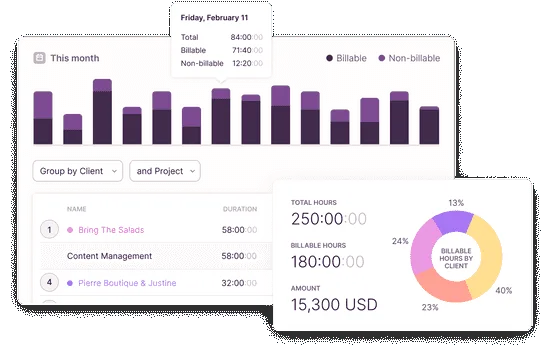
"You just hit the timer and get back to work, no complicated setup. I also like how it automatically groups your entries and shows everything clearly in the reports. It actually makes you aware of where your time is going without feeling heavy or confusing." - G2 review
Reviewers who tried other time tracking apps first tend to mention the same thing: fewer clicks to do the basic job. Starting and stopping a timer is a single action. Editing a time entry doesn't require digging through menus. Several users say they were fully comfortable using it within a few weeks of switching, without any training material.
"I love how I can start timing when I sit down to work and stop when I get up, which helps me track the exact amount of time I dedicate to studying. This is very helpful in maintaining consistency and ensuring real study hours." - G2 review
This is important because a lot of project management tools treat time tracking as a bolted-on feature, which shows up as extra steps or confusing navigation. Toggl Track was built specifically as a time tracker, so the core workflow (start, stop, categorize, review) stays short.
It also holds up whether you're a freelancer tracking billable hours solo or part of a team logging time entries across shared projects. Nobody needs a manual to figure out how to log four hours against a client project. That's the main draw: it does one job, and it does it with minimal friction.
Good: The interface is clean and consistent across the different platforms
The web app, desktop app, and mobile app all look and function close enough to each other that switching between them doesn't cost you anything. If you start a timer on your phone and check it later on desktop, the layout is familiar enough that you're not relearning the tool each time.
"The interface is clean, and it works the same on web and mobile, which makes it easy to keep track of things." - G2 review
This is a bigger deal than it sounds. A lot of tools change their navigation or hide core features depending on the platform, which forces you to remember two or three different versions of the same app. Toggl Track keeps the same buttons in the same places, whether you're syncing Toggl Track from mobile mid-commute or reviewing a report on desktop later.
"I love how clean and simple Toggl is, I can literally just hit start, get to work, and stop easily, no confusing UI or extra clicks." - G2 review
Not everything gets a pass, and a few reviewers flag the desktop app's dark theme as a bit hard to read, especially at first. That's a legitimate gripe worth including if you want the section to feel balanced rather than one-sided.
But the overall pattern in reviews is consistency: same core layout, same logic, across web, desktop, and mobile. For teams juggling multiple projects and clients, not having to relearn the interface every time they switch context is a real time-saver, not just a nice-to-have.
Good: The reporting features are solid
Time entries are only useful once you can turn them into something you can act on, and this is where Toggl Track gets specific praise. Reports break down time by project, client, or team member, and can be exported (Excel comes up often) or shared directly via a link.
"Full control over work hours. Both billable and non-billable. Good reports, and easy to use. Especially happy with the calendar sync with Outlook." - G2 review
This is used for two main things in reviews: client invoicing and spotting where time actually goes. If you're billing by the hour, the reports give you a paper trail. If you're managing a team, they show which projects are eating more time than budgeted, which is hard to catch without the data in front of you.
"As an account manager, the simple interface, detailed reporting, and ability to monitor billable hours help me stay on top of priorities and provide greater transparency when managing workloads and client engagements. The platform makes it easy to understand where time is being spent and identify opportunities to improve efficiency." - G2 review
There are limits, however.
Multiple reviewers note that once you need deeper financial forecasting, budget tracking, or highly customized dashboards, Toggl Track alone isn't enough, as you'll need to integrate it with another tool. That's a fair caveat to include rather than oversell the reporting as all-in-one.
Still, for the core use case of turning logged time entries into a report you can hand to a client or a manager, this is consistently rated as one of the stronger parts of the product, and one of the main reasons reviewers say they upgrade past the free plan.
Good: The calendar integration works really well
Toggl Track syncs with Google Calendar and Outlook, pulling your scheduled events in so you can convert them into time entries with one click instead of typing them out manually.
"Full control over work hours. Both billable and non-billable. Good reports, and easy to use. Especially happy with the calendar sync with Outlook." - G2 review
For anyone whose day is mostly back-to-back meetings, this cuts out a specific, recurring task: manually logging every meeting as a separate time entry after the fact. Reviewers who work in client-facing or account management roles mention this most often, since their calendars are usually full and their billable hours depend on accurate logging.
It also plays well with offline time tracking. If you're on a flight or in a location without signal, the desktop and mobile apps keep tracking locally and sync everything once you're back online. No lost entries, no manual backfilling from memory later.
This is a smaller feature than the core time tracker, but it's mentioned often enough in reviews to be worth a dedicated section. It's the kind of detail that doesn't sell the product on its own, but removes enough daily friction that reviewers bring it up unprompted.
Good: No administrative burden for smaller teams and freelancers
For freelancers and small teams, the recurring theme in reviews is that Toggl Track doesn't need a dedicated admin to run. No lengthy permission setup, no mandatory training, no ongoing maintenance to keep it running smoothly.
"What I like best about Toggl Track is how easy it is to capture and organize time across multiple clients and projects without adding extra administrative work. As an account manager, the simple interface, detailed reporting, and ability to monitor billable hours help me stay on top of priorities and provide greater transparency when managing workloads and client engagements." - G2 review
A solo freelancer can be tracking billable hours within minutes of signing up. A small team can roll it out without assigning someone to manage user roles or troubleshoot the tool full-time, which isn't the case with heavier project management tools built for larger organizations.
"I like that I can easily access it on the computer and/or my phone on the app. It is user-friendly. It also helps me stay on track, and I can run reports and categorize to see what I've been working on. I use it every day." - G2 review
Toggl Track pricing gets a lot of praise too.
Many users point out that the free plan covers what a solo user or small team actually needs day to day, and the paid tiers only become relevant once you need more advanced reporting or team management features.
The pattern across these reviews is a tool that stays out of the way. It's not positioning itself as an all-in-one enterprise suite, and for freelancers or small teams that just need a reliable time tracker without extra overhead, that's presented as a feature, not a limitation.
Bad: There are syncing issues between devices
The most common complaint across reviews is inconsistent syncing. A timer started on the mobile app doesn't always stop when it should on desktop, or vice versa.
A few users mention delays of several seconds to a minute before an entry started on one device shows up on another.
"One thing I don’t like is that sometimes the timer doesn’t start or stop when I expect it to, especially if I switch between devices. The syncing can feel a bit slow. Also, organizing multiple projects or editing past entries takes a few extra clicks, which gets irritating when you’re in a rush. The reports are helpful, but some of the filters feel a little limited unless you upgrade." - G2 review
This shows up most when people connect Toggl Track across multiple entry points, including the desktop app, mobile app, and browser extension, all running at once.
With more surfaces syncing at the same time, there's more room for one of them to lag or drop an update, and reviewers say it's usually the browser extension or mobile app that falls behind.
"Honestly, not much to complain about, but I wish the mobile app was a bit better because sometimes I feel like it takes a second to sync or find the project I am looking for. Also, a built-in calendar view would be nice instead of jumping between tools." - G2 review
For solo use, this is just a minor annoyance. For teams relying on accurate team time data for client billing, it's a bigger problem. A missed sync means a time entry that has to be manually corrected later, which defeats some of the point of automated time tracking in the first place.
It's not a constant issue that regularly pops up in reviews, more of an intermittent one. But it comes up often enough across reviews that it's worth flagging as a real limitation rather than a one-off complaint. If your workflow depends on switching devices mid-task throughout the day, this is the friction point to expect.
Bad: Editing past entries is clunky
Logging a new time entry is fast. Going back to fix one isn't. Reviewers consistently point out that correcting a past entry (e.g., wrong project, wrong duration, wrong date) takes more clicks than it should, especially compared to how quick the initial tracking is.
"Toggl Track is a great desktop application; however, I've had difficulties syncing it while switching between machines. This has led to some unpredictable time gaps that are irritating. It takes time when I have to use the web interface to search for the entry I need, copy and paste tags and descriptions, and then reset the timer on an older project." - G2 review
This becomes a real issue for anyone managing a detailed report at the end of the week or month. If several entries need adjusting before a report goes out for client billing, the extra clicks per fix add up, and a few reviewers describe it as tedious rather than difficult.
"Organizing all my data after the fact could be time-consuming and at first, it was rather confusing. I never quite got in the swing of it so it became an easily accomplished task each day. I also just don't like all the purple. I wish the reports looked more professional." - G2 review
Part of the issue is that the calendar view, while useful for seeing where the day went, isn't built for fast bulk editing. You can see the entries clearly, but adjusting several of them at once isn't as smooth as the rest of the tool.
This is one of the more specific, fixable complaints in the reviews. It's not a dealbreaker, but a real gap between how easy tracking time is and how much friction there is in cleaning it up afterward. Worth mentioning if you're weighing all the features against day-to-day usability rather than just the pitch.
Bad: Complex project management is not its strong side
Toggl Track is built as a time tracker first, and reviewers are direct about what that means: it's not a project management tool. There's no task dependency mapping, no resource allocation planning, and no built-in way to manage multi-phase projects beyond basic tagging and categorization.
"What I dislike about Toggl Track is that it can feel a bit limited when managing more complex reporting or advanced project financial tracking. While the core time tracking is very strong, deeper customization for dashboards and more robust forecasting or budgeting features can require workarounds or integrations with other tools." - G2 review
Reviewers managing more complex operations (multiple teams, layered budgets, shifting timelines) say the tracking features cover the time-logging part fine, but they still need a separate project management tool for anything beyond that. One reviewer in a transportation role specifically noted the lack of location tracking as a gap for field-based work.
"Analytics vs Reports vs Insight in the tools. Which is for which? In my opinion, it is all about analysing tracked time. I sometimes find it hard to analyse the data." - G2 review
This isn't necessarily a flaw so much as a scope limitation. Toggl Track doesn't claim to replace tools like Asana or Monday, and reviewers who use it alongside one of those tools generally have no complaints. The issue only comes up for people expecting a single tool to handle both time tracking and full project management, and finding that Toggl Track's key features stop at tracking.
Bad: Toggl Track's free plan is good, but limited
Reviewers are consistent on this: the free plan is genuinely useful and is often cited as making Toggl Track one of the best free time trackers on the market. But it caps out fast once your needs grow past solo or very small team use.
"One thing I wish it had was a reminder to turn the toggle on - if I forgot." - G2 review
The limits show up in a few specific places. For example, fewer projects and categories, restricted reporting tools, and no access to features like billable rate tracking or more advanced dashboards. For a freelancer with a handful of clients, this is rarely a problem. For a growing team trying to get a full, detailed report on where the team spends its time, it becomes a reason to upgrade.
"When I tried to start implementing Toggl Track with my organization, I quickly realized that it only allows up to 5 users on the free plan. Beyond that, I believe you have to pay per user." - G2 review
Reviewers generally don't complain that the premium plan is priced unfairly, just that the free tier's limits become obvious quickly once you need more than the basics. The Enterprise plan adds team-level controls and reporting that solo users won't need, so the practical question reviewers raise isn't whether Toggl Track is worth it overall, but which tier actually matches your team size and reporting needs.
Bad: No built-in invoicing and advanced financial tracking
Toggl Track logs time and reports on it well, but it stops short of handling money. There's no built-in invoicing, no way to generate a client bill directly from tracked hours, and no deeper financial forecasting or budget tracking baked into the product.
"It lacks some more advanced features you’ll likely need as your business grows, such as built-in invoicing and more in-depth reporting. Once your workflow becomes more complex, this tool can start to feel a bit too simple." - G2 review
For client billing, this means exporting a report and creating the invoice somewhere else, like a separate tool, a spreadsheet, or an accounting platform. Reviewers who need this workflow tightly integrated say it's a recurring extra step rather than a dealbreaker, but it's still a step Toggl Track doesn't handle on its own.
"Desktop utilization is the best timekeeping program known; however, it does not have the same quality as the cellular and internet interfaces. There is a lack of integration with our accounting software; this is a slight issue, however, it would be a great, ideal creation." - G2 review
This also shows up in how reviewers talk about tracking features versus reporting tools more broadly. The reporting side is strong for visibility, e.g., where time went, what a project cost in hours, but not for automated financial output.
A few reviewers also mention wanting a built-in Pomodoro timer or focus-session feature, which isn't part of the product either. None of these gaps break the core time tracking use case, but they're the first things reviewers say they had to solve with a separate tool.
Should you get Toggl Track today?
Based on everything in the reviews, the answer depends heavily on who you are and what you need day to day.
If you're a freelancer or a small team that just needs real-time tracking without extra overhead, Toggl Track is an easy yes.
The free version covers most of what a solo user needs, and reviewers consistently say the completely free tier is enough to run a basic freelance operation without ever touching a paid plan. If you're billing multiple clients on fixed-fee projects and just need clean records of hours worked, this is exactly the kind of straightforward use case Toggl Track offers well.
If you're trying to manage projects with more moving parts, the calculus changes. Teams that need built-in invoicing, deep financial forecasting, or tools to manage projects with multiple phases and dependencies will hit the limits reviewers already flagged.
You can still use Toggl Track for the tracking piece, but you'll be pairing it with something else to cover the rest.
So, is Toggl Track worth it?
For time tracking specifically, yes, and reviewers back that up consistently. It does one job well and stays out of the way while doing it. Where it falls short is anything beyond that core job, and if what you actually need is a tool built to maximize productivity across full project workflows rather than just logging hours, Toggl Track alone won't get you there.
That gap is worth keeping in mind because it's exactly where some competitors try to close the distance. This is where Timely comes in.
Get Timely instead
If some of the things above sound familiar, Timely is here to help.
The syncing problems come from Toggl Track relying on you to manually start and stop timers across devices. Timely skips that step entirely.
Our Memory Tracker runs in the background and logs your activity automatically, so there's no timer to forget, no device to sync, and no gap between what you did and what got recorded.
Editing past entries also gets easier. Instead of digging through a calendar view to fix individual time entries, Timely lets you review a day's activity as a single timeline and adjust it in one click before it becomes a finished timesheet. Reviewers describe finishing a timesheet in under two minutes, compared to the manual cleanup Toggl Track often requires.
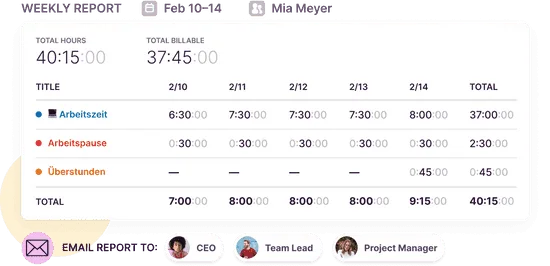
On the project management side, Timely adds project dashboards with budget tracking, estimated versus actual hours, and billable versus non-billable breakdowns built in. That covers a good chunk of what reviewers said Toggl Track was missing once projects got more complex.
The free plan limits are also less of an issue here, since Timely is built around giving teams full access to automatic tracking and reporting from the start, rather than gating core features behind a paid tier.
None of this means Timely is a perfect replacement in every case. But for anyone who read through the syncing complaints, the clunky editing, and the project management gaps above and thought "yeah, that's been me," it's a genuinely solid alternative to try next.
You can start tracking automatically in a few minutes.
Try Timely for free and see how it feels to stop chasing your own timesheets.