At $4.99 per user per month, Hubstaff seems like one of the more affordable time tracking software in the market, but that's only until you start scratching beneath the surface. When you compare the different pricing plans, add-ons, and limitations, it's far from affordable.
We did the research so you don't have to, and today, we're showing you how much Hubstaff really costs.
TL;DR: key features and plans comparison
| Most valuable feature | Starting price | Best for | |
|---|---|---|---|
| Starter | Basic time tracking with screenshots, timesheets, and client invoicing | $4.99 per seat per month | Very small teams, freelancers, and agencies that only need simple time tracking and light oversight |
| Grow | Project budgets and advanced reports | $7.50 per user per month | Small service teams that need to connect hours worked with budgets, expenses, and project costs |
| Team | Scheduling, payroll, approvals, and team management | $10 per user per month | Growing companies that need more structure around workforce management, attendance, approvals, and employee monitoring |
| Enterprise | Account provisioning, dedicated support, compliance support, and advanced monitoring features | $25 per user per month | Larger companies with stricter security needs, managed devices, bigger teams, and more complex admin requirements |
Want better pricing, fewer intrusive monitoring features, and automatic time tracking? Try Timely today for free.
There are four paid plans and a free trial
Hubstaff has a per-user pricing model for all of its plans, and you can pay monthly or annually. When you're purchasing an annual plan, you get two months of your chosen plan for free.
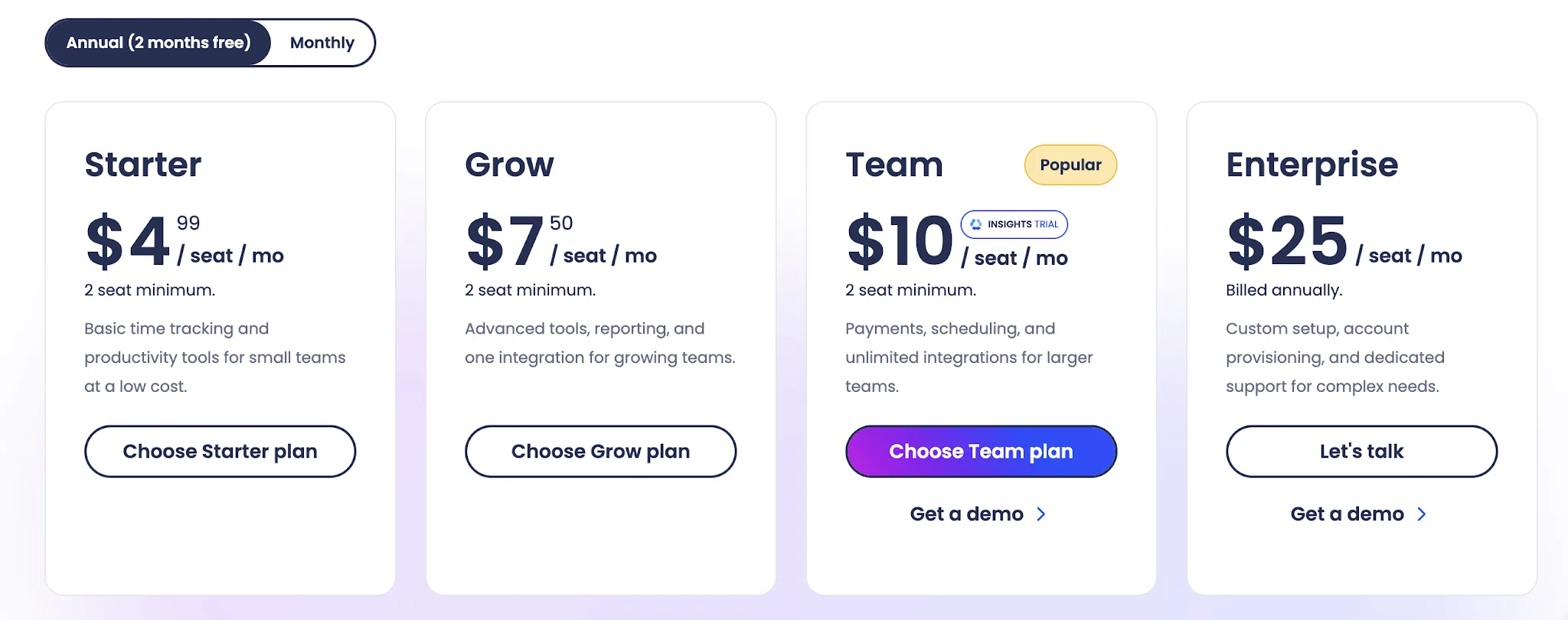
All of the plans have a two-seat minimum to get started, with the exception of the Enterprise plan, which is presumably built only for larger teams.
You can mix and match add-ons to create the right plan for your needs, from basic time tracking to full-blown employee time tracking and project management.
Is Hubstaff free?
Hubstaff doesn't have a free plan. You can get a free 14-day trial for each of the plans listed below.
If you’re looking to compare Hubstaff with a free time tracking tool, make sure to read our comparison of Hubstaff and Clockify.
The Starter plan starts at $4.99/seat/month
Hubstaff’s Starter plan is built for small teams that need basic time tracking without paying for heavier team management features. It covers the essentials for remote teams that need to track time, review activity, and turn hours into invoices.
- Time tracking: Employees can track time across desktop, mobile, and web, with hours tied to projects and tasks.
- Timesheets: Managers can review tracked hours in timesheets before approving work or using the data for payroll.
- Activity levels: Hubstaff shows activity percentages based on keyboard and mouse usage during tracked time.
- Screenshots: The plan includes 500 screenshots per user per month, which gives managers some visual context around work sessions.
- App tracking: Starter includes 500 app records per user per month, so teams can see which apps were used during tracked time.
- URL tracking: The plan includes 500 URL records per user per month, giving basic visibility into websites used while working.
- Tasks and to-dos: Teams get up to 500 tasks or to-dos, which is enough for basic project tracking but not ideal for heavier workloads.
- Client invoicing: Teams can create invoices from tracked hours, which is useful for agencies, freelancers, and service teams that bill clients by time.
- Payments: Starter includes limited payment features, so teams can connect tracked hours to basic payout workflows.
- Two-factor authentication: The plan includes basic account protection for team members.
- Help Center and email support: Users get access to Hubstaff’s Help Center and email support.
The main issue with Starter is that it feels more like a basic entry plan than a serious team management plan. You get enough to track time, but many advanced features are missing or limited, including higher screenshot limits, project budgets, expenses, scheduling, and stronger reporting. For growing teams that need more than simple time tracking tools, the plan can feel restrictive pretty quickly.
The Grow plan starts at $7.50/user/month
Hubstaff’s Grow plan is the next step up for teams that have outgrown basic time tracking and need more control over budgets, expenses, and reporting. It adds key features that help managers connect hours worked to project costs, budgets, and team performance.
- Advanced reports: Grow unlocks more detailed reporting, giving managers a clearer view of hours worked, activity, budgets, and team performance across projects.
- Project budgets: Teams can set budgets for projects and compare tracked time against planned work, which is useful for agencies, consultants, and service teams.
- Expense tracking: Grow adds expense tracking, so teams can record project costs alongside tracked hours.
- Break tracking: Managers can track breaks more clearly, which helps separate active work time from nonworking time in reports.
- Idle timeout: Hubstaff can detect idle time and prompt users to keep or remove it, which helps keep timesheets cleaner.
- Higher screenshot limits: Grow increases the screenshot limit from 500 to 1,500 screenshots per user per month.
- Full app and URL tracking: Grow removes the tighter Starter limits on app and URL tracking, giving teams more visibility into how work time is spent.
- One integration: The plan includes one integration, which is useful if Hubstaff needs to connect with one core tool in your stack.
- Hubstaff Tasks included: Grow includes Hubstaff Tasks, making it a better fit for teams that want task management and time tracking in the same setup.
Grow is a better fit than Starter if automated reporting, budgets, and team features matter more than basic time tracking. The main drawback is that it still limits integrations to one, so teams using several tools may need the Team plan instead. It also leans heavily into monitoring, which may not suit every team culture.
The Team plan starts at $10/user/month
Hubstaff’s Team plan is where the product starts to feel less like a basic timer and more like employee monitoring software with workforce management features. It adds stronger controls for scheduling, payroll, approvals, and productivity insights, which helps managers understand how employees spend their time across projects and workdays.
- Unlimited screenshots: Team removes the lower screenshot limits from Starter and Grow, making it a better fit for companies that rely on screenshots for work verification.
- Unlimited integrations: This plan removes the one integration limit from Grow, so teams can connect Hubstaff with more of their project management, payroll, and accounting tools.
- Payments and payroll: Team adds stronger payment and payroll features, making it easier to pay people based on tracked hours worked.
- Scheduling: Managers can create team schedules and compare planned shifts against actual tracked time.
- Time off and holidays: Team includes time off and holiday management, which makes it more useful for companies managing regular employees instead of only contractors.
- Attendance tracking: The plan helps managers see who worked, who missed a shift, and where time entries do not match the expected schedule.
- Timesheet approvals: Managers can review and approve timesheets before payroll, which adds a useful control layer for larger teams.
- Auto discard idle time: Hubstaff can automatically remove idle time instead of only prompting users to decide what to do with it.
- Teams: The plan adds team features for grouping employees, which helps managers review activity, reports, and productivity insights by team or department.
- Higher support level: Team users get faster support than lower-tier users, which can matter once Hubstaff becomes part of payroll, time management, and day-to-day operations.
The main drawback is that Team is still built around fairly detailed monitoring, so it may feel heavy for companies that only need simple time tracking. It is also the first plan where Hubstaff becomes meaningfully more expensive at scale, especially since paid plans have a two-seat minimum and some workforce management features may still require add-ons.
The Enterprise plan starts at $25/user/month
Hubstaff’s Enterprise plan is the premium plan for larger companies that need custom setup, account provisioning, stronger compliance support, and higher limits. It includes everything in the lower pricing tiers, then adds more advanced features for companies with stricter security, support, and productivity monitoring requirements.
- Custom setup: Enterprise customers get more hands-on setup support, which can help larger teams roll out Hubstaff across departments without configuring everything alone.
- Account provisioning: The plan includes SCIM user and group provisioning, making it easier to add, remove, and manage users at scale.
- Dedicated support: Enterprise includes dedicated support for more complex needs, which is useful when Hubstaff is tied to payroll, workforce management, compliance, and daily operations.
- Silent app: Enterprise includes the silent app, giving companies access to more discreet monitoring features for managed devices.
- Locations and GPS tracking included: The Locations add-on is included, which helps field teams track job sites, routes, and attendance with GPS-based tools.
- Insights included: Enterprise includes Hubstaff Insights, which adds deeper productivity insights around focus time, meeting load, utilization, and how employees spend their working hours.
- Tasks included: Hubstaff Tasks is included, so teams can manage work, assign tasks, and connect productivity monitoring to actual project progress.
- Higher public API limits: Larger teams get higher API limits, which helps companies connect Hubstaff data to internal systems, dashboards, or reporting tools.
- ACH payments: Enterprise supports payment by bank debit, giving companies another way to handle billing.
- HIPAA compliance: The plan supports HIPAA compliance needs, which can matter for healthcare and other regulated teams.
- SOC 2 Type II compliance: Enterprise includes SOC 2 Type II compliance support, which is important for companies with stricter vendor review requirements.
The main downside is that Enterprise is expensive compared with the lower Hubstaff plans, especially because it starts at $25 per user per month on annual billing. It also adds the strongest monitoring features in Hubstaff’s lineup, which may be too much for teams that want productivity insights without heavier employee monitoring software.
Hubstaff offers six available add-ons
Hubstaff also sells several add-ons that let teams expand specific parts of the product without moving every user to a higher tier. Some are included in higher plans, but on lower plans, they can raise the real monthly cost per user.
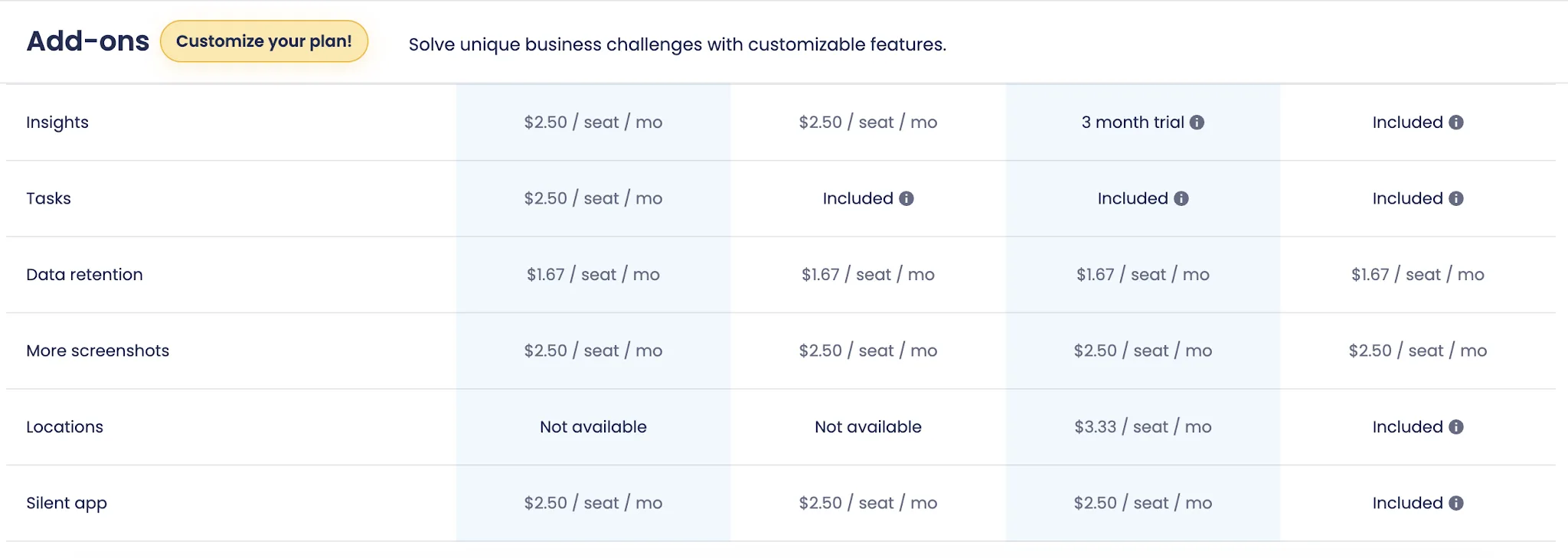
- Insights: Starts at $2.50 per seat per month. This add-on gives managers deeper visibility into productivity patterns, including unusual activity detection, unproductive apps and URLs, team leaderboards, smart notifications, focus time, meeting time, and categories for core, non-core, and unproductive work.
- More screenshots: Starts at $2.50 per seat per month. This add-on raises the screenshot limit to up to 10 screenshots every 10 minutes and can include secondary monitors in use.
- Tasks: Starts at $2.50 per seat per month. This adds Hubstaff’s task management features, including Kanban view, timeline view, task comments, start dates, due dates, labels, and attachments.
- Data retention: Starts at $1.67 per seat per month. This extends data retention to six years for selected Hubstaff data, including smart notifications, calendar and limits, and finances.
- Locations: Starts at $3.33 per seat per month. This add-on is built for field teams that need mobile location tracking, job sites with geofences, work orders, and jobs.
- Silent add on: Paid add-on, price not publicly listed on the pricing page. Hubstaff’s support docs describe this as an add-on for silent tracking features, including automatic start and stop tracking for company devices, account provisioning, and access to the silent client. It comes included with Enterprise.
Why Hubstaff’s pricing model won’t work for many teams
Hubstaff’s pricing looks simple at first, but the real total cost can climb quickly once you add more people, multiple projects, and the features most teams actually need. The lower plans are fine for basic time tracking, but they rely on limits, add-ons, and plan upgrades that can make Hubstaff harder to budget for as your team grows.
- The lower plans can feel limited quickly: Starter and Grow cover the basics, but teams that need better reporting, more integrations, scheduling, time off, or stronger controls have to move up fast. That makes the cheaper pricing tiers less useful for companies that need more than basic reporting.
- Add-ons make the real price harder to predict: Hubstaff charges extra for things like Insights, Tasks, Locations, more screenshots, and longer data retention. If you need productivity metrics, task management, and location tracking, the listed plan price may not reflect what you will actually pay.
- Costs rise fast for larger teams: Since Hubstaff charges per user, every new employee adds to the monthly bill. For global teams with contractors, part-time staff, and managers across different regions, the total cost can become difficult to control.
- Many productivity tools are already covered elsewhere: Teams may already use project management, payroll, invoicing, reporting, and task management tools. Paying Hubstaff for overlapping features can feel wasteful, especially if only part of the team needs them.
- Monitoring may be too heavy for some teams: Hubstaff’s pricing pushes users toward more screenshots, app tracking, URL tracking, productivity metrics, and other monitoring features. That can work for some companies, but it may create trust issues in teams that prefer outcome-based management.
- Project-based teams may need a higher plan: If you manage multiple projects, client budgets, expenses, approvals, and reports, the cheaper plans may not be enough. That means agencies and service teams can end up paying for a higher tier just to get the controls they need.
For many teams, the problem is not that Hubstaff is expensive on paper. The problem is that the useful version of Hubstaff often costs more than the headline price suggests.
Get the best Hubstaff alternative (that money can buy)
Time tracking should help your team understand work, not create another layer of admin. That is where Hubstaff pricing becomes hard to defend. The base plans look affordable, but the features teams need for visibility, reporting, projects, and productivity often sit behind higher pricing tiers or paid add ons.
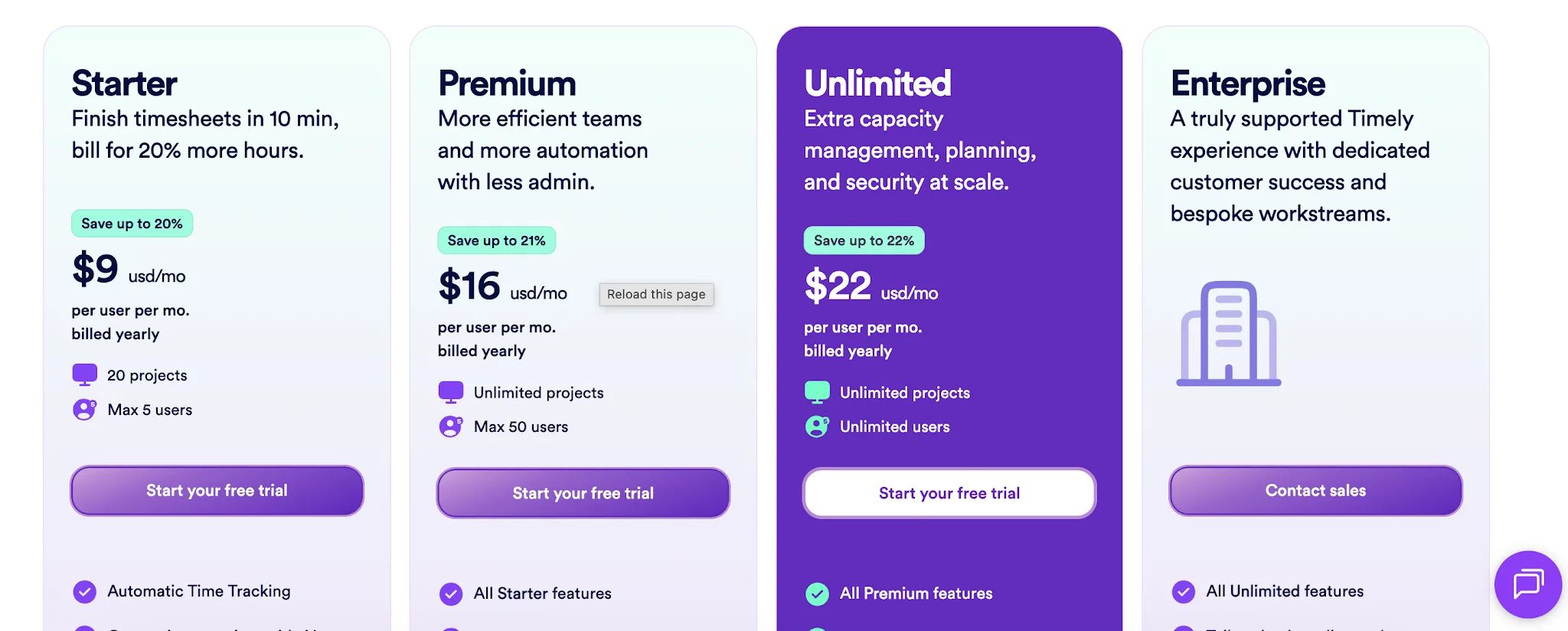
Timely is built for a different kind of time tracking experience. Instead of asking people to remember timers, clean up missing entries, or explain activity scores, Timely captures work automatically and helps teams build accurate timesheets from real activity. That means less manual work for employees and cleaner data for managers.
You still get the visibility you need. Timely helps you see where time goes, how projects are tracking, which work is billable, and where capacity is getting stretched. Those detailed insights make it easier to manage time tracking and productivity without turning the process into employee surveillance.
Hubstaff leans heavily on screenshots, activity levels, URL tracking, and productivity monitoring. Timely focuses on accurate records, project clarity, budgets, and team planning. Managers get useful data, while employees get a less invasive way to track their day.
If Hubstaff feels too limited at the lower end and too monitoring-heavy at the higher end, Timely is the better alternative.
You get fairer pricing, automatic time tracking, and the reporting you need to understand work without making time tracking feel like a punishment.