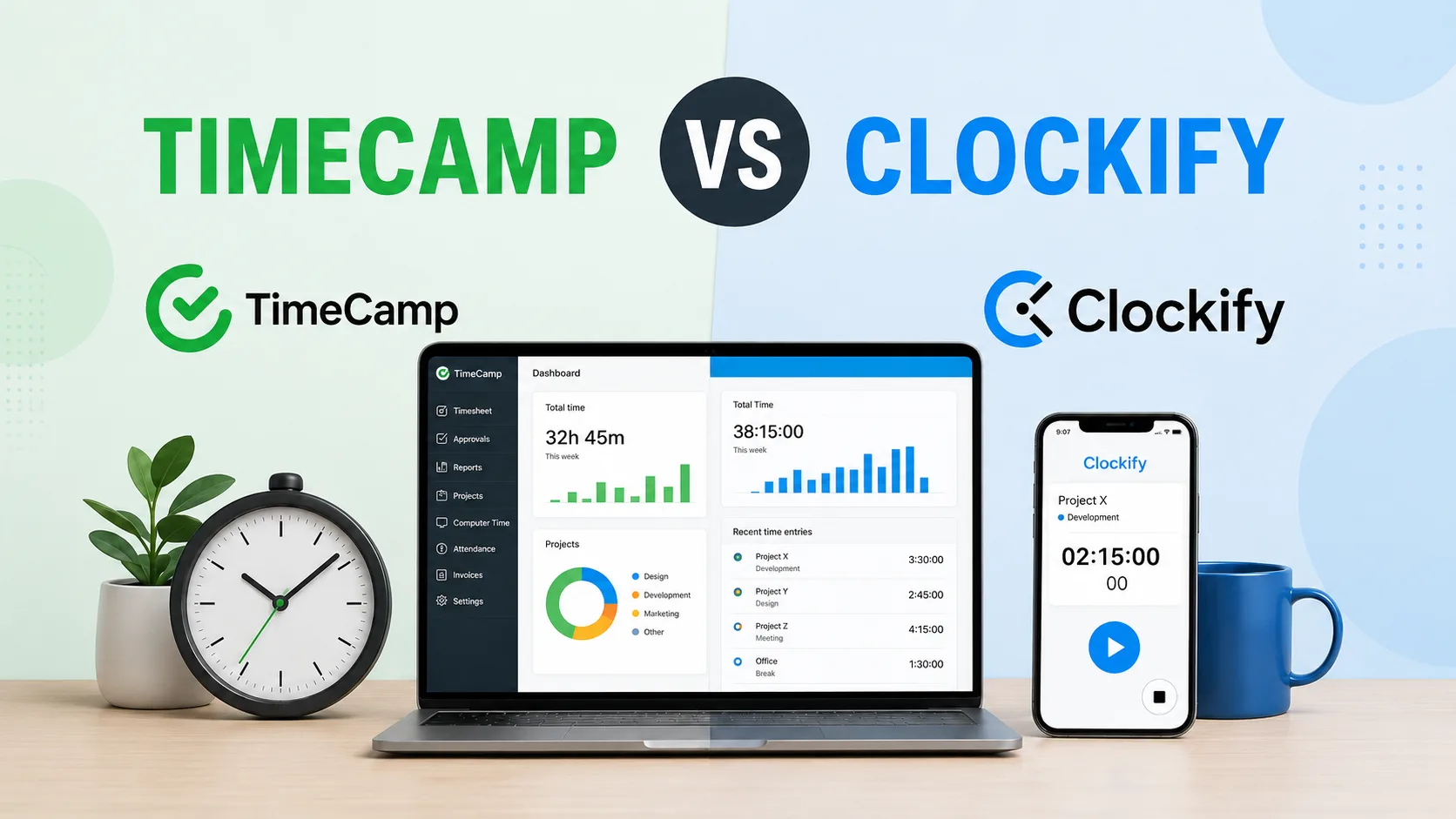
TimeCamp has a very competitively priced entry plan, along with a forever-free plan that competes against tools like Clockify. In total, there are five plans, including an Enterprise plan with custom pricing. If you're looking to get TimeCamp for your team, how do you choose the right plan for your needs? And are the plans good value for money?
Today, we dive deep into TimeCamp pricing, explaining how the pricing plans are structured and what each plan is best for.
TL;DR
| Starting price | Most valuable features | Biggest downsides | Best for | |
|---|---|---|---|---|
| Free | $0 | Unlimited users and projects, automatic time tracking, desktop and mobile apps, GPS tracking, basic reports | No invoicing, billable time, project budgets, attendance tracking, approvals, or activity monitoring | Freelancers, individuals, and small teams that only need basic time tracking |
| Starter | $3.99 per user per month with annual billing, or $5.49 with monthly billing | Attendance tracking, time off management, overtime tracking, invoicing, Excel and Google Sheets exports | No billable rates, labor costs, project budgets, activity levels, or timesheet approvals | Small teams that need attendance records, leave management, and simple invoicing |
| Premium | $6.99 per user per month with annual billing, or $9.99 with monthly billing | Billable time, project budgets, activity levels, website tracking, budget alerts, calendar integrations, scheduled reports | Only one project synchronization integration, with no approvals, screenshots, expenses, or labor cost tracking | Agencies and service teams that need billing data, project budgets, and better reporting |
| Ultimate | $9.99 per user per month with annual billing, or $13.99 with monthly billing | Timesheet approvals, screenshots, billable rates, labor costs, expense tracking, custom roles, fixed fee projects, unlimited project integrations | Higher cost, with several monitoring and security features that smaller teams may never use | Larger teams that need approval controls, detailed profitability data, and closer employee oversight |
| Enterprise | Custom pricing | Geofencing, Time Clock Kiosk, private deployment, audit logs, custom integrations, onboarding, training, dedicated support | No public pricing, a longer sales process, and features that may be excessive for smaller organizations | Large companies with strict security, deployment, compliance, and implementation requirements |
Get better value with automatic time tracking. Try Timely today for free.
TimeCamp has a free trial, free plan and four paid plans
You can try each of TimeCamp's plans for free for 14 days. There is a completely free plan with the basic time tracking features that you can use forever.
If you want to explore everything TimeCamp has to offer, there are four plans with various feature sets and limitations, depending on how much you're looking to pay.
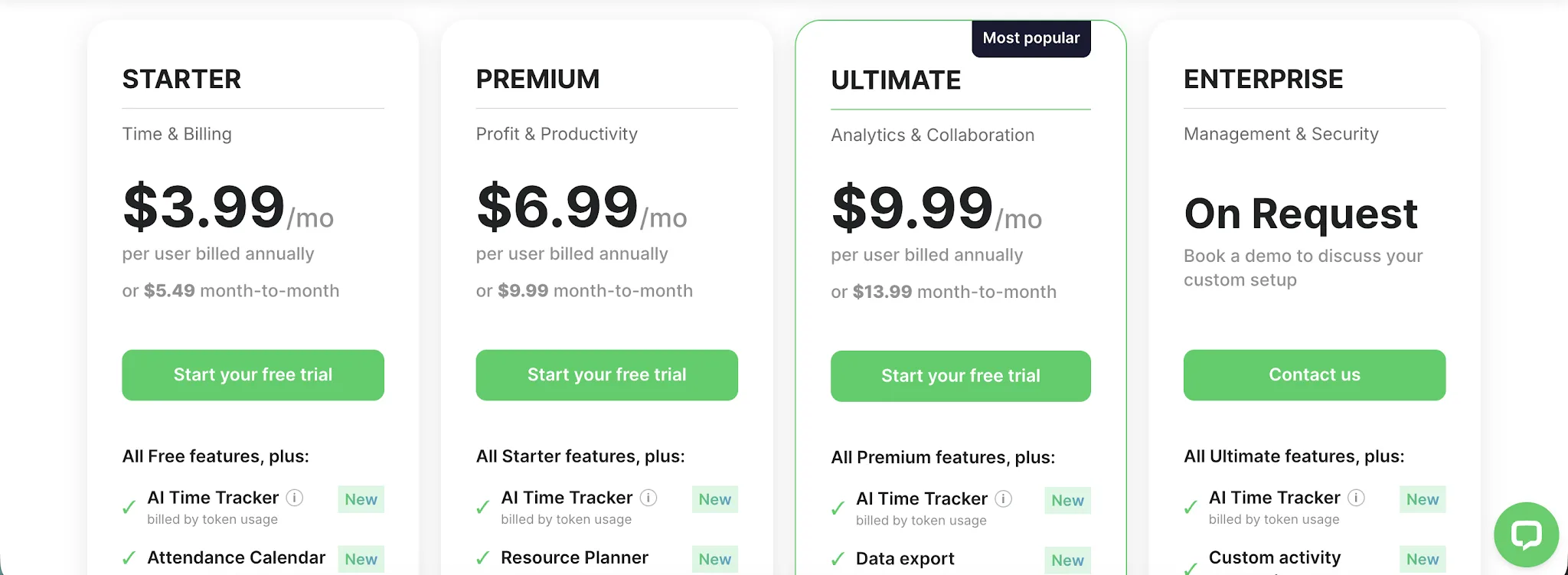
Each plan has two price points: one (cheaper) with annual billing and another (more expensive) with month-to-month payments.
The forever free plan gives you the basic time tracking feature set
TimeCamp's Free plan costs $0 and can be used indefinitely. It supports unlimited users and projects, making it more generous than many free time tracking plans. However, most of its features focus on recording work hours rather than attendance, billing, or workforce management.
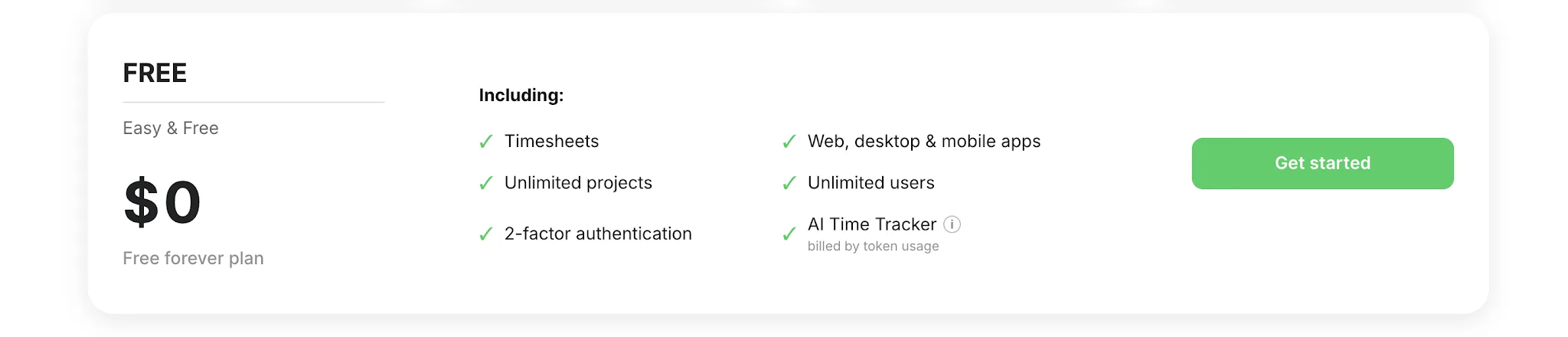
The Free plan includes the following TimeCamp key features:
- Web, desktop, and mobile applications
- A timer and manual time entries
- Weekly timesheets and a calendar view
- Automatic time tracking
- A personal activity timeline
- Idle time tracking
- GPS location tracking
- The option to add time for other users
- Keyword based automatic tracking
- Time tracking inside more than 80 tools through the browser plugin
- Unlimited users and unlimited projects
- Project templates and bulk editing
- CSV imports for projects, users, and groups
- More than 10 time tracking reports
- PDF report exports
- API access and the Trello Power Up
- Access to the knowledge base and email support
Who is the Free plan best for?
The Free plan is best for freelancers, individual users, and small teams that primarily need to record how much time they spend on projects. Unlimited users and projects also make it an appealing starting point for growing teams that want to test TimeCamp without paying for every new team member.
The automatic tracker, mobile app, and basic reports cover the main requirements for personal productivity tracking and simple internal timesheets.
Why it might not be enough
The plan becomes restrictive when time data needs to support payroll, client billing, or team supervision. It does not include attendance tracking, time off management, overtime tracking, invoicing, billable time, or labor cost calculations.
You also miss application and website tracking, activity levels, screenshots, timesheet approvals, spreadsheet exports, calendar integrations, task synchronization, and live chat support. If you need more than basic time records will probably have to upgrade fairly quickly.
The Starter plan starts at $3.99 per month
The Starter plan costs $3.99 per user per month when billed annually. Choosing monthly billing raises the price to $5.49 per user per month. It keeps the Free plan's desktop app, automatic tracker, and manual time tracking while adding attendance and invoicing tools.
New features in the Starter plan include:
- Attendance tracking
- Time off management
- Overtime tracking
- Invoicing
- Unlimited tasks
- Attendance reports
- Time off reports
- Overtime reports
- Excel report exports
- Google Sheets report exports
- Live chat support
Who is the Starter plan best for?
The Starter plan is best for small teams that need to record employee attendance and manage leave alongside regular time tracking. It also works for freelancers and service providers that want to create invoices from their recorded hours without paying for more advanced reporting tools.
Why it might not be a fit for you
The Starter plan does not include billable time, billable rates, labor costs, or project budgets. These limitations make it difficult to calculate project profitability or properly manage billable hours across clients.
Time entry suggestions are not listed as part of the plan either. Teams also miss website tracking, activity levels, calendar integrations, project synchronization, and timesheet approvals, all of which require a higher tier.
The Premium plan starts at $6.99 per month
The Premium plan costs $6.99 per user per month with annual billing. The price rises to $9.99 per user when paying monthly. It adds billing controls, activity data, budgeting, and connections to project management tools.
New features in the Premium plan include:
- Application and website tracking
- Private time
- Activity levels
- Window title tracking
- Billable time
- Invoice exports to QuickBooks and Xero
- Unlimited subtasks
- Unlimited teams
- Management roles
- Project archiving
- Unlimited tags
- Hidden time and pages
- Tag lists
- Budgets and estimates
- Budget alerts
- Time rounding
- Scheduled email reports
- Reports shared through a link
- Calendar integrations
- One project and task synchronization integration
Who is the Premium plan best for?
Premium is best for agencies, consultants, and service teams that need to connect tracked hours with client billing and project budgets. It also gives managers more insight into how the entire team uses its time through the desktop app and activity monitoring.
The plan can also suit teams that use TimeCamp as their main time tracker alongside project management tools. Its reporting and budgeting features provide more context than the basic AI time tracker and manual time entries alone.
Why it might not be a fit for you
Premium only supports one project and task synchronization integration. Teams working across several project management tools would need Ultimate for unlimited integrations.
It also does not include timesheet approvals, screenshots, expenses, billable rates, or labor cost tracking. These missing controls can limit its usefulness for larger teams that need stricter oversight or more detailed profitability reporting.
The Ultimate plan starts at $9.99 per month
The Ultimate plan costs $9.99 per user per month with annual billing. The price rises to $13.99 per user when paying month to month. It adds approval controls, deeper financial reporting, and more options for managing access.
New features in the Ultimate plan include:
- Timesheet approvals
- Screenshots
- Remote work detection
- Expense tracking
- Billable rates
- Labor costs
- Historical billing rates
- Time entry history
- Mandatory tags
- Custom user roles
- Custom user fields
- Single sign on login
- Two factor authentication
- Pivot tables
- Fixed fee projects
- Unlimited project and task synchronization integrations
Who is the Ultimate plan best for?
Ultimate is best for larger service teams that need tighter control over tracked time and billing data. It works well for managers who use the web app as their main time tracking tool and need team productivity monitoring alongside approval workflows.
The existing activity tracking and GPS tracking features also become more useful when paired with screenshots, remote work detection, and custom roles. These tools give managers more context when reviewing team productivity and approving employee timesheets.
Why it might not be a fit for you
The price can become difficult to justify if you only need regular time records, invoicing, or project budgets. Smaller teams may pay for screenshots, security controls, and financial features that they rarely use.
Geofencing and the Time Clock Kiosk are still reserved for Enterprise customers. Dedicated onboarding, a custom service agreement, and implementation support also require the Enterprise plan.
The Enterprise plan has custom pricing
TimeCamp does not publish a fixed price for its Enterprise plan. You'll need to get in touch with the sales team to discuss your number of users, technical requirements, and preferred setup. The plan includes everything in Ultimate, with added security and support options.
New features in the Enterprise plan include:
- Geofencing
- Time Clock Kiosk
- Self hosted deployment
- Private SaaS deployment
- Audit logs
- Custom integration development
- A custom service level agreement
- A dedicated Customer Success Manager
- Onboarding support
- User training
- Implementation services
- Product customizations
- On premises installation
- Private cloud installation
Who is the Enterprise plan best for?
The Enterprise plan is built for larger organizations that need more control over data storage, user access, and system deployment. It can support remote workers through location based monitoring features while giving managers more context about team performance.
It also works well companies that want to combine task management integrations with time data and track billable hours across a large workforce. Dedicated onboarding and custom integration services can help fit TimeCamp into existing business systems.
Why it might not be a fit for you
Enterprise pricing is only available through the sales team, so you cannot compare the exact costs with the standard plans before making contact. The buying process may also involve discussions about setup and implementation.
Smaller teams are unlikely to need private hosting, custom product changes, or a dedicated manager. Ultimate already includes the main tracking, billing, and productivity features without requiring a custom agreement.
Why Timely is the better value for your team
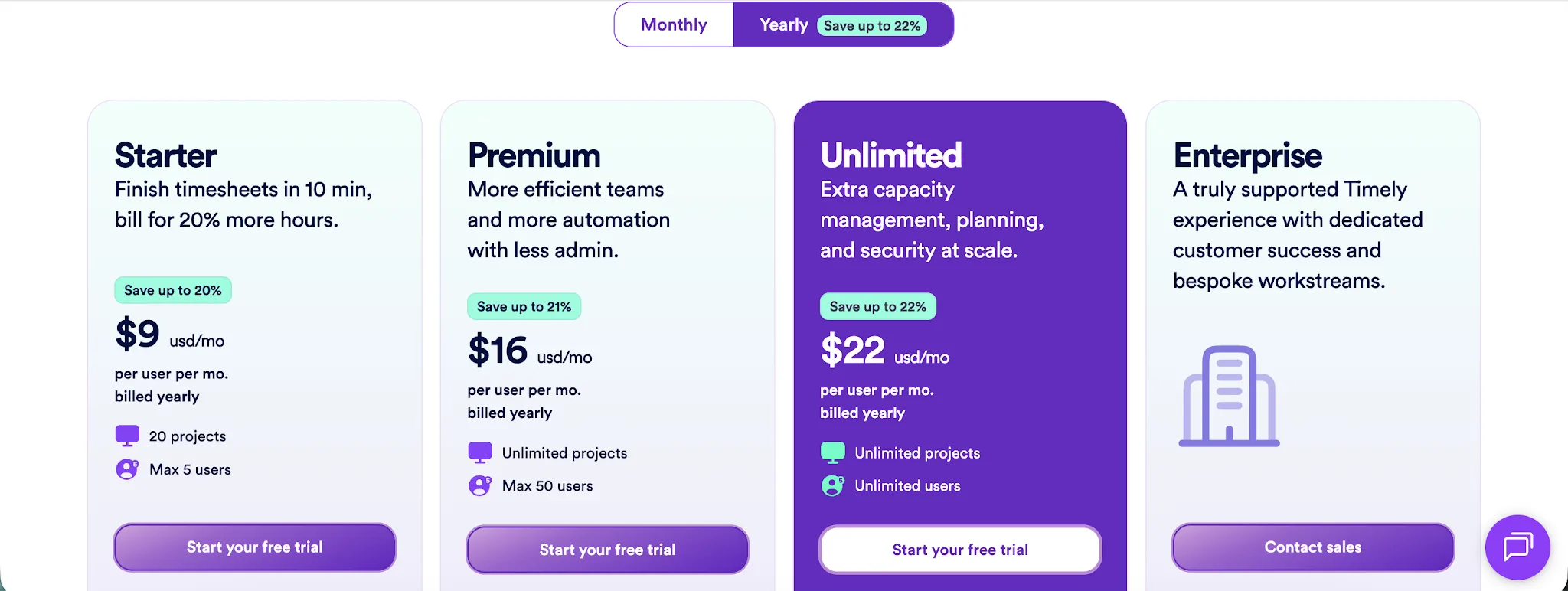
TimeCamp wins on the lowest possible price. It has a free plan, while Timely starts at $9 per user per month with annual billing, or $11 with monthly billing. However, the cheapest option is rarely the one that gives your team the most useful features.
Timely gives you more automation from the first plan
Timely Starter includes automatic time tracking, AI categorization, billable hour reporting, and project health monitoring. It records work across desktop and web applications, then helps users turn that activity into completed timesheets.
With TimeCamp, the lower plans still depend more heavily on timers and manual entries. Features such as billable time, project budgets, website tracking, and activity data only arrive with the Premium plan.
Timely costs more upfront, but our starting plan addresses the main reason many teams buy time tracking software in the first place. It helps capture work that employees might otherwise forget to enter.
Timely Premium combines tracking with planning
Timely Premium costs $16 per user per month with annual billing, or $20 with monthly billing. It includes unlimited projects, project management connections, accounting integrations, team management, budget controls, and work planning.
This is a higher price than TimeCamp Ultimate. However, Timely Premium covers both past work and upcoming workloads, giving managers one place to review recorded hours and plan how team capacity should be used.
That can be better value for agencies and consultancies that would otherwise need a separate planning tool. The plan is designed around accurate billing and project decisions, rather than screenshots and employee surveillance.
Timely Unlimited offers predictable pricing for larger teams
Timely Unlimited costs $22 per user per month with annual billing, or $28 with monthly billing. It removes user limits and adds capacity reporting, overtime management, support for more than 50 currencies, and premium customer support.
TimeCamp Enterprise has custom pricing, so larger companies need to speak with sales before they can calculate the final cost. Timely gives them a published price and a clearer picture of what they receive before starting that conversation.
TimeCamp remains the cheaper choice for basic time records, attendance, or employee monitoring. Timely offers better value when accurate billable hours and easier timesheet completion can justify paying more per user.
If you bill clients by the hour, missing work can cost far more than the difference between the two subscriptions. At Timely, we focus our plans on capturing that work accurately and turning it into useful project data.
Looking to get real value from your time tracking tool? Try Timely today, completely free.