If you feel like you need a calculator to figure out how much Apploye will cost your team, you're not alone. You have to pick a plan based on the features you need and, on top of that, you have to pick monthly, quarterly or annual pricing. It's a lot of choices to make, and there's a free plan and a free trial too.
To make your life easy, we wrote this guide to Apploye pricing for anyone interested in the free and paid Apploye plans. We'll show you how much each plan costs (for different time durations) and which plan is best for what type of team.
TL;DR
| Price with annual billing | Price with quarterly billing | Price with monthly billing | Best for | |
|---|---|---|---|---|
| Starter | Free for up to 10 users | Free for up to 10 users | Free for up to 10 users | Individuals and small teams with basic time tracking and monitoring needs |
| Elite | $4.50 per user per month | $6 per user per month | $7 per user per month | Growing teams that need stronger monitoring, reporting, and fewer usage limits |
| Power | $8 per user per month | $10.50 per user per month | $12 per user per month | Remote and distributed teams that need advanced monitoring and higher screenshot limits |
| Enterprise | Custom pricing | Custom pricing | Custom pricing | Larger organizations that need enterprise security, deployment controls, and dedicated support |
Get the better Apploye alternative for automatic time tracking. Try Timely for free today.
Apploye has one free and three paid plans
Apploye offers four plans in total:
- Starter
- Elite
- Power
- Enterprise
Starter is the free plan, while Elite, Power, and Enterprise are paid options.
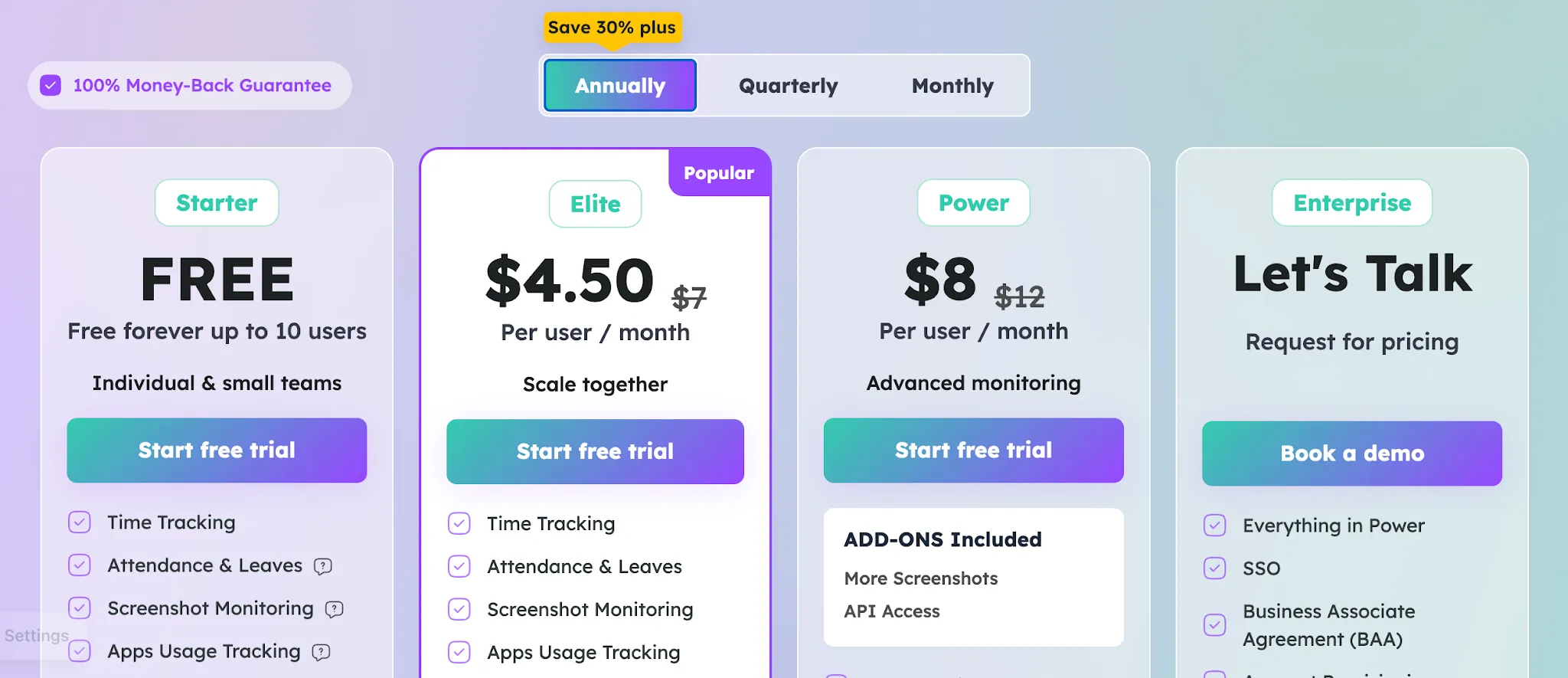
Apploye also offers a 10-day free trial with no credit card required, so you can test the paid service before committing to a subscription.
For paid plans, you can choose between monthly, quarterly, or annual billing. Quarterly billing comes with a discount compared with paying month by month, while annual billing gives you the biggest discount.
We will break down the pricing and what you get with each plan below.
The Free plan is free forever for up to 10 users
Best for: Freelancers and small teams with up to 10 users that need basic time tracking, attendance, timesheets, and light employee monitoring without paying for a subscription.
Apploye Starter is free forever for up to 10 users. It covers much more than basic clocking in and out, so it can work as a permanent option for a small team with fairly simple tracking needs.
Key features include:
- Time tracking across multiple platforms
- Attendance and leave tracking
- Timesheets and timesheet approvals
- Idle time detection
- Manual time entries and time entry notes
- Billable and nonbillable hour tracking
- Screenshot monitoring, limited to one screenshot per hour
- App usage tracking, limited to three applications per day
- URL tracking, limited to five websites per day
- Activity analytics with up to seven days of visibility
- Up to three projects with unlimited tasks
- Up to three clients
- Client invoicing
- Payroll and member management
- Team manager and admin controls
The main drawback is that several features come with tight usage or history limits. Timesheets and payroll history only go back one month, while activity analytics only cover seven days. App tracking, URL tracking, screenshots, projects, and clients are also restricted.
You also miss features available on paid plans, including integrations, custom reports, onboarding help, and several optional monitoring tools. Starter makes sense if your requirements are basic, but a team that needs deeper reporting or longer records may outgrow it fairly quickly.
The Elite plan starts at $4.50 per user per month
Best for: Growing remote teams and agencies that need stronger employee monitoring capabilities and fewer usage limits than the Free plan provides.
- Annual billing: $4.50 per user per month
- Quarterly billing: $6 per user per month
- Monthly billing: $7 per user per month
The Elite plan is the first paid Apploye tier. It expands the monitoring and reporting options available in the Free plan while removing several restrictions on historical data and usage.
Key features that are new or upgraded include:
- Up to 18 screenshots per hour
- Unlimited app and URL tracking
- Full timesheet and payroll history
- Integrations with Jira, Asana, Trello, ClickUp, Zoho, Monday.com, and Deel
- Custom reports
- Real-time active view
- Unlimited projects and clients
- More detailed employee productivity tracking based on keyboard and mouse usage
Elite also gives you stronger payroll management and reporting than the Free plan, which can be useful once you have more employees to track.
The main downside is that some employee monitoring capabilities remain paid add-ons. More screenshots cost $2 per user per month, screen recording costs $4, stealth mode costs $2, and API access costs $1. If you need several of these extras, the effective monthly price can rise quickly.
The Power plan starts at $8 per user per month
Best for: Larger remote teams that need deeper monitoring features and more frequent screenshots, without moving to a custom Enterprise plan.
- Annual billing: $8 per user per month
- Quarterly billing: $10.50 per user per month
- Monthly billing: $12 per user per month
The Power plan includes everything in Elite, then expands Apploye's monitoring capabilities. It is positioned around advanced monitoring, with higher screenshot limits and API access included in the subscription.
Key features that are new or upgraded include:
- Up to 60 screenshots per hour, compared with 18 on Elite
- Real-time instant screenshots
- API access included at no additional charge
- More screenshots included instead of being a paid extra
- AI report analysis, listed as coming soon
- AI chatbot, listed as coming soon
The rest of the package carries over from Elite, including project management, workforce analytics, and tools for managing payroll. That means Power is less about adding a completely new set of management tools and more about giving managers much deeper visibility into workforce productivity and workforce productivity trends.
The main downside is that some advanced monitoring features still cost extra. Screen recording costs another $4 per user per month, while stealth mode costs $2 per user per month. Power therefore makes the most sense if the higher screenshot frequency and included API access are features you will actually use.
The Enterprise plan has custom pricing
Best for: Large organizations that need stronger security, centralized user management, guided onboarding, and higher API limits alongside Apploye's full monitoring and workforce management toolkit.
The Enterprise plan includes everything in Power, then adds advanced features aimed at larger organizations with stricter security, deployment, and account management requirements. You need to contact Apploye for a quote based on your setup and requirements.
Key features that are new or upgraded include:
- Single sign-on
- Business Associate Agreement support
- Account provisioning
- Higher public API limits
- ACH payments
- Guided implementation and onboarding
- Dedicated support
These additions focus more on administration and enterprise controls than everyday time tracking. Larger organizations can still use Apploye's reporting tools to get detailed insights into workforce performance and identify areas where they could enhance productivity or improve the team's efficiency.
The obvious downside is the lack of public pricing. You cannot compare Enterprise directly with the other plans without speaking to Apploye first. Some optional services also carry separate charges, so it is worth confirming exactly what your quote includes before signing up.
Optional add-ons
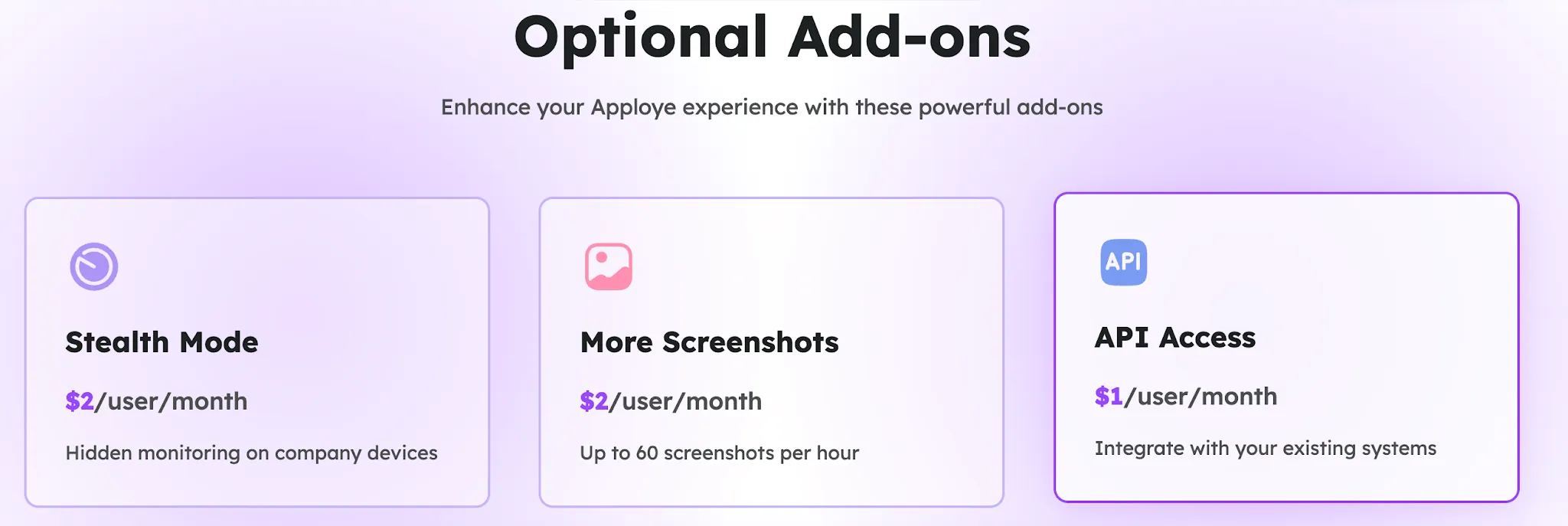
Apploye also sells several optional add-ons that let you expand monitoring, integrations, branding, and data access without changing plans. Most are priced per user each month, while BigQuery uses a flat organization-level fee.
One limitation is worth knowing upfront. Apploye has mobile apps for Android and iOS, and remote employees can use them to record tracked hours and work hours from mobile devices. However, activity monitoring and screenshots require the desktop app.
Stealth Mode
Price: $2 per user per month
Stealth Mode runs Apploye in the background on company computers and tracks time automatically based on computer usage. It is intended for situations where administrators do not want employees to start and stop the tracker themselves.
More Screenshots
Price: $2 per user per month
This add-on raises screenshot frequency to up to 60 screenshots per hour. It gives managers a much more detailed record of employee screen activity than the standard screenshot allowances on lower plans.
API Access
Price: $1 per user per month
API Access lets you pull data about members, timesheets, and projects into other systems. It can reduce administrative overhead if Apploye data needs to feed into your own reporting or internal tools. API access is already included with the Power and Enterprise plans.
White Labelling
Price: $3 per user per month, minimum 100 users
White Labelling lets you use custom branding instead of Apploye branding. It is mainly relevant to organizations seeking a branded version of the software for a large workforce or client facing deployment.
On Premise
Price: $3 per user per month, minimum 100 users
The On Premise option lets you host Apploye data on your own servers. The 100 user minimum means it is primarily an enterprise option for companies that have specific infrastructure or data hosting requirements.
Screen Recording
Price: $4 per user per month
Screen Recording captures employee work sessions while time is being tracked through the desktop app. Apploye records three-minute screen videos at intervals, giving managers more context than individual screenshots alone.
Big Query
Price: $1,000 per organization per month
Big Query is Apploye's highest-priced add-on and provides access to advanced data analytics capabilities. At $1,000 per organization each month, it is clearly designed for larger companies that need to analyze workforce data beyond Apploye's standard reports.
Professional services
Apploye also offers two professional services for companies that need extra help getting started. These are separate from your subscription and optional add-ons, so you can factor them into your initial budget only if you need them.
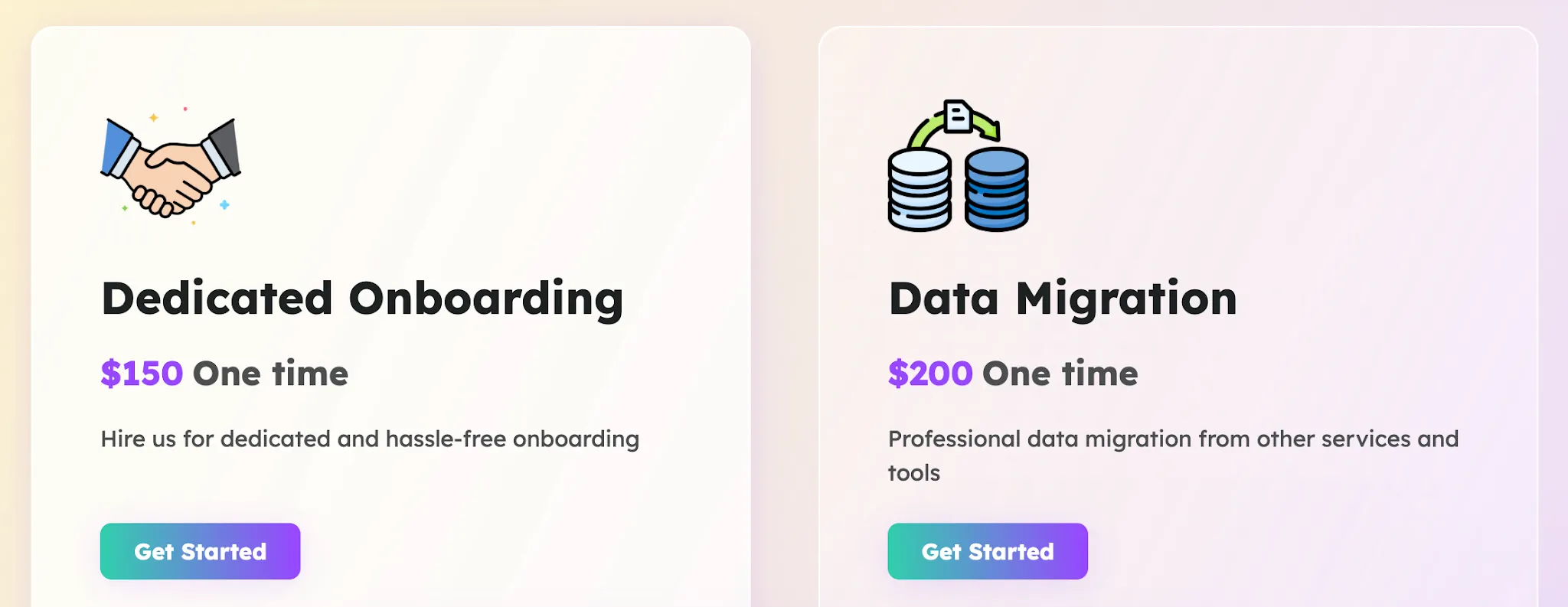
Dedicated onboarding
Price: $150 one-time
Dedicated onboarding gives your company direct help with setting up Apploye. It can be useful if you have a larger team or want assistance configuring the solution around your existing processes.
A proper setup can also make reporting more useful from the start. Managers can establish consistent tracking across teams, review resource allocation, and use the resulting data to identify top performers without spending as much time fixing configuration issues later.
Data migration
Price: $200 one-time
Apploye can migrate your existing data from another time tracking or workforce management tool. This is particularly useful if you already have historical records that you want to keep when switching platforms.
The service can reduce the work involved in moving resources and historical information into Apploye while maintaining access to records you may need for reporting or compliance. At $200 as a one-time charge, it may be easier to justify than handling a complicated migration internally.
Is Apploye worth it?
Apploye can be worth it if your main priority is employee monitoring alongside time tracking. The pricing is accessible, the interface is relatively intuitive, and managers get a centralized dashboard for reviewing attendance, activity, projects, and time management data.
The problem is that Apploye goes much further than simply recording working hours. Features such as random screenshots, screen recording, app tracking, URL tracking, keyboard and mouse activity, and Stealth Mode turn it into an employee surveillance tool as much as a time tracker.
That level of monitoring may be justified in some environments, but it comes with a real privacy tradeoff. Capturing an employee's screen throughout the day can expose private messages, personal information, or sensitive client data that has little to do with measuring work. Stealth Mode raises an even bigger concern because tracking can happen in the background without employees controlling the timer themselves.
There is also the question of trust. More monitoring does not automatically lead to better time management or higher productivity. In some teams, constant observation can create pressure to appear active instead of encouraging people to focus on useful work.
So, Apploye is worth considering if detailed employee monitoring is genuinely part of your management model. The Free plan is generous, and the paid tiers give you plenty of control for the price.
If your goal is mainly to understand where work hours go, improve planning, and get accurate time data without random screenshots or intrusive monitoring, a different type of time tracking solution may make more sense.
Get the best Apploye alternative for automatic time tracking
If Apploye feels too focused on surveillance, Timely offers a very different way to track employee time.
Timely automatically records work activity in the background and turns it into a private timeline. Employees review what was captured and decide what gets added to their timesheets. Managers do not get access to that private activity history.
That gives Timely a clear advantage for companies that need accurate time data without relying on screenshots, keystroke logging, or mouse tracking.
Timely also offers:
- Automatic time tracking: Work activity is captured in the background, so employees do not have to constantly start and stop timers.
- Privacy by design: Private activity stays visible only to the individual employee until they choose what to submit.
- An intuitive interface: Employees can review activity, complete timesheets, and manage their time without navigating an employee surveillance dashboard.
- Customizable reports: Reports can be filtered by people, clients, projects, billing status, and date range.
- Project and profitability insights: Timely connects tracked time with project budgets, costs, billable rates, and capacity.
The key difference is the approach to tracking. Apploye gives managers more ways to monitor how employees work. Timely focuses on capturing accurate time and turning it into useful business data while keeping private activity under the employee's control.
If automatic tracking is the reason you are considering Apploye, Timely is worth trying before you commit. Start your free Timely trial and see how automatic time tracking works without invasive employee monitoring.